Connected Field Service Architecture
Connected Field Service is assembled from parts that already exist elsewhere in GENESIS. It takes its alarms from the Alarm Server, runs its workflows on the Bridging workflow engine, and delivers its messages through Alert Notifications. What it adds of its own is the worker directory, the logic that selects workers from it, and the ability to keep a running workflow synchronized with the state of the alarm that started it.
Understanding what each component does matters when you configure a system, because most of the settings a workflow depends on are not held under the Connected Field Service node. The email account is configured under Alert Notifications, the alarm that triggers a workflow is defined on the Alarm Server, and the worker's shift calendar is a Schedule.
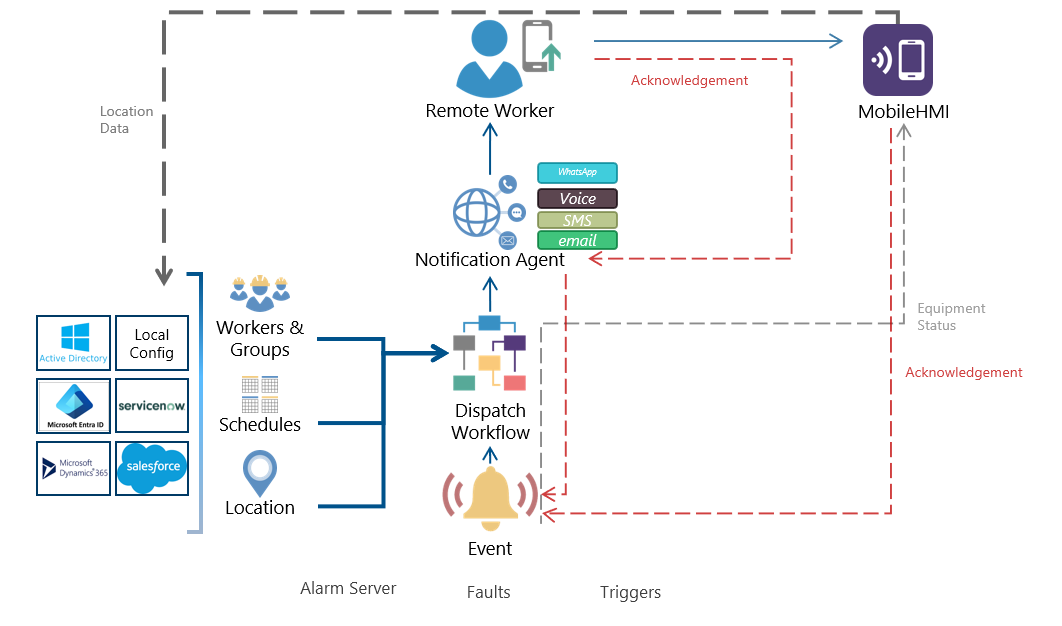
Connected Field Service Components
In Workbench, the Connected Field Service node holds five kinds of configuration:
-
Workers—The people who can be contacted, together with the sources they come from. Worker configurations contain the email addresses and phone numbers used to reach them, the schedule that says when they are on duty, and the alarms and assets they are responsible for. Learn more
-
Groups—Named sets of workers, used to narrow a lookup to the right team and to apply a shared availability schedule. Learn more
-
Templates—The workflow diagrams. A template is a diagram of activity blocks that looks up workers, sends messages, tests the alarm state, and loops or branches. Learn more
-
Workflows—The binding between a template and the alarms that trigger it. Workflows live inside a workflow configuration, which holds the settings shared by every workflow in it, such as the alarm subscription and the scheduling mode. Learn more
-
Variables—Datasets that a workflow reads and writes as it runs. Global variables are shared across workflows; local variables give each executing workflow its own copy, which is what a counter in a loop needs. Learn more
A working configuration needs a template and a workflow at minimum. Groups and variables are used as the diagrams you build call for them.
Notification Sequence
Notifications can be sent for any alarms you subscribe to, and they follow a standard pattern in Connected Field Service for generation and management:
-
An alarm becomes active on the Alarm Server, or Fault Detection raises an incident.
-
The workflow configuration's alarm subscription receives the alarm, together with the alarm fields it subscribes to, and passes it to the Connected Field Service scheduler.
-
The scheduler tests the alarm against the alarm filter of each workflow in the configuration. Every workflow whose filter matches is queued for execution.
-
A workflow engine takes the queued workflow and runs the diagram held in its template.
-
Worker lookup activities in the diagram query the worker directory, applying the group, schedule, assignment, and location restrictions configured on the activity, and produce an ordered list of workers.
-
Send activities pass each worker's contact address to Alert Notifications, which delivers the message through the configured provider and logs it.
-
Condition activities re-read the current state of the triggering alarm, so the diagram can loop, wait, escalate, or finish according to whether the alarm has been acknowledged or has returned to normal.
Relation to Bridging
Connected Field Service and Bridging share a workflow engine. The template designer, the activity library, the expression editor, the variables, and the execution settings work the same way in both. What you know about one applies to the other.
The differences are these:
-
What starts a workflow—A Bridging transaction is started by a trigger, a client, or an operator. A Connected Field Service workflow is started by an alarm that matches the workflow's filter. Alarms and data triggers can also be listed on the workflow's Workflow Execution tab.
-
Separate Activity blocks—Connected Field Service adds activities that have no meaning outside field service: worker lookup, contact lists, the alarm state conditions, and work order creation. Standard Bridging activities are available as well, so a workflow can read a dataset or write a tag alongside notifying a worker. Learn more
-
What recovery means—A Connected Field Service workflow that is interrupted can be restarted from the beginning or left unrecovered. It cannot resume from the activity it was executing.
Load balancing and redundancy are configured exactly as they are for Bridging. Connected Field Service schedulers hold the queue of workflows waiting to run and dispatch them to the running workflow engines. If one engine fails, the scheduler dispatches to the remaining engines. You can configure redundant schedulers, but only one is active at a time. Learn more
Security-Critical Activities
Two of the standard activities act on the host operating system rather than on GENESIS data and are treated as security critical: Command Line, which runs a program or a shell command line, and File Transfer, which moves files. Both are disabled for Connected Field Service by default.
The permissions are held in C:\ProgramData\ICONICS\11\Servers\CFS.xml. Change the Allow attribute of an activity from 0 to 1 to permit it, and then restart the Connected Field Service Workflows Point Manager service:
Connected Field Service and Bridging keep separate files, so permitting an activity in the Bridging equivalent does not permit it here. An activity that is not permitted does not execute, and the engine records the refusal in the trace log. Learn more
A permitted Command Line activity runs whatever the workflow tells it to run, with the rights of the account the workflow engine runs as. Grant the permission only on the nodes that need it, and keep the program and its arguments under your control rather than deriving them from an alarm field or other outside input.
Relation to Alert Notifications
Connected Field Service holds no provider credentials of its own. The Send Email, Send Sms, Send Voice Message, and Send WhatsApp activities each name a Provider Type, and that provider is the one you configured under Alert Notifications. The message is composed in the activity, handed to the Alert Notifications service, and logged in the Alert Notifications runtime tables.
Services
Connected Field Service runs as three Windows services, each of which can be placed on a different node. Learn more
|
Service |
Responsibility |
|---|---|
|
GENESIS Connected Field Service Workers Point Manager |
Maintains the worker directory, synchronizes with external worker sources, and answers worker lookups. Also exposes worker data as GENESIS data points. |
|
GENESIS Connected Field Service Workflows Point Manager |
Executes workflow diagrams. This is the engine, and it can be distributed across several nodes. |
|
GENESIS Connected Field Service Workflows Scheduler |
Translates incoming alarms into queued workflow executions and dispatches them to the engines. Redundant schedulers are supported. |
Connected Field Service Data in the Data Browser
The worker directory and the running workflows are exposed as GENESIS data points, so you can read them from a display, log them, or use them in an expression anywhere in the product. In the Data Browser, the Connected Field Service node contains the following:
-
Workers—Runtime data about each worker, including name, contact addresses, mobile device health, and schedule state. You can subscribe to a single property or take a whole source as a dataset.
-
Workflows—The tags of the Connected Field Service Workflows Point Manager, covering the workflows it is executing.
-
Field Scheduler—The tags of the Connected Field Service Workflows Scheduler, covering the queue and dispatch of workflows.
Related Topics