Bridging Activities List
Bridging activities are the building blocks of a transaction diagram. You drag them from the Activities Library in the Template Designer onto the Diagram Editor and connect them to define the workflow. Learn more
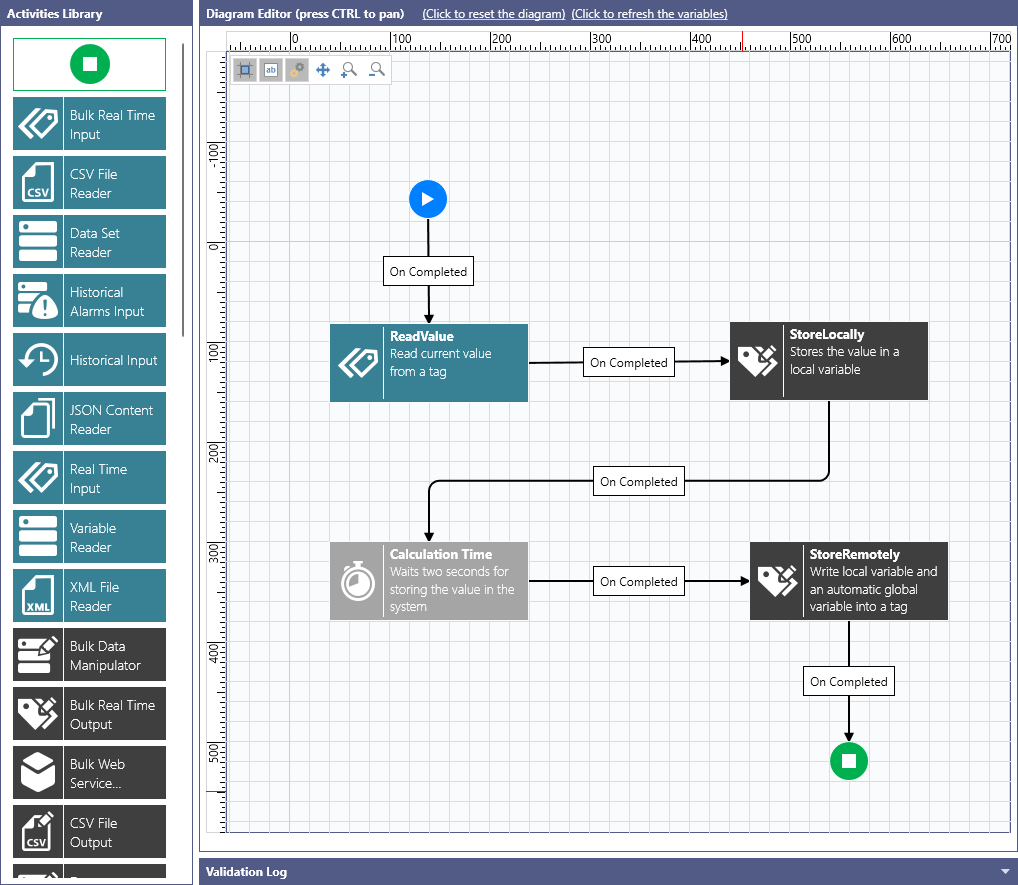
Every activity produces an output dataset that later activities can consume, and most of an activity's fields accept an expression rather than a fixed value. For the reference syntax used to reach another activity's output, see Bridging Dataset and Expression References. Where an activity exposes a fixed set of output columns, they are named in the description below; select the activity in the Template Designer and open its Data Schema section to confirm the columns for your configuration.
Command Line Activity and File Transfer Activity act on the host operating system and are treated as security critical. Both are disabled by default and must be permitted per node before a transaction can use them. Learn more
The following table describes the activities that are available for creating a transaction diagram workflow.
|
Activity |
Category |
Description |
|---|---|---|
|
|
Transaction Flow Control |
Start Activity marks a transaction entry point. Every transaction diagram has exactly one start activity. This is the only activity block that cannot be removed from the transaction diagram design surface. |
|
|
Transaction Flow Control |
End Activity marks a transaction completion point. A transaction diagram may contain one or more such blocks. Each completion point can be assigned a Success or Fail transaction completion result. |
|
|
Bulk Data Reader |
Bulk Real Time Input Activity takes input data from another block's output dataset. This activity creates a tag point name from each row in the input dataset, and then requests all points as real-time OPC tags. It exposes the output dataset with the following columns: PointName, Value, Quality, Timestamp, ArrayIndex. |
|
|
Data Reader |
CSV File Reader Activity reads structured data from a .csv file. The collected data is exposed through its output dataset for further processing in subsequent blocks. |
|
|
Data Reader |
Data Set Reader Activity requests a dataset point, such as those exposed by database data sources, and passes the collected rows of data through its output for further processing in subsequent blocks. |
|
|
Data Reader |
Historical Alarms Input Activity requests an alarm history point for a given time range and passes the collected alarm history through its output for further processing in subsequent blocks. |
|
|
Data Reader |
Historical Input Activity requests a historical data point from a historical data source (such as Data Historian) for a given time range, and passes the collected raw data samples or processed aggregations through its output for further processing in subsequent blocks. To read a Data Historian tag, the tag must allow external data access. Learn more |
|
|
Data Reader |
JSON Content Reader Activity reads structured data from .json content, taken from a file, from another activity's output, or from an expression. The collected data is exposed through its output dataset for further processing in subsequent blocks. |
|
|
Data Reader |
Real Time Input Activity requests a configured point as a real-time OPC tag. The point names may contain global aliases or be a result of an expression evaluation. The activity exposes the output dataset with the following columns: PointName, Value, Quality, Timestamp, ArrayIndex. |
|
|
Data Reader |
Variable Reader Activity takes all data rows and columns of the selected global or local variable and passes the data through its output for further processing in subsequent blocks. Learn more |
|
|
Data Reader |
XML File Reader Activity reads structured data from a .xml file. A specific XPath Query is applied to a .xml document, and the results are mapped to the block's output dataset for further processing in subsequent blocks. |
|
|
Bulk Data Writer |
Bulk Data Manipulator Activity takes input data from another block's output dataset. For each row in the input dataset, this activity executes the specified database data manipulator and passes a set of the data manipulator parameter values that are calculated from the input data row. If the data manipulator returns any output parameters, their values are exposed via the block's output dataset with the following columns: InputRowIndex, OutputParameterName, Value. |
|
|
Bulk Data Writer |
Bulk Real Time Output Activity takes input data from another block's output dataset. From the data in each row of the input dataset, this activity creates a tag point name and a value to write, and then it commits write value operations to real-time OPC points. Optionally, this activity waits a few scan periods for the data updates from the OPC server to confirm that new values were accepted by the server. The activity exposes an output dataset with the following columns: PointName, WriteValue, WriteStatus, WriteTimestamp, HasReadValue, ReadValue, ReadStatus, ReadTimestamp. |
|
|
Bulk Data Writer |
Bulk Web Service Manipulator Activity takes input data from another block's output dataset. This activity executes the specified web service manipulator for each row in the input dataset and passes a set of the web service manipulator parameter values that are calculated from the input data row. If the web service manipulator returns any output parameters, their values are exposed via the block's output dataset with the following columns: InputRowIndex, OutputParameterName, Data, StatusCode. |
|
|
Data Writer |
CSV File Output Activity takes input data from another block's output dataset. This activity formats the input data rows and writes them into a specified .csv file. Optionally, the rows are appended to an existing file. The activity exposes an output dataset with the following columns: FolderName, FileName, CsvContent, Status. |
|
|
Data Writer |
Data Manipulator Activity executes the specified database data manipulator, providing a set of the data manipulator parameter values. If the data manipulator returns any output parameters, their values are exposed via the block's output dataset with the following columns: OutputParameterName, Value. |
|
|
Data Writer |
Data Set Transformer Activity takes input data from another block's output dataset and creates a different view of the input dataset. It applies a filtering expression to select only the matching rows, hide certain columns, or add new calculated columns. The resulting dataset is exposed as the block's output. |
|
|
Data Writer |
Dynamic Tag Writer Activity writes a set of values into a set of real-time OPC data points. The data values and point names could be the results of an expression evaluation. Optionally, this activity waits a few scan periods for the data updates from the OPC server to confirm that the new values were accepted by the server. This activity exposes an output dataset with the following columns: PointName, WriteValue, WriteStatus, WriteTimestamp, HasReadValue, ReadValue, ReadStatus, ReadTimestamp. |
|
|
Data Writer |
Generic JSON Writer Activity formats data values into a specified .json file according to a specific document structure. You can construct complex .json schemas including both scalar and array nodes. The activity exposes an output dataset with the following columns: FolderName, FileName, JsonContent, Status. |
|
|
Bulk Data Writer |
Historical Upload Activity takes input data from another block's output dataset. It creates a tag point name, a value to write, a timestamp, and a data sample quality from the data in each row of the input dataset, and then it commits a historical insert or replace operation for OPC HDA historical points. The activity exposes an output dataset with the following columns: PointName, Value, Status, Timestamp, Skipped, HdaUpdateStatus. |
|
|
Data Writer |
Real Time Output Activity writes a set of values into a set of predefined real-time OPC data points. Optionally, this activity waits a few scan periods for the data updates from the OPC server to confirm that the new values were accepted by the server. The activity exposes an output dataset with the following columns: PointName, WriteValue, WriteStatus, WriteTimestamp, HasReadValue, ReadValue, ReadStatus, ReadTimestamp. |
|
|
Data Writer |
Variable Writer Activity takes input data from another block's output dataset. Then this activity populates rows of a specific global or local variable according to the variable's columns schema with values calculated from input rows. Both Replace and Append operations are supported. The modified variable's data rows are exposed as this block's output. Learn more |
|
|
Data Writer |
Web Service Manipulator Activity executes the specified web service manipulator, providing a set of the web service manipulator parameter values. If the web service manipulator returns any output parameters, their values are exposed via the block's output dataset with the following columns: OutputParameterName, Data, StatusCode. |
|
|
Data Writer |
XML File Output Activity takes input data from another block's output dataset. This activity formats the input data rows and writes them into a specified .xml file, organizing the column values either as child .xml nodes or as attributes. |
|
|
Transaction Flow Control |
Condition Activity can implement logical branching in a transaction workflow execution, based on the result of a specific runtime condition. The result of an expression evaluation determines whether the workflow execution continues along the On True or On False workflow pathways. Combined with a variable that holds a counter, it is also how a diagram repeats a set of activities. Learn more |
|
|
Data Writer |
Alarm Event Output Activity sends an event message to the audit events server in the format of an alarm message. Alarm fields such as SourceName, ActiveTime, Severity, ActorID, ConditionName, and SubconditionName are copied from the alarm that triggered the transaction. This activity is intended to be used in transactions that started by alarm triggers. Otherwise, the activity acts like Audit Event Output Activity. |
|
|
Data Writer |
Audit Event Output Activity sends a free-format event message to the audit events server. The message field accepts expressions and the message text shortcuts, which makes it a convenient way to report a transaction's progress. Learn more |
|
|
Action |
Command Line Activity allows a transaction to start a specific external process or a specific OS command line. It can wait for the process or command to complete, in which case it retrieves a standard output of the process and makes it available for further processing in subsequent blocks through the output dataset, which has a single column: Stdout. This activity is security critical and is disabled by default. Learn more |
|
|
Transaction Flow Control |
Delay Activity pauses a transaction execution for a certain number of milliseconds or until the specified condition is met. It is also the point at which a transaction can hibernate: a transaction paused for longer than the transaction's Hibernation Threshold is set aside by the workflow engine, so that the server's memory and CPU resources are available to other running transactions. When the pause period ends, or the wait condition is met, the transaction is restored, and execution continues from the block that follows the Delay Activity. Learn more |
|
|
Action |
File Transfer Activity copies and exchanges files between local directories, between a local directory and a network shared folder, between a local or shared directory and an FTP server, or between different FTP servers. This activity is security-critical and is disabled by default. |
|
|
Action |
Generate Report Activity creates a new instance of a specific report by sending a command to the reports server, passing required report parameters. |
|
|
Action |
Generic Method Call Activity executes a specific method of a particular point manager and passes the required method parameters. If the method returns any output data, it is exposed through the activity's output dataset with the following columns: OutArguments of type Void (Variant). |
|
|
Action |
Information Broker Activity prepares a .json payload and sends it as an outgoing message to the MQTT information broker. |
|
|
Action |
NT Event Output Activity prepares a free-format text message and appends it to the system event log as a specific event type. |
|
|
Action |
Push Notification Activity prepares a free-format text message and sends it out as a push notification using the specified messaging platform. |
|
|
Action |
Send Email Activity prepares a free-format text message and sends it to e-mail recipient(s) using the specified e-mail provider. |
|
|
Action |
Send SMS Activity prepares a free-format text message and sends it to the specified recipient(s) as an outgoing SMS using the specified SMS provider. |
|
|
Action |
Send Voice Message Activity prepares a free-format text message, converts it to voice, and sends it to the specified recipient(s) as an outgoing voice message using the specified voice message provider. |
|
|
Action |
Send WhatsApp Message Activity prepares a free-format text message and sends it to the specified recipient(s) as an outgoing WhatsApp message using the specified provider. |
|
|
Action |
Send Teams Message Activity prepares a free-format text message and sends it to the specified recipient(s) as an outgoing Teams instant message. |


















In addition to the standard activities, you can add your own activity block by writing a .NET class and registering it with the workflow engine, which makes it available in the Activities Library alongside the stock blocks. Learn more
Settings Common to Most Activities
Whichever activity you choose, its configuration panel groups the settings in a consistent way.
|
Section |
Description |
|---|---|
|
General Settings |
Activity Name, which must be unique in the diagram and is how expressions and traces refer to the activity; Activity Label and Activity Description, which annotate the block; and the block's Position, Color, Width, and Height on the design surface. |
|
Data Input |
Consume data from selects the activity whose output dataset this activity processes—either Previous Activity or a named activity. |
|
Data Sources |
The points, files, or parameters the activity acts on. Most entries accept an expression as well as a literal value. |
|
Data Schema |
The columns this activity will expose as its output. (Reset) restores the columns implied by the current configuration, and (Refresh) re-reads them from the source. |
|
Data Filter |
An expression evaluated per row that selects which rows are passed to the next block. Use |
|
Timeout Settings |
Timeout for the activity and, where applicable, the number of Threads and the Sampling Rate used to subscribe to data. |
|
Retry Settings |
Retry Count and Delay, which govern how many times the activity is retried before it is marked as failed. |