Bridging Overview
Bridging is the data integration and workflow engine of GENESIS. It moves and transforms data between GENESIS components and heterogeneous external systems—databases, web services, message brokers, files, and virtually any real-time or historical manufacturing or business data source—by executing configurable workflows called transactions.
You configure Bridging in Workbench under the Bridging node, using a point-and-click interface that requires no code. A workflow is drawn as a diagram of activity blocks, so a task that would otherwise need a custom application—reading a dataset from a .json file and writing a value to an OPC UA tag, for example—can be as simple as connecting two blocks. Workflows range from straightforward IF/THEN logic to loops of conditional decisions, and you can extend the standard activity library with your own .NET activity blocks. Learn more
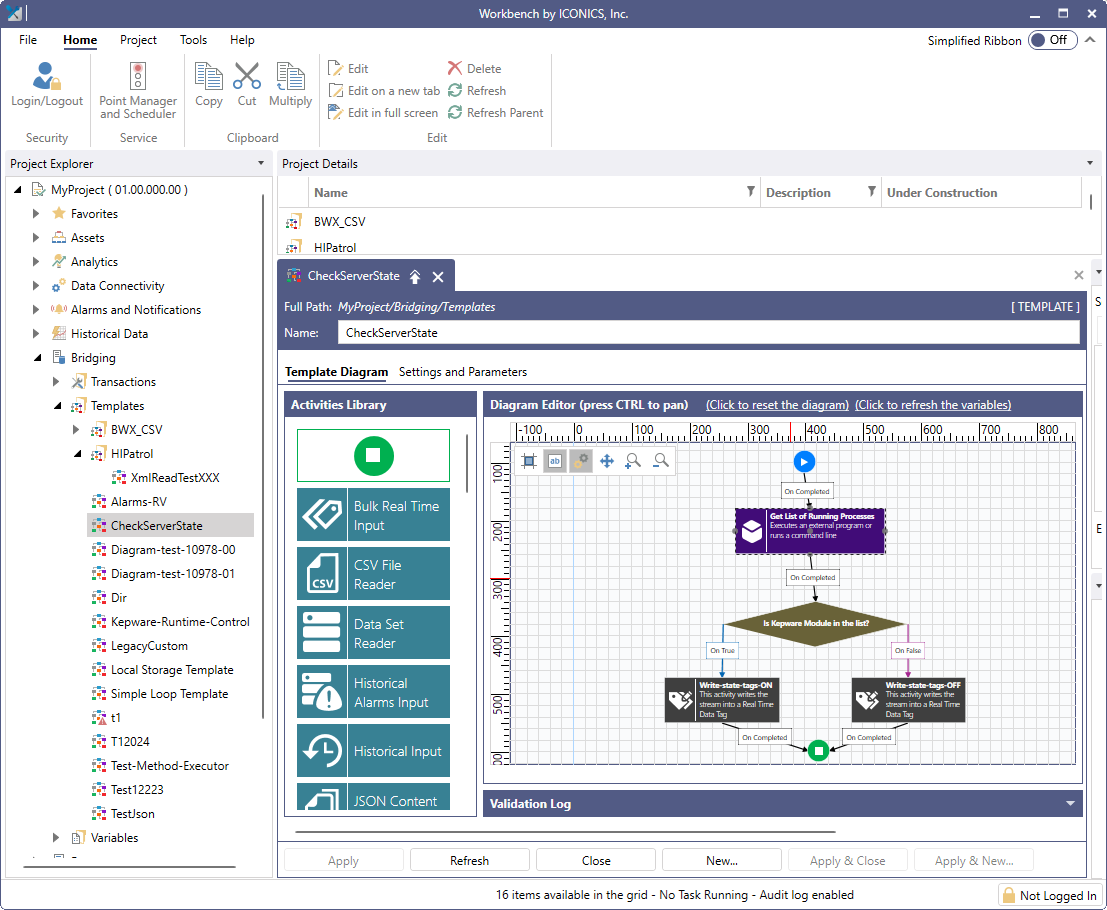
A transaction is built from three configuration elements—the transaction, the template that holds its diagram, and the variables it uses—and every activity in the diagram hands its result to the next as a dataset. Learn more
The engine runs transactions concurrently on a thread pool, queues work that exceeds capacity, and can hibernate long-waiting transactions, so that their execution slots are released. Learn more
Key Capabilities
Bridging offers the following key features.
|
Feature |
Description |
|---|---|
|
Transactional Workflow Execution |
Includes the following features:
|
|
Connectivity to Heterogeneous Data Sources |
Provides the following actions:
|
|
Workflow Execution Triggering |
Provides the following trigger types:
|
|
Custom Script and Command Execution |
Starts an external process or runs an operating system command line from within a workflow, and captures its standard output as a dataset. Learn more |
|
Runtime Visibility |
Records a transaction log for every execution, exposes live counters and per-transaction status as data points, and presents both to operators through the Bridging Navigator and Bridging Viewer controls. Learn more |
|
Resilience and Scale |
Recovers interrupted transactions after an unexpected shutdown, and distributes execution across a redundant network of load-balancing schedulers. Learn more |
Using Bridging with GENESIS Data
Bridging consumes and produces data through the same point managers that serve the rest of GENESIS, so anything addressable as a GENESIS data point is available to a workflow. It reads and writes real-time and historical tags, reads and writes database data sources and manipulators, subscribes to the alarm server, calls web methods, publishes to MQTT brokers, generates reports, and sends notifications.
Transactions can be started by GENESIS triggers, alarm subscriptions, operator actions in a display, or on demand from Workbench. Learn more
For the comprehensive list of available Bridging activity blocks, refer to Bridging Activities List.
Related Topics