Licensing with a USB Security Key
A GENESIS license can be bound to a USB security key instead of to the computer that runs GENESIS. When a license is bound to a USB security key, its entitlements follow the key: GENESIS is licensed on whichever computer the key is plugged into, and moving the license to another computer is as simple as moving the key.
GENESIS supports two ways to bind an activated license. Both draw on the same purchased entitlements and use the same Web Licensing site to generate a license file. They differ only in what the license is tied to.
|
Licensing method |
Bound to |
Portability |
|---|---|---|
|
Software license |
The site code of the computer, derived from its hardware and operating system identity. |
The license stays on the computer where it was activated. To move it, you transfer the license by killing it on one computer and activating it on another. |
|
USB security key license |
A certificate on a YubiKey USB security key. |
The license runs on any computer that has the license file and the key plugged in. To move the license, you move the key. |
How It Works
When you activate a license, the License Utility asks how to bind it. Choosing License bound to USB Security Key (instead of License bound to this machine) initializes the key with a certificate and produces a certificate blob. You submit this blob to the Web Licensing site in place of a site code, and the site generates a license file that is bound to that key. GENESIS then validates the local license file against the certificate on the key.
Because the license is tied to the key rather than to a single computer, the key must remain plugged in for the license to stay active:
-
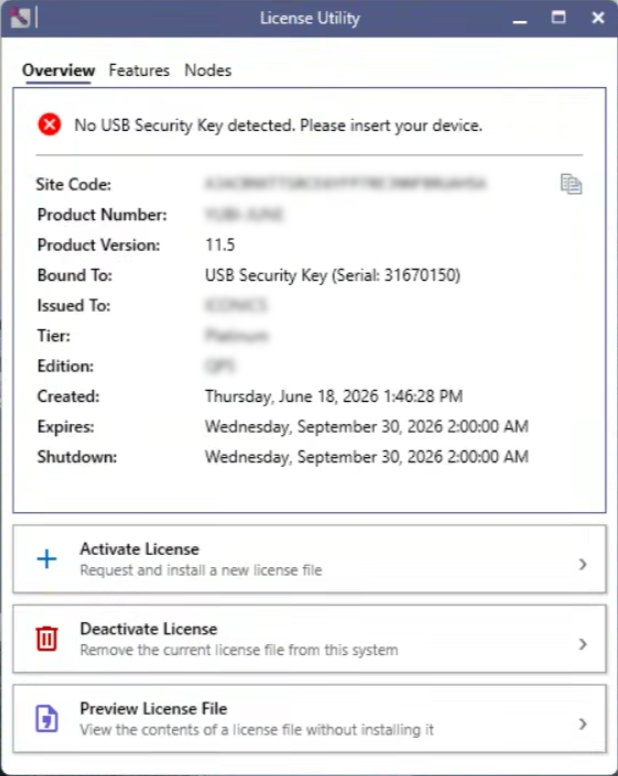
When the key is plugged into a computer that has the license file, GENESIS is licensed with the key's entitlements. The License Utility lists the key under Bound To.
-
When the key is removed, the License Utility reports No USB Security Key detected and that computer returns to demo mode.
-
When the key is plugged back in, the license is restored immediately.
The license file is stored locally, in the same location as a software license (C:\ProgramData\ICONICS\11\License). You can copy this file to more than one computer so that any of them can host the license when the key is present.
Requirements
-
A YubiKey that supports Smart Card (PIV). Keys that lack Smart Card (PIV) support cannot hold a GENESIS license.
-
The YubiKey Utilities component, selected in the component list of the GENESIS installer. These utilities allow GENESIS to validate the license against the key.