Distributed Assets Overview
If your solution spans multiple sites, each with its own independent asset structure, you can use the Distributed Assets functionality. This feature allows you to merge multiple independent asset trees into a single global asset tree on an aggregating machine using external links. This approach provides a centralized overview of all sites while maintaining the local management of individual site structures.
As an example, suppose you have partial asset trees on two nodes, Foxboro and Pilsen, which you want to aggregate for viewing on a Global node.
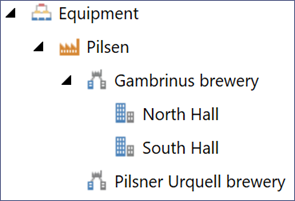
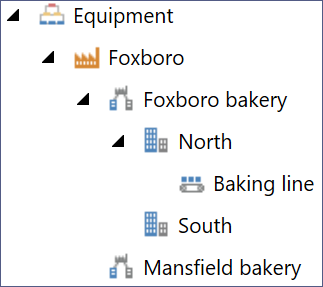
To use the distributed assets setup, you need to perform the following tasks:
-
Configure the communication between nodes to ensure that the aggregator (the Global node) can access the child node assets via the FrameWorX network. Learn more
-
Create new equipment entries in the Global asset tree to act as links to the actual equipment on the child nodes (Foxboro and Pilsen). Each link represents the root of the remote subtree that you want to monitor. Learn more
-
Verify the link by viewing the remote assets in the GraphWorX runtime mode. Learn more
-
Configure an aggregating external tree view of the distributed assets. Learn more