Configuring a Tree View with Distributed Assets
When using the distributed assets functionality, the asset structures from child nodes are displayed in the aggregating instance's asset tree as a unified structure in Asset Navigator. Additionally, if you have defined tree views with specific filtering and grouping rules on the child nodes, you can configure a tree view on the aggregating instance to merge these views.
Prerequisites:
Make sure that you have a working distributed assets setup with an aggregator node and multiple child nodes. Learn more
The setup must meet the following conditions:
-
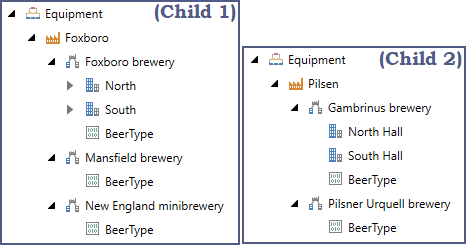
The equipment nodes on the aggregator have external links to the equipment on the child nodes.
-
The aggregating equipment has the same name as the linked child node equipment.
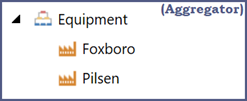 <-------------->
To create an aggregating external tree view:
-
On each child node, create a tree view with your desired filtering and grouping rules. The tree view name and rules must be identical in all child nodes. Learn more
Instead of manually creating the tree view on each node, you can use the Import/Export functionality to propagate it from one node to the other ones.
-
On the aggregator machine, open Workbench and in the Project Explorer pane, expand Assets.
-
Right-click Tree views and select Add Tree view.
-
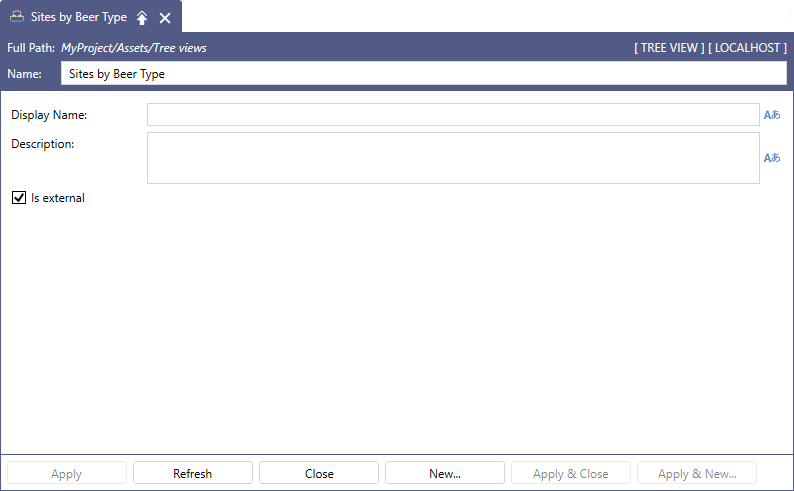
Enter the Name of the tree view. Optionally, specify the Display Name and Description.
-
Select the Is External checkbox and click Apply.
What's Next?