Getting Detailed Web API Documentation
Web API provides a Swagger interface that contains a documentation page for each mapped REST API, declaring its HTTP method, content type, and input file (such as JSON, XML, or binary) when applicable. You can reach the Swagger page and get the details of an API on a specific URL, provided that GENESIS Web API Service is running.
To get the Web API documentation on the Swagger page:
-
Start GENESIS Web API Service . Learn more .
-
In your browser, go to http://localhost/fwxapi/swagger/index.html or https://localhost/fwxapi/swagger/index.html.
If your Web API service is running on a different server, replace localhost with your server name or IP address.
The list of all endpoints provided by the Web API is displayed.
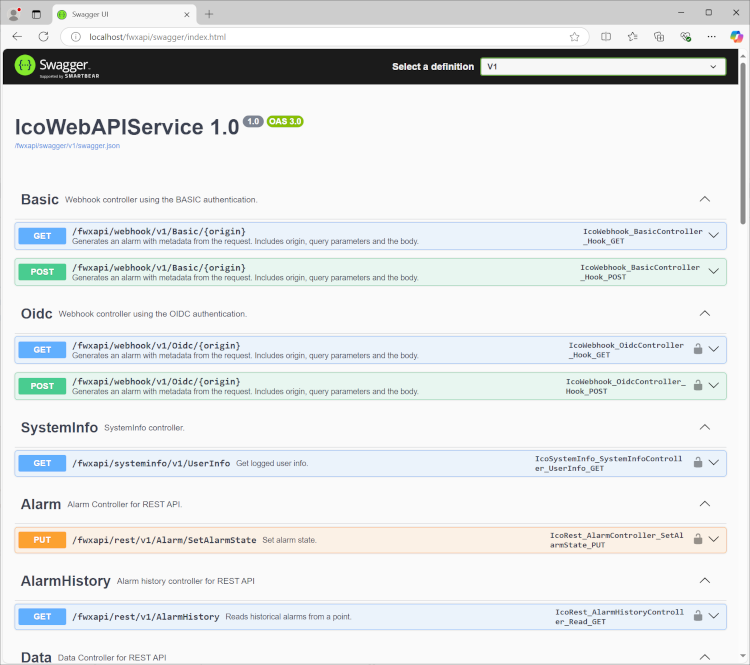
-
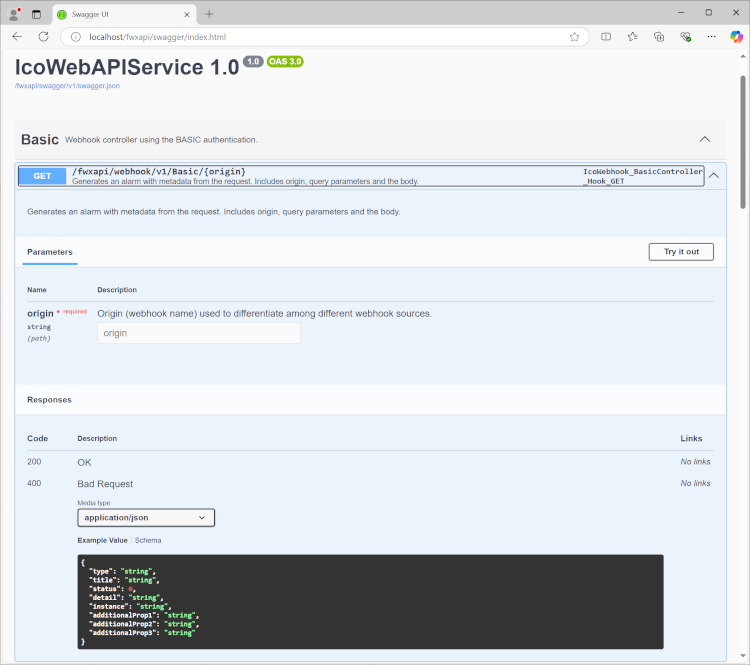
In the list of all endpoints provided by the Web API, select the desired endpoint to access the documentation.
In the example image, the following fields are available:
-
The HTTP method
Usually one of the following values: GET, POST, PUT, or DELETE.
-
The HTTP endpoint
The path to access the managed resource (in this case, /fwxapi/webhook/v1/Basic/).
-
The API description
-
Parameters
One or more parameters that are used in the request. For HTTP GET, it is usually a URL query string; for POST, PUT, and DELETE, it is usually the content of a JSON or XML input file.
-
Response code and its description
A pair of values that define whether the request was successful or not, and why.
-
What's Next?