Internet of Things Connectivity Overview
Internet of Things (IoT) connectivity is the ability of GENESIS to exchange data with devices and applications through a message broker rather than by polling them directly. GENESIS connects to a broker as a publisher, as a subscriber, or as both at once: it sends its own data to the broker, receives data that other systems have sent, or does both. The broker relays messages between GENESIS and everything else connected to it.
This model suits equipment that a conventional industrial protocol cannot reach: small gateway devices and sensors that report on their own schedule, sites behind a firewall that can open an outbound connection but cannot accept an inbound one, and cloud applications that expect telemetry to be pushed to them. Where Modbus, BACnet, and OPC UA connect GENESIS to a device, IoT connectivity connects GENESIS to a broker that many devices share.
You configure IoT connectivity in Workbench, in the Project Explorer, under your project > Data Connectivity > Internet of Things.
Publishing and Subscribing
A broker-based system uses a publish-subscribe (pub/sub) model. A publisher sends messages to the broker; a subscriber asks the broker to deliver messages to it. Publishers and subscribers never address each other. They address a topic, and the broker matches one to the other. A device can take either role or both.
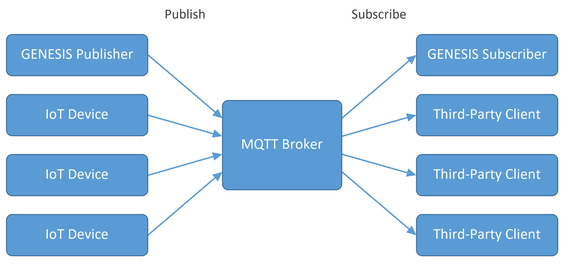
In GENESIS, each role is served by its own service:
-
Internet of Things Publisher—Sends GENESIS data out to a broker. You choose the tags to send in a publish list, and the publisher encodes and sends them at the rate you configure.
-
Internet of Things Subscriber—Receives messages from a broker and exposes their contents to the rest of GENESIS as real-time points, datasets, or events. Subscribed data is addressed with the iot: prefix and appears in the Data Browser under My Computer > Internet of Things.
Both services must be running for the configured connections to work. Learn more
Connection Types
A connection defines one link between GENESIS and one broker or endpoint. Subscriber connections and publisher connections are configured separately, so a system that both sends and receives data uses one of each. The transport is set by the connection type: MQTT and Sparkplug B connections use MQTT, and Azure connections use AMQP.
|
Connection type |
Publisher |
Subscriber |
Description |
|---|---|---|---|
|
MQTT |
✓ |
✓ |
Connects to an MQTT broker such as Mosquitto, HiveMQ, or ActiveMQ. The most common choice for on-premises and third-party devices. Learn more |
|
Sparkplug B |
- |
✓ |
Subscribes to an MQTT broker carrying Sparkplug B encoded data, a standardized profile of MQTT for industrial devices. Learn more |
|
Azure IoT Hub |
✓ |
✓ |
Connects to a Microsoft Azure IoT Hub, a managed cloud broker, over AMQP. Carries telemetry in and commands back out. Learn more |
|
Azure Event Hub |
✓ |
✓ |
Connects to a Microsoft Azure Event Hub, a managed cloud event ingestion service. Telemetry only; it cannot carry commands back to devices. Learn more |
Configuration Elements
IoT is configured in Workbench under the Internet of Things node in Project Explorer, and consists of the elements described in the following table. Not every element is needed for every system; a subscriber that only reads data from a third-party device needs a broker and a subscriber connection, and nothing else.
|
Element |
Publishing |
Subscribing |
Description |
|---|---|---|---|
|
MQTT Brokers |
✓ |
✓ |
The address, protocol, and credentials of a broker. Publisher and subscriber connections both point at a broker defined here, so the broker is defined once and reused. Learn more |
|
Publisher Connections |
✓ |
- |
One outbound link to a broker, including the encoder and the publish list it sends. Learn more |
|
Subscriber Connections |
- |
✓ |
One inbound link from a broker, including the topic to subscribe to and the decoder used to interpret the messages that arrive. Learn more |
|
Publish Lists |
✓ |
- |
The set of real-time points, historical points, and alarms that a publisher connection sends, and the rates at which it sends them. |
|
Collection Groups |
✓ |
- |
Named collection rates that the points in a publish list are sampled at. |
|
Aggregate Groups |
✓ |
- |
The calculation settings used when a publish list sends aggregated historical values rather than raw ones. |
|
Custom Encoders/Decoders |
✓ |
✓ |
User-defined message formats, used as an encoder when publishing and as a decoder when subscribing. Learn more |
Encoding and Decoding Messages
A broker moves message payloads without interpreting them, so both ends must agree on the format. GENESIS applies an encoder to everything a publisher connection sends, and a decoder to everything a subscriber connection receives.
When both ends are GENESIS, the native JSON and binary formats carry point names, values, timestamps, and quality, and clients can browse the address space of the far end. When the far end is a third-party device, the format is whatever that device produces, so GENESIS provides decoders for common formats and a CustomJson plug-in that you configure against the layout of your own messages. Learn more
Licensing
The Internet of Things Subscriber is included in all GENESIS license tiers. The Internet of Things Publisher and the JSON encoding and decoding used by MQTT and Sparkplug B are add-ons. Learn more
What's Next?