Configuring Support for Vonage Notifications Acknowledgment
After configuring a Vonage account and creating a default Vonage configuration for outgoing alert notifications in Workbench, you can set up the support for status receipts and acknowledgment of incoming notifications via SMS, WhatsApp, and Text-to-Speech.
Before you can enable logging the status receipts and acknowledging Vonage notifications, you need to perform the following tasks.
-
Set up the GENESIS Web API Service. The server running the Web API Service must be accessible externally via HTTPS and set up by your IT department.
Test your setup by entering https://yourdomainname/fwxapi/echo in the desired web browser. It should respond with “OK” and an instance ID.
-
For incoming SMS and acknowledgment via Connected Field Service or Bridging, do the following:
-
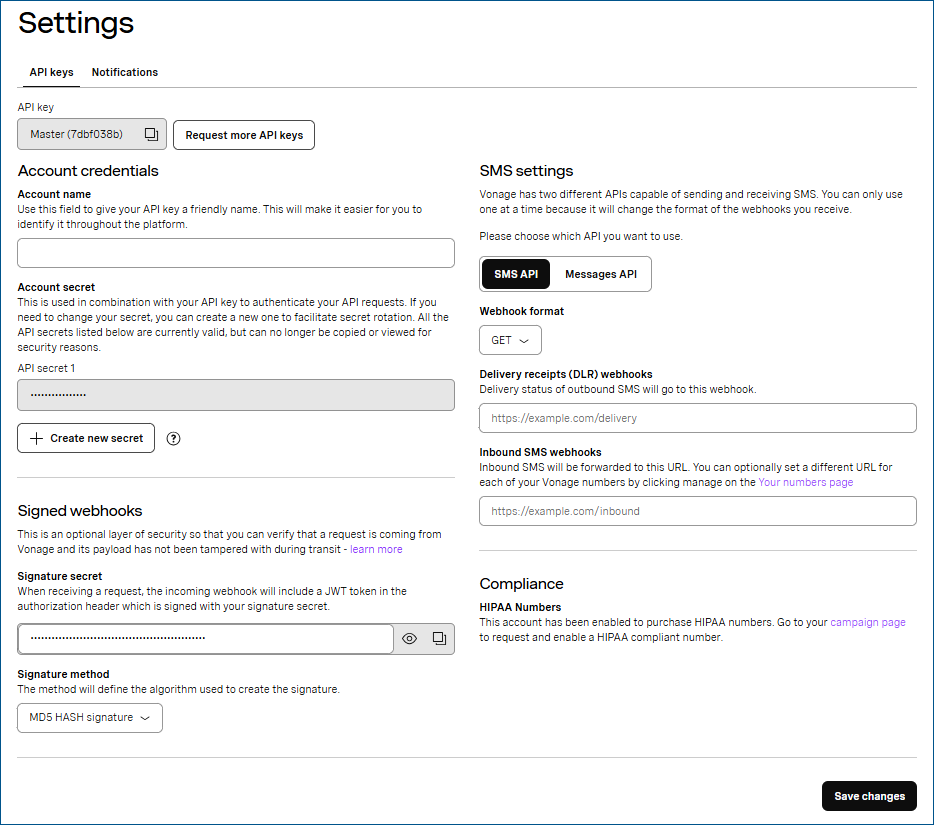
Log in to your Vonage account and navigate to API Settings.
-
The settings open on the API keys tab.
-
In the Signed Webhooks section in Signature secret, click
 to copy the signature secret code, and in Signature method, select the desired method of the signature encryption.
 -
In the SMS Settings section, select SMS API and in Webhook Format, select GET.
-
Enter the following webhooks, and then click Save Changes.
-
Delivery receipts (DLR) webhooks: https://yourdomain/fwxapi/nexmo/sms/status
-
Inbound SMS webhooks: https://yourdomain/fwxapi/nexmo/sms/
-
Replace yourdomain with the domain that you set up with Web API Service.
-
Contact support@api.vonage.com to request enabling signatures for incoming messages and delivery webhooks. Learn more
The email may change, so verify it before emailing.
-
Use the Signature secret and Signature method from the Signed Webhooks settings in your Vonage account to add Vonage environment variables to the machine(s) with the GENESIS Web API Service and GENESIS Alert Notifications REST Point Manager services. Learn more
What's Next?
Enabling Status Logging and Acknowledging Vonage Notifications