Enabling Status Logging and Acknowledging Vonage Notifications
In Workbench, you can set up acknowledging Vonage notifications via SMS and Text-to Speech and enable logging status information in Alert logs.
To enable status logging and acknowledging Vonage notifications:
-
Open Workbench and in Project Explorer, expand your project > Alarms and Notifications > Alert Notifications and double-click General Settings to open the configuration.
-
In the General Settings section, select Enable SMS ID, and then click Apply & Close.
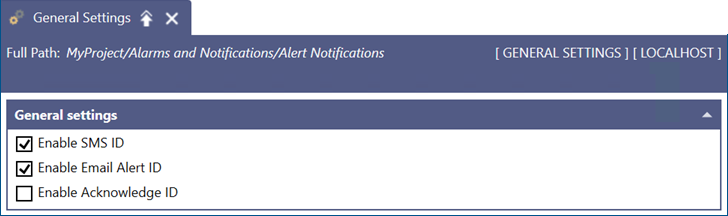
Additionally, select Enable Acknowledge ID if you have defined the default acknowledge code in the Connected Field Worker or Bridging configuration, or unique acknowledge IDs for individual workers in Connected Field Service. Learn more
-
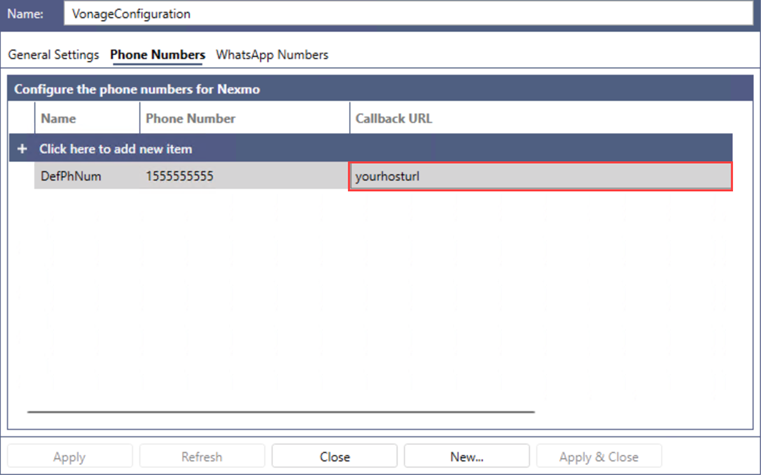
In Project Explorer, navigate to Alert Notifications > Vonage Configurations, open the default Vonage configuration, and go to the Phone Numbers tab.
-
In the Callback URL field of the default phone number, enter the host URL that was set up using GENESIS Web API Service and is accessible externally via HTTPS. Then click Apply.