Displaying the Result of a Web Manipulator
A web manipulator allows you to call a method on a REST API on demand.
This topic describes how to visualize the result from a web manipulator once you call a REST API on demand using one of the following ways:
To visualize a web manipulator result:
- Open GraphWorX in the configuration mode (default).
-
On the Dynamics ribbon, select Process Point, and then drag the mouse diagonally across the canvas to make a rectangle for inserting the process point. The process point is added to the screen and in the Dynamics pane on the right, a property grid is displayed with the Data Source box pre-selected.
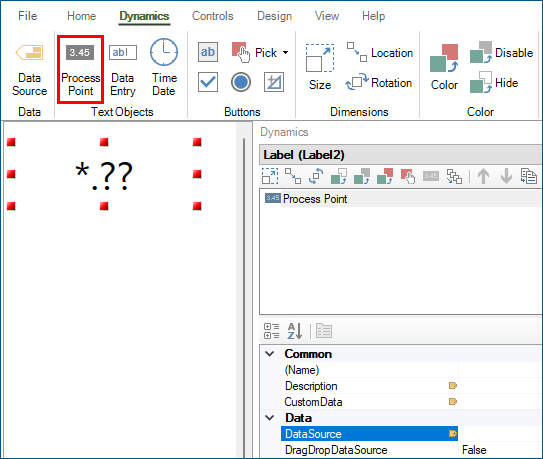
- In Data Source, click
 to open Data Browser.
 -
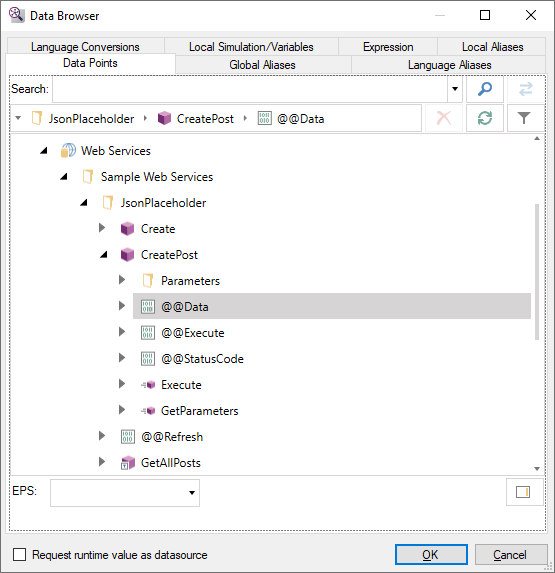
Go to Data Connectivity > Web Services, expand the desired web method (JsonPlaceholder) and web manipulator (CreatePost), select the desired tag (@@Data), and then click OK.
-
In the upper right corner of the GraphWorX screen, click
 , or press CTRL+M. GraphWorX switches to the runtime mode.
 -
Execute the web manipulator as you have configured it, following one of the three methods described. The result of the REST API call is displayed in the process point.
 The schema of the web manipulator's result is not browsable. However, you can drill in the result and only display the desired properties by manually appending the path to the desired property to the tag name.
- In the upper right corner of the GraphWorX screen, click
 , or press CTRL+M to exit the runtime mode.
 -
Select the process point connected to the web manipulator's result and append .id to the tag name.
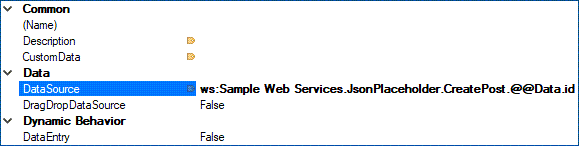
- Switch back to the runtime mode. Only the value for the id property is displayed.
- In the upper right corner of the GraphWorX screen, click