Using a Web Manipulator via a Method Call
This topic describes how to call a REST API on demand using a web manipulator via a method call.
To call a REST API on demand using a web manipulator via a method call:
- Open GraphWorX in the configuration mode (default).
-
On the Dynamics ribbon in the Buttons section, select
 , and then drag the mouse diagonally across the canvas to make a rectangle for inserting the control. The button is added to the screen and in the Dynamics pane on the right, a property grid is displayed.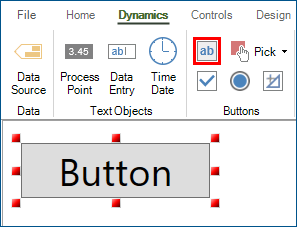
-
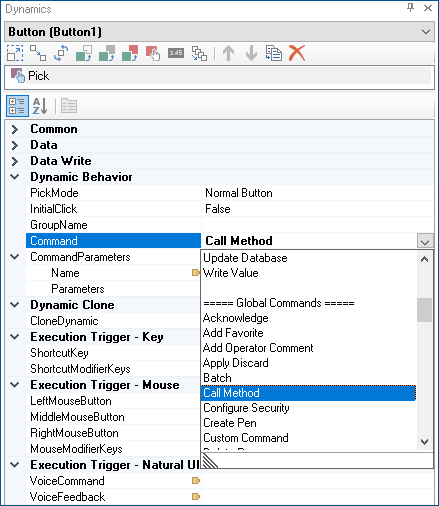
In the property grid in the Dynamic Behavior section, select Command, and then expand the drop-down list, navigate to Global Commands, and select Call Method.
-
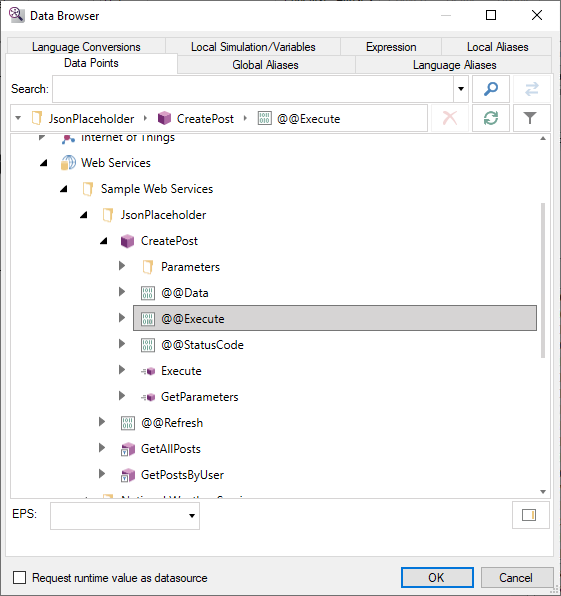
In CommandParameters, select Name value, and then select Browse/Edit... from the drop-down list. A Data Browser dialog opens.
-
Go to Data Connectivity > Web Services, expand the desired web method (JsonPlaceholder) and web manipulator (CreatePost), and select Execute. The method name populates the Name field.
-
In CommandParameters, select Parameters value, and then click
 to display the CallMethodParameterData Collection Editor dialog.
 -
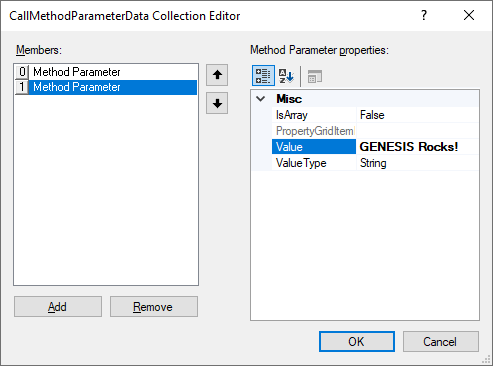
Use the dialog to configure the parameter values, and then click OK.
- Click Add to create a new parameter.
- In Method Parameter properties, click the Value text box and enter the parameter's value.
- Click Value Type and select the parameter's data type.
- Repeat to add multiple parameters.
 To follow the example, enter the following method parameters in the this order.
Value ValueType Notes Posted from a command String This is the @body parameter. GENESIS Rocks! String This is the @title parameter. The parameters values must be specified in the same order in which they are defined in the web manipulator's parameter list in Workbench. If the web manipulator uses virtual parameters, you do not need to specify the Request Body parameter.
- In the upper right corner of the GraphWorX screen, click
 , or press CTRL+M. GraphWorX switches to the runtime mode.
 - Click the button. The web manipulator is executed with the parameter values specified in the command configuration.