Adding an Alarm to an Equipment Property
Once you enable the Assets extension for Alarm Server, you can add alarms defined in Alarms and Notifications to an equipment class property or an individual equipment property instance in your asset tree.
To add an alarm to a specific equipment property instance, follow the procedure below, but in step 1, go to the Assets > Equipment section to open the desired equipment property instance. However, it is only recommended for equipment that has not been created from an equipment class. Otherwise, the settings will be lost if the equipment class configuration is regenerated.
To add an alarm to an equipment class property:
-
Open Workbench and in Project Explorer, expand your project > Assets > Equipment classes, navigate to the desired equipment class, and double-click the desired equipment property to open its configuration.
-
On the Alarm tab of the configuration dialog, select Enable Alarms. The Type field is displayed.
-
Click
 next to the Type field to display a list of available alarm types that have been configured in Alarms and Notifications > Alarm Server > Types.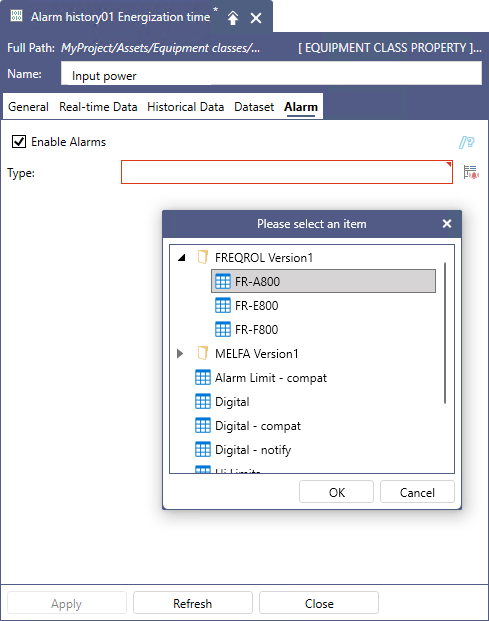
-
Select the desired alarm type and click OK. The selected alarm is added to the Type field and related settings are displayed.
-
Complete the settings based on the selected alarm type, and then click Apply to add the alarm to the equipment class. Once the equipment class configuration is updated, the alarm will be added to all (or all selected) existing instances of that equipment class. Learn more