Alert Notifications Reply Format
Acknowledging messages responding to alert notifications via Bridging or Connected Field Worker Services must be sent in the expected reply format. The following sections describe the formats for emails, SMS and WhatsApp, and for Text-to-Speech.
The expected reply format is AlertID AcknowledgeID/Code OptionalComment, followed by a carriage return or new line. For example:
23 A123Z Acknowledging alarm at pump house 1
It is composed of the following information:
-
AlertID is the Alert ID of the email alert and is mandatory for acknowledgment. It must be enabled by selecting the Enable SMS ID checkbox in Alert Notifications > General Settings.
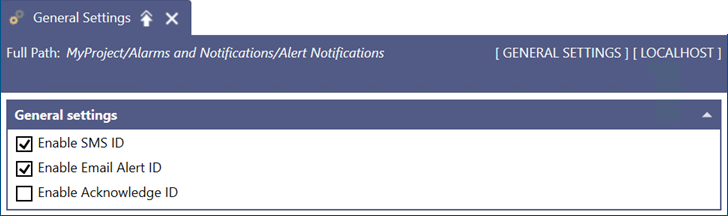
-
Acknowledge ID/Code could be a worker's Acknowledge ID or the default Acknowledge Code configured in Connected Field Worker or Bridging, in case the worker does not have an Acknowledge ID assigned.
The worker's Acknowledge ID takes precedence over the Acknowledge Code in Connected Field Services. Bridging does not currently support the Worker Lookup activity, so it will use the Acknowledge Code from the Bridging configuration. The Acknowledge Code/ID is optional, and you can avoid it by clearing the Enable Acknowledge ID checkbox in General Settings in Alert Notifications.
-
OptionalComment is any comment that you want to add.
Use the Worker Lookup (Dynamic Worker List) activity for acknowledgment in the Connected Field Service Template before using the Send Email activity. Fixed lists do not support acknowledgment.
Expected Format for SMS and WhatsApp
The expected reply format is AlertID AcknowledgeID/Code OptionalComment, for example:
23 A123Z Acknowledging alarm at pump house 1
It is composed of the following information:
-
AlertID is the Alert ID of the notification alert and is mandatory for acknowledgment. It must be enabled by selecting the Enable SMS ID checkbox in Alert Notifications > General Settings.
-
Acknowledge ID/Code could be a worker's Acknowledge ID or the default Acknowledge Code configured in Connected Field Worker or Bridging, in case the worker does not have an Acknowledge ID assigned.
The worker's Acknowledge ID takes precedence over the Acknowledge Code in Connected Field Services. Bridging does not currently support the Worker Lookup activity, so it will use the Acknowledge Code from the Bridging configuration. The Acknowledge Code/ID is optional, and you can avoid it by clearing the Enable Acknowledge ID checkbox in General Settings in Alert Notifications.
-
OptionalComment is any comment that you want to add.
When you use the Fixed List activity for acknowledgment in the Connected Field Service Template before using the Send notifications activity, the code used for acknowledgment is the Acknowledge Code in the Connected Field Service configuration.
The Reply Format for Text-to-Speech
For Twilio or Vonage Text-To-Speech calls triggered via Bridging or Connected Field Service, you have the options to acknowledge, unsubscribe, or end the call. Depending on the keypad options that you provide, you can trigger the acknowledgment of an alarm from the call. If the Enable Acknowledge ID checkbox in Alert Notifications > General Settings is selected, you will be asked to enter the acknowledge ID.
For voice calls, it is important to set up the acknowledge ID for a worker or the acknowledge code in Bridging or Connected Field Service configuration as numeric, since GENESIS only provides a Dual-Tone Multi-Frequency (DTMF) input.