Configuring Support for Twilio Notification Acknowledgment
After configuring a Twilio account and creating a default Twilio configuration for outgoing alert notifications in Workbench, you can set up the support for status receipts and acknowledgment of incoming notifications via SMS, WhatsApp, and Text-to-Speech.
Before you can enable logging the status receipts and acknowledging Twilio notifications in Workbench, you need to perform the following tasks.
-
Set up the GENESIS Web API Service. The server running the Web API Service must be accessible externally via HTTPS and set up by your IT department.
Test your setup by entering https://yourdomainname/fwxapi/echo in the desired web browser. It should respond with “OK” and an instance ID.
-
Configure the environment variables for Twilio, especially the variables for basic webhook authentication, and then restart the GENESIS Web API Service and GENESIS Alert Notifications REST Point Manager services. Learn more
-
For incoming SMS and acknowledgment via Connected Field Service or Bridging, do the following:
- Open your Twilio console and on the Develop tab of the account dashboard, navigate to Phone Numbers > Manage > Active numbers.
- Select the active number to open its settings.
-
On the Configure tab in the Messaging Configuration section, set up the primary webhook.
- In Primary handler fails, select Webhook.
-
In URL next to the Primary handler fails field, enter the webhook address in the following format:
https://username:password@yourhostname/fwxapi/twilio/sms/
As the username and password, use the Ico_Cfs_Username and Ico_Cfs_Password system environment variables (or the older Ico_Twilio_Username and Ico_Twilio_Password variables) that you have set up here.
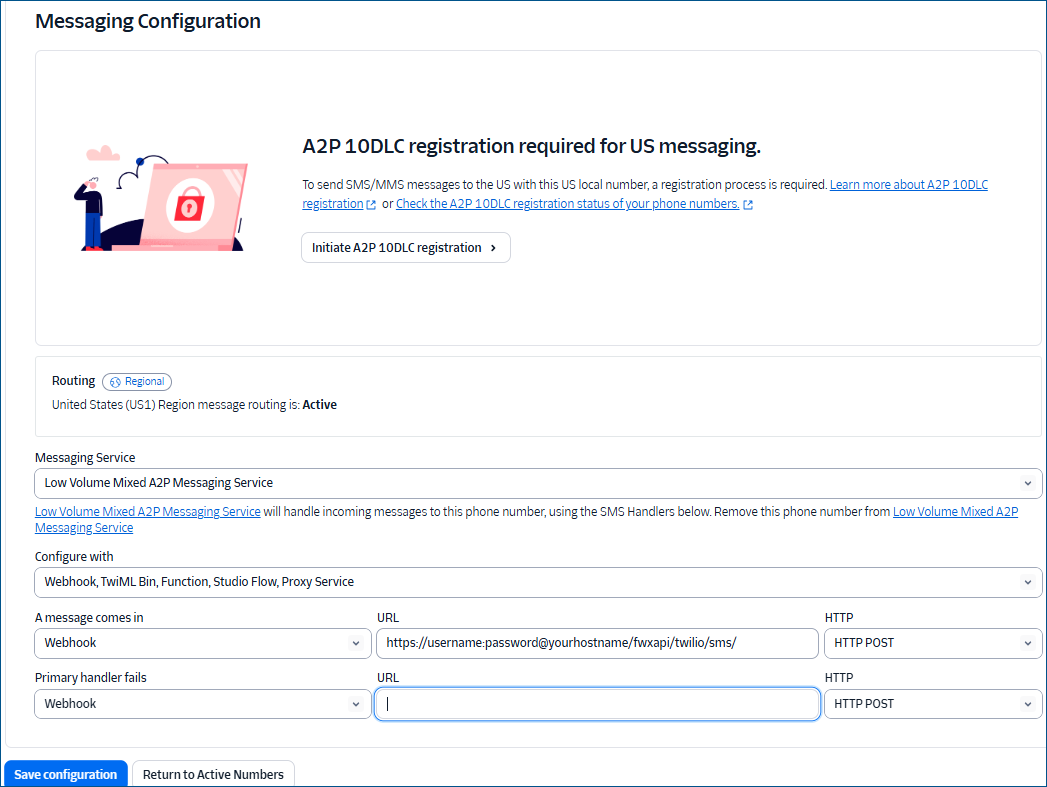
- In the HTTP field, select HTTP POST, and then click Save Configuration.
-
The webhook URL (set up via Web API) for status updates on SMS, Text-to-Speech, and acknowledgement via Text-to-Speech calls is provided in Workbench in the callback URL field.
-
Add IIS reverse proxy headers HTTP_X_FORWARDED_HOST and HTTP_X_FORWARDED_PROTO to all requests forwarded to the Web API Service. Learn more
What's Next?
Enabling Status Logging and Acknowledging Twilio Notifications