Configuring Twilio IIS Variables
After configuring , you need to set up additional web server variables for enabling Twilio Voice (when configured with Callback URL), SMS Reply and Status features. This topic describes the procedure on the Internet Information Services (IIS) web server.
After you perform the additional steps, the reverse proxy adds the following headers to all requests forwarded to GENESIS Web API Service:
- X-Forwarded-Host
- X-Forwarded-Proto
To add server variables to the IIS web server:
-
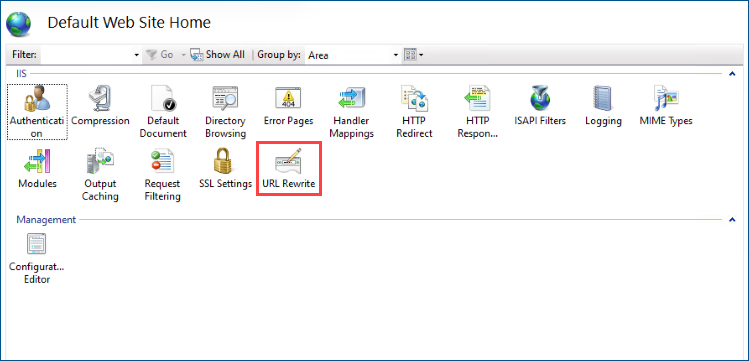
Open the IIS Manager and in the Connections menu, expand Web Sites > Default Web Site > IIS > URL Rewrite.
-
Double click the rule that contains fwxapi/(.*) in the pattern column to open it.
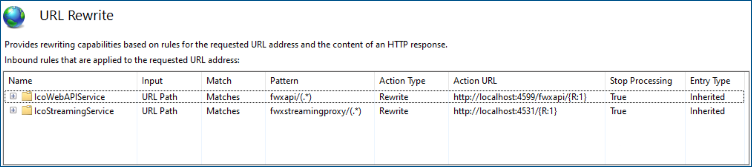 The inbound rules in the list were set up for you by the installation.
 -
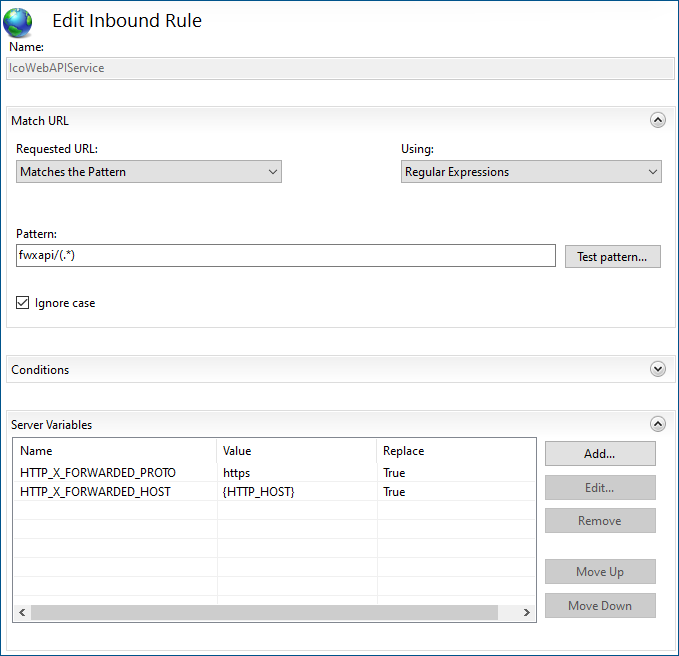
Make sure that the Server Variables section contains HTTP_X_FORWARDED_PROTO and HTTP_X_FORWARDED_HOST. If not, click Add on the right and add these two variables.
-
In the Value column, provide the following information and apply the changes.
-
For HTTP_X_FORWARDED_HOST, enter your domain name in the following format:
yourcompanywebhook.xyz:portnumber
- For HTTP_X_FORWARDED_PROTO, enter https.
-
Running GENESIS Web API Service now enables the status updates and posting replies to the respective endpoints.