SendGrid Call Methods in GraphWorX Commanding
Once you create a default SendGrid configuration, you can access multiple SendGrid commands in Data Browser under that configuration. You can use these commands with parameters to send email notifications via the Call Method command in GraphWorX. Learn more
SendGrid notifications support the following call methods:
- SendEmail
- SendEmailFrom
- SendEmailWithAttachments
- SendEmailWithAttachmentsFrom
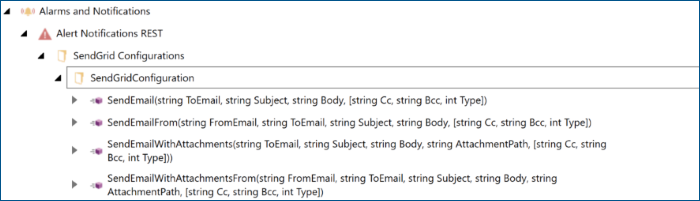
The basic differences of the methods include the following:
- SendEmail and SendEmailWithAttachments use the Default From email configured in Workbench as the sender's address.
- SendEmailFrom and SendEmailWithAttachmentsFrom allow you to add a different From Email as a parameter.
- SendEmail and SendEmailFrom do not support attachments.
The Call Method command has the following parameters:
-
ToEmail (string): The recipient's email address, mandatory for all methods.
You can add multiple recipients by separating them with a semicolon (;) as the delimiter. You can also include the name of the recipient with a comma (,) as the delimiter. For example:
user1@domain.com,User1Name;user2@domain.com, User2Name
This is also possible in the Cc and BCc fields. - Subject (string): The subject of the email, mandatory for all methods.
- Body (string): The text of the email, mandatory for all methods.
-
AttachmentPath (string): the path and type of the attachment, for example:
C:\Users\admin\Pictures\test.jpg
You can add up to 10 attachments with a semicolon (;) as the delimiter.
- FromEmail (string): The sender's email address to be used instead of the default email (Default From) from the configuration.
- Cc (string): The email of the person/s to whom you want to Cc to. This is an optional parameter. You can add multiple recipients using a ; delimiter. You can also mention the name of the recipient with a , delimiter. For example, user1@domain.com,User1Name;user2@domain.com, User2Name .
- Bcc (string) is the Email of the person/s to whom you want to Bcc to. This is an optional parameter. You can add multiple recipients using a ; delimiter. You can also mention the name of the recipient with a , delimiter. For example, user1@domain.com,User1Name;user2@domain.com, User2Name .
- Type (int32) is the Type of Email - Set this to 2 for HTML type. When set to HTML type(2), this allows you to send Emails formatted and rendered in HTML.