Configuring SendGrid for Outgoing Email
After setting up your SendGrid account and obtaining the API Key and verified email, you can create a SendGrid configuration for outgoing email in Workbench.
To configure SendGrid for outgoing email in Workbench:
-
Open Workbench and in Project Explorer, expand your project > Alarms and Notifications > Alert Notifications.
-
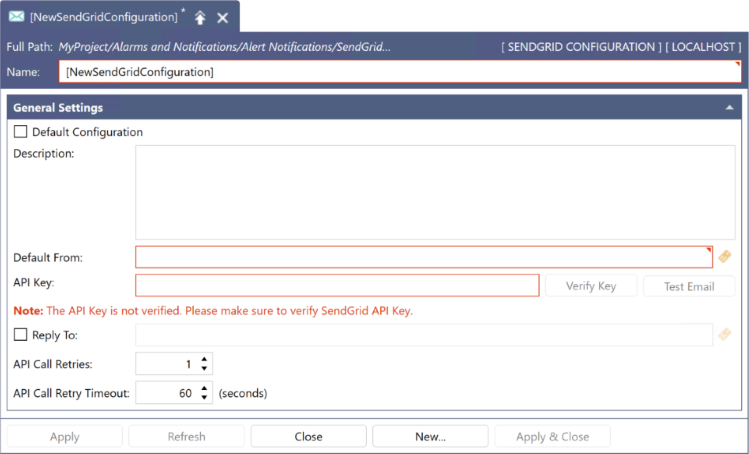
Right-click SendGrid Configurations and select Add SendGrid Configuration. The New SendGrid Configuration dialog is displayed.
-
In Name, enter a unique name of the configuration. Optionally, add more details in Description.
-
Select the Default Configuration checkbox to make this configuration default. The alert notification service (GENESIS Alert Notifications REST Point Manager) requires a default SendGrid configuration to send SendGrid email alerts.
-
In Default From, enter the verified email obtained after verifying the sender identity.
This address is used when calling methods with no From fields (SendEmail and SendEmailWithAttachments). Learn more -
Add the initially created API Key that was copied to the API Key field. Ensure that the Alert notification REST service(ICONICS Alert Notifications REST Point Manager) is running and click on the Verify Key button. The Verify Key button should become disabled if it is successfully verified. This process ensures that the integration with SendGrid is done successfully.
-
(Optional) Select the Reply To checkbox and provide a different email for replies. This is especially useful if you want to set up a new domain which parses acknowledgments. By default, the Reply To is the From Email.
-
Click Apply to save the configuration, and then test the functionality by sending a test email.
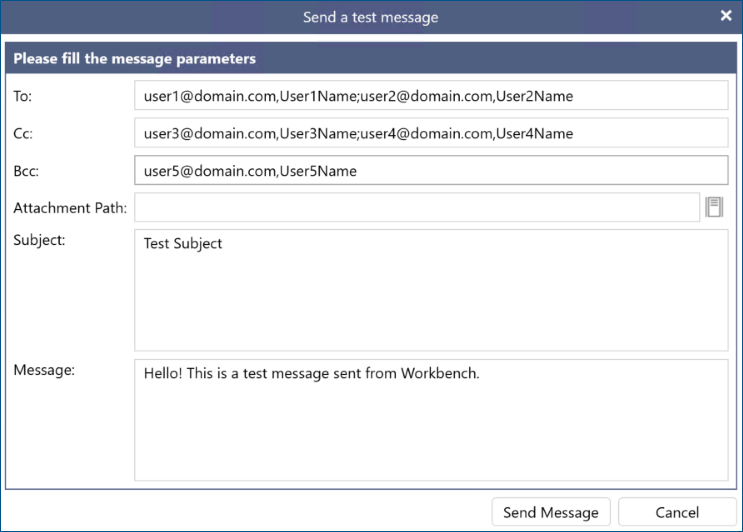
- Click Test Email next to the Verify Key button to open the Send a test message dialog.
- In To, enter the desired recipient's email address.
- Fill in the other required fields, Subject and Message, and then click Send Message.
 Some emails sent via SendGrid may end up in the recipient's spam folder. You can read more about this issue and possible resolutions here.