Configuring Support for SendGrid Email Acknowledgment
After configuring a SendGrid account and configuring SendGrid for outgoing email in Workbench, you can set up support for status receipts and acknowledgment of incoming email notifications.
Before you can enable logging the status receipts and acknowledging SendGrid notifications, you need to perform the following tasks.
-
Set up the GENESIS Web API Service. The server running the Web API Service must be accessible externally via HTTPS and set up by your IT department.
Test your setup by entering https://yourdomainname/fwxapi/echo in the desired web browser. It should respond with “OK” and an instance ID.
- Configure the SendGrid system environment variables for basic webhook authentication, and then restart the GENESIS Web API Service and GENESIS Alert Notifications REST Point Manager services. Learn more
-
For email status updates, do the following:
- In your SendGrid dashboard, open Mail Settings in the Settings section, and Event Webhooks.
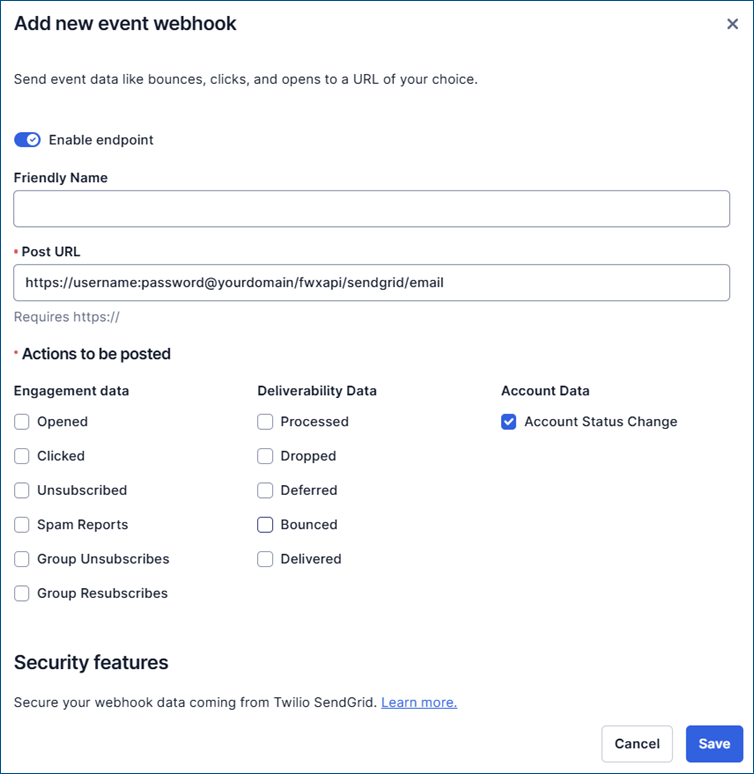
- On the Event Webhook page, click Create new webhook. The Add new event webhook dialog opens.
- In Post URL, enter https://username:password@yourdomain/fwxapi/sendgrid/email.
- In the Actions to be posted section, select the desired settings, and then click Save.
- For parsing incoming email and acknowledging via Connected Field Service or Bridging, do the following:
- In your SendGrid dashboard, open Inbound Parse in the Settings section, and click Add Host & URL.
- Use your authenticated sender domain and a subdomain as the receiving domain for inbound parse. If you did not authenticate a sender domain when setting up the SendGrid account, you need to do that first.
Enter the destination URL (reply webhook) in the following format:
https://username:password@yourdomain/fwxapi/sendgrid/email/inbound
As the username and password, use the SendGrid system environment variables Ico_Cfs_Username and Ico_Cfs_Password (or Ico_Sendgrid_Username and Ico_Sendgrid_Password for older versions). As your domain, use the domain set up with the GENESIS Web API Service.
You can set up a new domain for this purpose or subdomain your existing domain for inbound parse. Avoid using an existing mail domain, as this would parse all e-mails coming to this domain, which probably includes confidential information.
For more details about inbound parsing settings, refer to Setting Up The Inbound Parse Webhook.
What's Next?