Configuring Email Settings
After creating a new Email node, the dialog opens on the Email Settings tab.
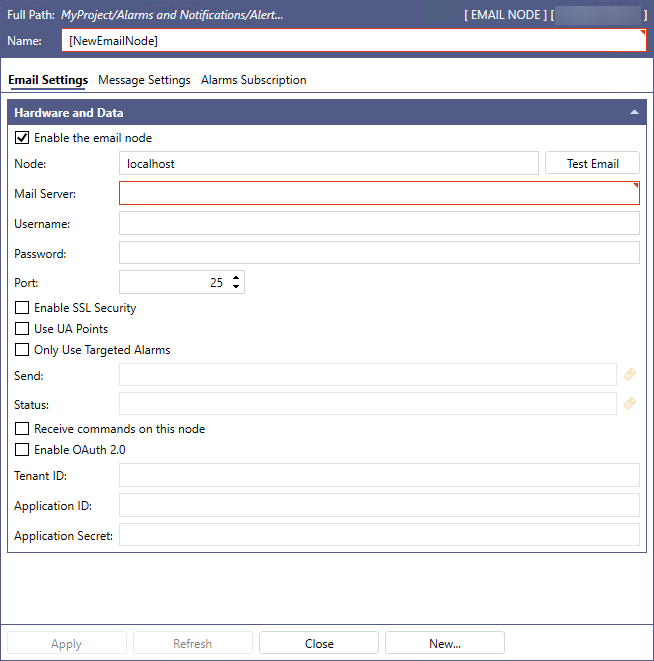
Configure the following Hardware and Data settings, and then click Apply.
|
Setting |
Description |
|---|---|
|
Enable the email node |
Select the checkbox to activate the node. |
|
Node |
Enter the node name of the Alert Email Service. |
|
Mail Server |
Enter the name of the mail server used for outgoing email notifications, and then enter the following information for connecting to the server.
|
|
Enable SSL Security |
Select the checkbox if the mail server requires an SSL/TLS security connection. |
|
Use UA Points |
Select the checkbox to load the Notification Message Fields as data points, and then complete the following fields.
|
|
Receive commands on this node |
Select the checkbox to receive commands from the client. |
|
Authentication Mode |
|
 to open Data Browser and select the data source.
To test the email connection, click Test Email next to the Node text box. In the Send a test message dialog, complete the Node name (should be entered automatically), From email address, To email address, Subject, and Message, and then click Send Message.
If you have more than one email node, the Test Email button may not send from the selected node. It sends the test message using either the node with Receive commands on this node enabled or, if there is none, the first node alphabetically. It may send from a disabled node.
What's Next?