Using Extended Point Syntax for Security
With the extended syntax of a process point, you can add the name of the currently logged-in user to a GraphWorX display.
To create a user, see Adding a User and Configuring Permissions.
To add the current user name to a process point:
-
Open GraphWorX.
-
Expand the File menu and select Login/Logout , and then enter your credentials.
-
On the Dynamics ribbon, select Process Point, and then drag the mouse diagonally across the canvas to make a rectangle where the process point is displayed.
-
In the Data Browser in the left pane of the GraphWorX screen, go to the Data Source property and enter ?Current:UserName as the DataSource value.
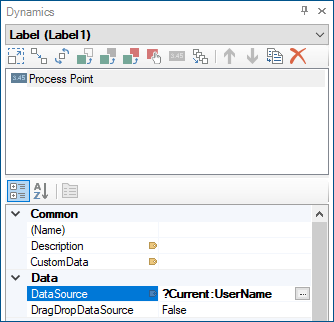
-
Use the options on the upper right of the GraphWorX screen to switch to the runtime mode
 or to open the display in a web browser
  . You can see that the process point now shows the user name. When you log out, the process point clears.