Setting Up a Parameter for the Value Set Tag Value
You can configure a parameter to set the value of a schedule's value set tag. This topic describes how to define a value set with this parameter.
To define a value set with a parameter for the value set tag value:
- Open Workbench and in Project Explorer, expand your project > Actions > Schedules, right-click ValueSets, and select Add ValueSet.
- In the new value set form, enter the value set's name, and then navigate to the Value Set Tags tab and select Click here to add new item.
-
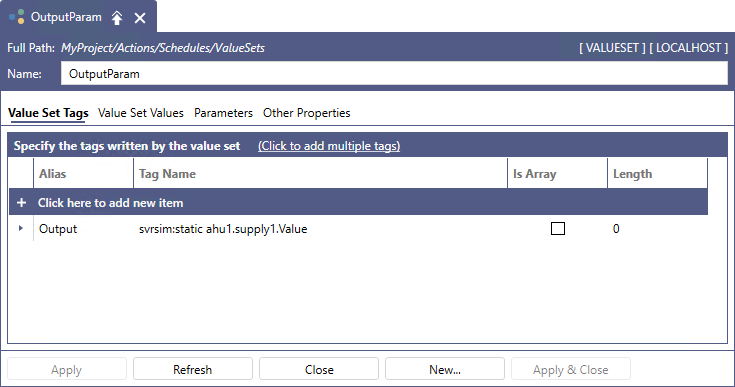
Provide an Alias for the new value set and a (static) Tag Name in the related columns.
-
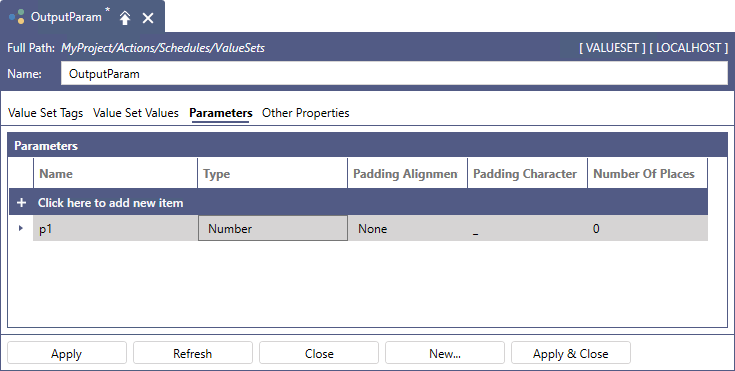
On the Parameters tab, select Click here to add new item, enter the new parameter's name and in the Type column, select Number.
-
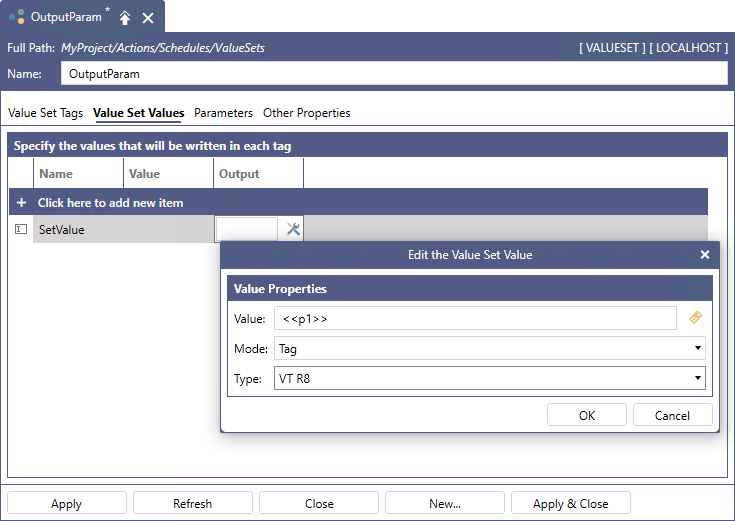
On the Value Set Values tab, select Click here to add new item to add a new value to be written to the Output tag mapped to the parameter, and enter the value's name in the Name column.
-
In the Output column, click
 to open the Value Properties dialog. Set up the properties as follows, and then click OK.
- In Value, enter the parameter name (p1) enclosed by << and >>.
- In Mode, select Tag.
- In Type, select VT R8 (the float type tag).
-
Click Apply to save the parameterized value set. It is now ready to be utilized in a schedule.
What's Next?