Creating a Diagnostic Model
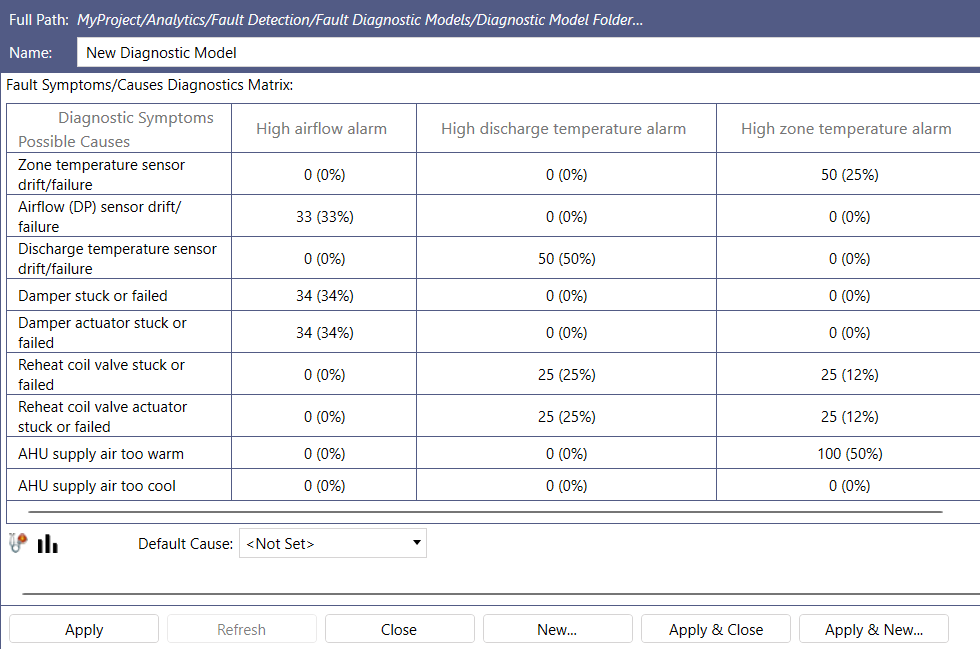
A diagnostic model describes how the faults of a type of equipment relate to their root causes. It is a matrix of Possible Causes (rows) and Diagnostic Symptoms (columns), where each cell holds the number of instances in which a cause produces a symptom. Fault Detection converts these values into the percentage likelihood that each cause is responsible for each symptom, and uses them to rank the possible causes when symptoms appear. The values can come from manufacturer specifications, maintenance records, or the experience of your maintenance staff.
After you create a model, link it to equipment and map its symptoms.
To create a diagnostic model:
-
Open Workbench and in Project Explorer, expand your project > Analytics > Fault Detection.
-
Right-click Fault Diagnostic Models, select Add Diagnostic Model Folder, enter a Name, and click Apply & Close.
-
Right-click the new folder, select Add Diagnostic Model, and enter a Name for the model.
-
Click
 , and then click
  and enter a Name for each possible cause. Click OK.
 -
Click
 , and then click and enter a Name for each diagnostic symptom. Click OK.
 -
In the matrix, double-click the cell where a cause meets a symptom it produces, and enter the number of instances. Enter a value for at least one symptom of each cause. Fault Detection calculates the percentage likelihood for each cell as you go.
-
Click Apply & Close.