Reading Members of OPC UA Structured Variables
An OPC UA structured variable holds a complex data structure made up of named members. When a display, expression, or client needs only one value from the structure, use the member() modifier to read that member as a separate point. Some structures define optional members that the server includes only in some cases. Use the memberexists() modifier to check whether such a member is present before you rely on its value.
Both modifiers use the same syntax, where <complexPointName> is the name of a point whose value is a structure and <memberName> is the name of a member of that structure:
-
member() returns the value of the member, or a value with Bad quality if the member does not exist. To read a member of a nested structure, continue the path with dots, for example
member(<complexPointName>).BuildInfo.SoftwareVersion. -
memberexists() returns a read-only Boolean value that is true when the member exists and false when it does not.
The following procedure shows both modifiers in a GraphWorX display. Before you begin, create an OPC UA connection to a server that exposes structured variables, and select Fetch Complex Type Information in the connection settings.
The examples use a connection named UaCpp to the Unified Automation C++ demo server, which exposes the structure StructureWithOptionalFields with the member MandatoryInt32. Substitute the point and member names from your own server.
To read a member of a structured variable and check whether it exists:
-
Open GraphWorX in the configuration mode (default).
-
On the Dynamics ribbon, select Process Point, and then add the process point element to the canvas.
-
In the right panel on the Dynamics tab, select DataSource and click
 to open Data Browser.
 -
Expand Data Connectivity > OPC UA > UaCpp, select the structured variable, and then click OK. The point name is added to the DataSource property field.
-
In the DataSource field, enclose the point name in member() and append the name of the member to read. For example:
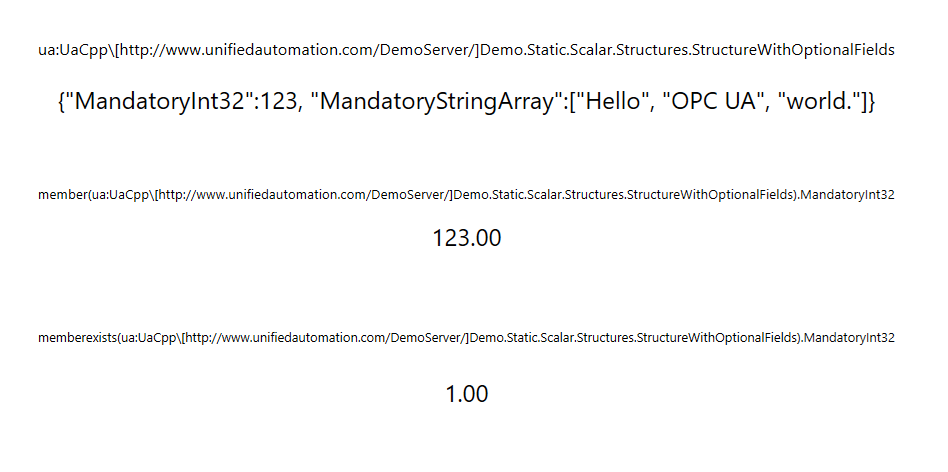
member(ua:UaCpp[http://www.unifiedautomation.com/DemoServer/]Demo.Static.Scalar.Structures.StructureWithOptionalFields).MandatoryInt32 -
Add a second process point, repeat steps 3 and 4, and then enclose the point name in memberexists() with the same member name. For example:
memberexists(ua:UaCpp[http://www.unifiedautomation.com/DemoServer/]Demo.Static.Scalar.Structures.StructureWithOptionalFields).MandatoryInt32To show a member value only when the server includes it, use the memberexists() point as the data source of a Hide dynamic on the object that displays the value.
-
Use the options on the upper right of the GraphWorX screen to switch to the runtime mode
 or to open the display in a web browser
  . The first process point displays the value of MandatoryInt32, or Bad quality if the server omits the member. The second process point displays 1 if MandatoryInt32 exists or 0 if it does not.