GDS Troubleshooting
When registering or unregistering GENESIS as a GDS application from Workbench in Data Connectivity> OPC UA > Global Discovery Server Settings, you may encounter some issues that prevent the process to complete successfully. This topic describes such situations and the available options of addressing them.
Registering to GDS
If the registration process fails, the button bar in the Server Registration section of the Global Discovery Server Settings contains the Continue and Cancel buttons, and Status is set to InProgress. You can detect the issue in the log that is displayed in the box below the bar. Learn more
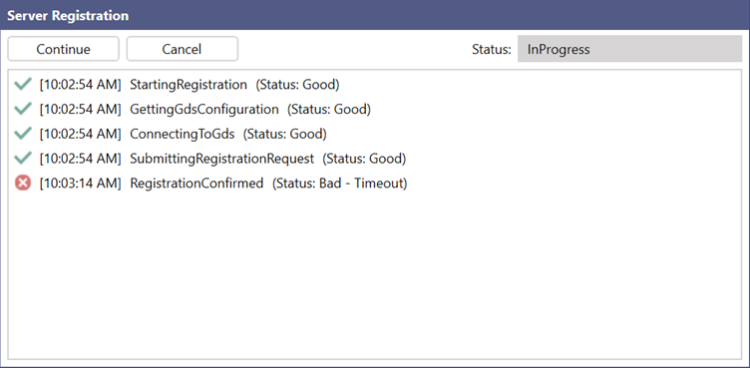
Do one of the following:
- Resolve the issue in the GDS settings form (for example, incorrectly typed username or server URL), apply the changes, and then click Continue to resume the registration process.
- Contact the GDS administrator and wait for the confirmation that the issue was resolved on the server side, and then click Continue to resume the registration process.
- If the issue cannot be resolved, click Cancel to remove any data from the GDS.
Removing a GDS Registration
Since you can only configure one GDS connection and registration in GENESIS, it is important to correctly remove the registration before you can set up another connection. To do that, click Unregister in the Server Registration section of the Global Discovery Server Settings. Learn more
If the unregistration process fails, you can detect the issue in the log that is displayed in the Server Registration section of the Global Discovery Server Settings. The Reset button is added to the button bar.
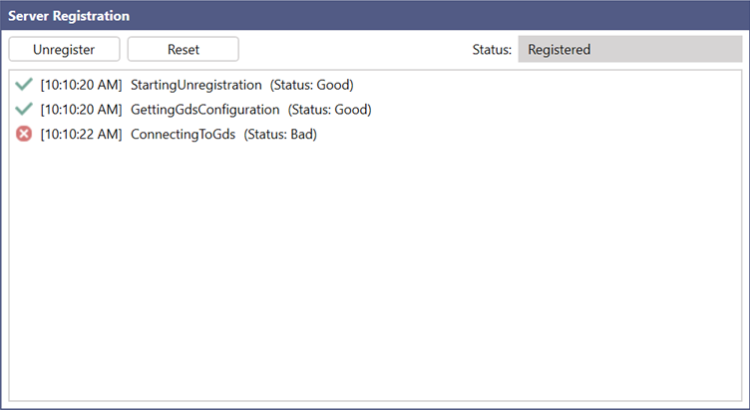
Do one of the following:
- Contact the GDS administrator and wait for the confirmation that the issue was resolved on the server side, and then click Unregister to resume the unregistration process.
- If the issue cannot be resolved (for example, if the server is temporarily unavailable or no longer exists), click Reset. This removes the information about the registration from GENESIS as a client, so you can set up a new GDS connection. However, it does not remove the registration from the server; it must be unregistered directly on the GDS.