BI Server SQL Fundamentals
BI Server Data Types
In BI Server, each column, expression and parameter has an associated data type, which specifies what kind of data the attribute can hold. When two expressions that have different data types are combined by an operator or a function, the characteristics of the result are determined by the data type precedence rules. The following table describes all the data types supported by BI Server, in increasing order of precedence (i.e.: the first type in the list has the lowest precedence, while the last type in the list has the highest precedence).
| Data Type | Description |
|---|---|
| String | Unicode character string, with no maximum length |
| Guid | A 128-bit (16 bytes) unique identifier |
| Boolean | A Boolean (true or false) value |
| Byte | An 8-bit unsigned integer. Range is from 0 through positive 255 |
| SByte | An 8-bit signed integer. Range is from negative 128 through positive 127 |
| Int16 | A 16-bit signed integer. Range is from negative 32,768 through positive 32,767 |
| UInt16 | A 16-bit unsigned integer. Range is from 0 through 65,535 |
| Int32 | A 32-bit signed integer. Range is from negative 2,147,483,648 through positive 2,147,483,647 |
| UInt32 | A 32-bit unsigned integer. Range is from 0 through 4,294,967,295 |
| Int64 | A 64-bit signed integer. Range is from negative 9,223,372,036,854,775,808 through positive 9,223,372,036,854,775,807 |
| UInt64 | A 64-bit unsigned integer. Range is from 0 to 18,446,744,073,709,551,615 |
| Single | A single-precision 32-bit number with values ranging from negative 3.402823e38 to positive 3.402823e38, as well as positive or negative zero, PositiveInfinity, NegativeInfinity, and not a number (NaN) |
| Double | A double-precision 64-bit number with values ranging from negative 1.79769313486232e308 to positive 1.79769313486232e308, as well as positive or negative zero, PositiveInfinity, NegativeInfinity, and not a number (NaN) |
| Decimal | A 12- byte decimal numbers ranging from positive 79,228,162,514,264,337,593,543,950,335 to negative 79,228,162,514,264,337,593,543,950,335 |
| TimeSpan | A time interval (duration of time or elapsed time) that is measured as a positive or negative number of days, hours, minutes, seconds, and fractions of a second |
| DateTime | Represents dates and times with values ranging from 00:00:00 (midnight), January 1, 0001 Anno Domini (Common Era) through 11:59:59 P.M., December 31, 9999 A.D. (C.E.) in the Gregorian calendar |
| DateTimeOffset | **Represents a point in time, typically expressed as a date and time of day, relative to Coordinated Universal Time (UTC) |
When an operator combines expressions of different data types, the type with the lower precedence is first converted to the data type with the higher precedence. For operators combining operand expressions having the same data type, the result of the operation has that data type. Implicit conversion is supported from any type to a higher precedence type, with the exception of GUID which cannot be implicitly converted to other types. For more information on type conversions, consult the CAST and CONVERT functions.
The following query uses implicit conversion to convert the literal 1 into the equivalent integer. The conversion happens because the string has a lower precedence than Int32, so it gets converted.
Example:
SELECT * FROM Products WHERE ProductID = '1'
Culture and Collation
In the BI Server every Data Model is assigned a collation, which determines the default lexical rules to apply to string comparisons and, in certain cases (see DAYOFWEEKOFFSET), the calendar rules to use for certain functions. BI Server collations are composed of two parts, separated by underscore:
{culture identifier}_{case sensitivity modifier}
-
The culture identifier follows the .NET rules for culture identifiers. The name is a combination of an ISO 693 two-letter culture code associated with a language and an ISO 3166 two-letter subculture code associated with a country or region. Examples include jp-JP for Japanese (Japan) and en-US for English (United States). For more information, refer to Culture names and Identifiers for .NET.
-
The case sensitivity modifier can be one of the two possibilities:
- ci – which stands for case-insensitive
- cs – which stands for case-sensitive
BI Server sets the collation for all string columns in a data model to the system’s current culture, case-insensitive. This means that string comparisons will follow the lexical rules of the system’s culture and will be case-insensitive. In certain cases, it is possible to use the COLLATE keyword to override the default data model’s collation.
Compatibility Level
With the evolution of the BI Server SQL language, some of the features from the previous version are being deprecated and kept for backwards-compatibility reasons only. For this reason, the BI Server introduces the concept of Compatibility Level for Data Models, which determines how some of the features of the SQL language work.
Currently, Data Models belonging to a configuration that has been upgraded from a previous version (prior to 10.97.1) will be set at compatibility level 0x109700 and function in backwards-compatibility mode. Data Models created in the current version will be set at compatibility level 0x109710 and will disable the backwards-compatible features.
The differences between backwards-compatibility and current mode are the following:
-
Aggregated columns without an explicit alias will produce a different auto-generated output column name when running in current mode. See Automatically generated aliases in Using the SELECT Keyword for more information.
-
Expressions written with the Expression Engine syntax as string literals will be parsed and executed only when running in backwards-compatibility mode. See Using SELECT with calculations and scalar functions for more information.
Using Comments
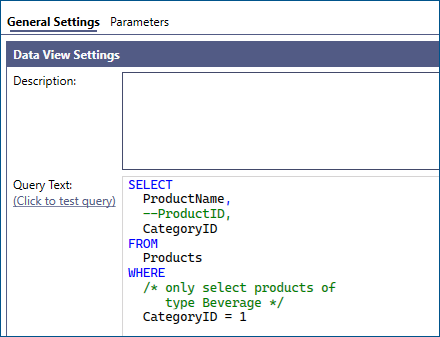
BI Server supports comments in queries, both with the SQL single and multi-line syntax.
Example:
SELECT
  ProductName,
  --ProductID,
  CategoryID
FROM
  Products
WHERE
  /* only select products of
     type Beverage */
  CategoryID = 1