Using the SELECT Keyword
The SELECT SQL keyword retrieves data from a Data Model and enables the selection of one or many rows or columns from one or many tables. SELECT needs to be followed by a list of attributes. Table or column identifiers containing reserved symbols (such as spaces, commas, or periods) must be enclosed in square brackets.
Using SELECT to retrieve rows and columns
The following example returns all rows and all columns from the Orders table in the default Northwind Data Model. All columns are returned using the * (asterisk) qualifier.
Example:
SELECT * FROM Orders
Column names can be explicitly listed after the SELECT keyword to retrieve a subset of the columns. Projected columns can also be renamed using the AS keyword.
Example:
SELECT OrderID AS ID, CustomerID, OrderDate FROM Orders
Automatically generated aliases
Projected columns that are not aliased will produce an output column with the same name as the column itself. The following query will produce two output columns named CategoryID and CategoryName.
Example:
SELECT CategoryID, CategoryName FROM Categories
If an expression is used without an alias, the resulting output column will be named expr, where n is a three-digit integer. The following query will produce one output column named expr000.
Example:
SELECT CategoryID + 1 FROM Categories
Aggregated columns without an alias will also produce output columns named expr. The following query will produce two output columns named expr000 and expr001.
Example:
SELECT MAX(UnitPrice), MIN(UnitPrice) FROM Products
Backwards compatibility: This behavior is different for Data Models that function at compatibility level of 0x109700 (backwards-compatible). For these models, aggregated columns with no alias will produce output columns named as [_n] where aggregated column name is the name of the column being aggregated, optionally followed by an integer qualifier to make output column names unique.
The following query will produce one output column named UnitPrice.
Example:
SELECT MAX(UnitPrice) FROM Products
The following query will instead produce two output columns named UnitPrice and UnitPrice_1.
Example:
SELECT MAX(UnitPrice), MIN(UnitPrice) FROM Products
Using SELECT with calculations and scalar functions
Expressions and scalar functions can be used in the SELECT list to perform calculations. The next example calculates the total price for each product in an order:
Example:
SELECT OrderID, ProductID, UnitPrice * Quantity * (1 - Discount) AS TotalPrice FROM [OrderDetails]
Expressions can generally be used anywhere where a column reference can be used, with the exception of the ON clause in a JOIN predicate, where only column references can be used. Besides arithmetic operators, BI Server supports an extensive list of functions that can be used in expressions. For more information refer to the Scalar Functions section.
Backwards compatibility: Previous versions of BI Server only allowed expressions in the SELECT list, and required the expressions to be written:
- As string literals
- With a mandatory alias
- Referencing columns using the Expressions Engine’s variable syntax with double curly braces
The following query illustrates how such expressions work in Data Models at compatibility level of 0x109700 (backwards-compatible).
Example:
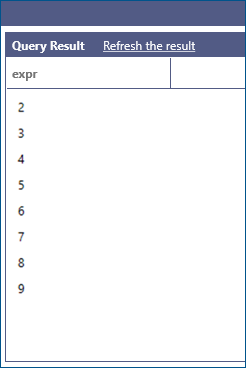
SELECT '{{Categories.CategoryID}} + 1' AS expr FROM Categories
This query produces the following result set:
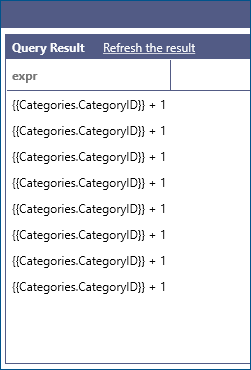
When a Data Model is at compatibility level of 0x109710 (current) string literals will not be parsed as expressions, but simply returned as literals. The previous query, in this case, will produce a one column, multiple row result set containing the literal string:
It is still possible to use the Expression Engine syntax even for Data Models at compatibility level 0x109710, by enclosing the literal string expression with the EXPRESSION keyword. The following query parses and executes the expression and produces the same result as the query without the EXPRESSION keyword at compatibility level 0x109700.
Example:
SELECT EXPRESSION('{{Categories.CategoryID}} + 1') AS expr FROM Categories
Expression written with the Expression Engine syntax remain supported for backwards compatibility. The preferred way of writing expressions in the BI Server is to directly inline them in the query. The following query illustrates the same query as the previous example, written with the new syntax.
Example:
SELECT CategoryID + 1 FROM Categories
Using SELECT with DISTINCT
The DISTINCT keyword can be used to retrieve unique rows only from the results of a query. The following example retrieves all the unique titles from the Customers table.
Example:
SELECT DISTINCT ContactTitle FROM Customers
Using SELECT with TOP
The TOP keyword limits the number of rows returned by a query to a specified number of rows. Percentages are not supported by BI Server. The following example retrieves the top 10 products with highest unit price.
Example:
SELECT TOP 10 * FROM Products ORDER BY UnitPrice DESC