Using Relative References
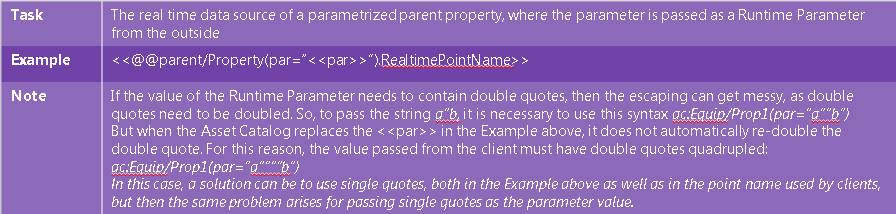
Relative references are special placeholders that reference other equipment, properties, or their attributes as a relative path from the current position. In runtime, they are replaced by their full point names if used directly, or by the values of those points when enclosed in chevrons << and >>. Learn more
You can use the following relative references:
-
@@self/—References the current equipment.
-
@@parent/—References the parent equipment.
-
@@ancestor[n]/—Depending on the numeric value of [n], references the current equipment or an ancestor equipment of the specified number of levels down. @@ancestor[0]/ equals to @@self/.
-
@@property—References a current equipment property. This placeholder can only be used on properties.
To reference an equipment, property, or attribute that is relative to the relative reference, simply combine them together:
-
@@self/Heating/Temperature—A property named Temperature on the Heating equipment that is a child of the current equipment.
-
@@parent/.Name—The Name attribute on the parent equipment.
-
@@property.Name—The Name attribute on the current property.
Relative references can be used in the following places:
-
Equipment configuration—All text fields except the Name, Custom Identifier, and Time Zone fields.
-
Equipment Properties configuration—All text fields except the Name and Time Zone fields. They cannot be used in the Runtime Parameters section.
-
Some configuration dialogs of the Alarms & Events settings and in the fields of incoming external alarms. Learn more
-
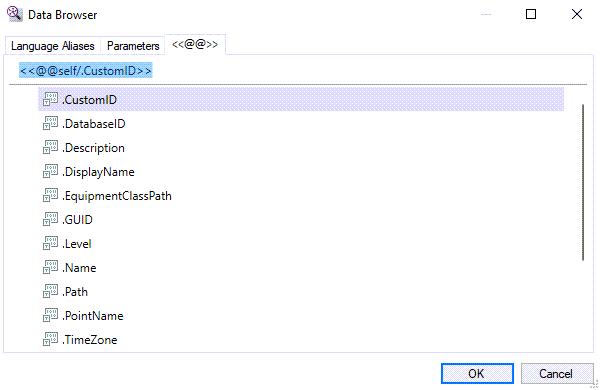
Assets extensions to other components, such as Data Historian or Alarm Server, may support relative references. Where relative references are supported, a specialized tab in Data Browser is available.
-
In many command fields (although not in all, due to technical reasons), including command text fields (except for the command’s Name field).
Examples:
An equipment property that sums together the values of two sibling properties, named a and b.
An equipment description that uses the value of its own parent’s display name.
An equipment command that sets the value of a global alias to the path of the current equipment.
Direct and Indirect Use of Relative References
-
Direct relative references—typically used in curly brackets {{@@ }} inside expressions, but can be used anywhere—are replaced by the point name of the current equipment (without the node name prefix). They are usable whenever a point name is expected, like in expressions.
-
When further enclosed by chevrons << @@ >>, Assets replace the relative references with their static value. For example, <<@@self/.Name>> could get replaced by Equipment.
-
This applies to the value of a static equipment property or the value of attributes on both equipment and properties.
-
Taking the real-time value of the referenced equipment property is possible, but the property must be static or cached (the Use database cache setting on the Real-time tab of the property configuration must be enabled.) Learn more
However, we strongly recommend to get the real-time value of a cached equipment property using a direct reference whenever possible.
When taking the real-time value of a cached equipment property, Assets checks for changes in the cached value of the property every 10 seconds, so if you rewrite the property value, it will not change until the next check (with up to 10 second delay).
Examples on how to achieve specific goals:
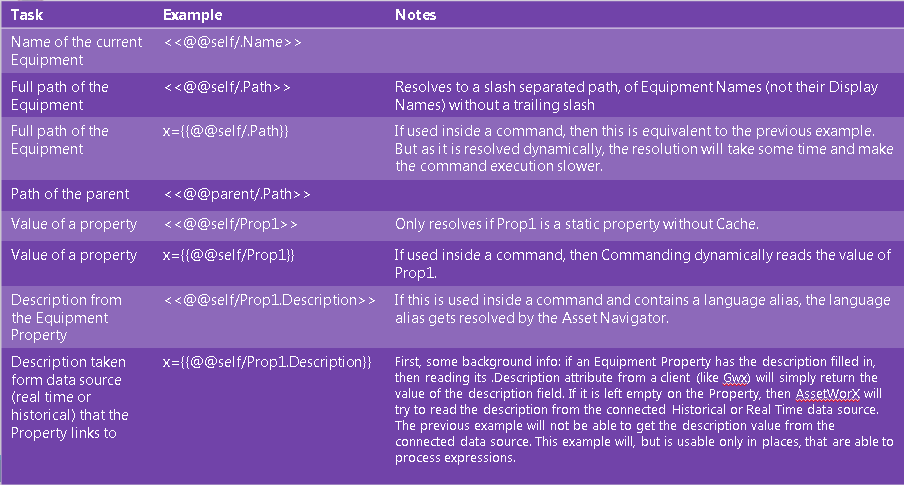
Advanced example: