Supported Report Formats
When generating a report in GENESIS using the Reports component, you can create multiple report files in the following formats.
-
Excel: Saves the report in the Microsoft Excel format. This format is particularly useful when you need to draw conclusions once you can use Microsoft Excel formulas on it.
-
PDF: Saves the report in the PDF (Portable Document Format) format. This format can be practical in case you need to redistribute the report while blocking the file edition.
-
HTML: Saves the report in the HTML (HyperText Markup Language) format. This format is used for redistributing the report through a web application.
-
CSV: Saves the report in the CSV (Comma Separated Value) format. This format is applicable for integration with third-party applications.
To select the file format(s) for a report:
-
Open Workbench and in Project Explorer, expand your project > Reports > Configurations, and then expand the desired configuration and double-click the desired report to display its settings.
-
On the Report Settings tab, navigate to Generate reports as: in the General Properties section, and select the desired report file formats. By default, the Excel, PDF, and HTML formats are selected automatically.
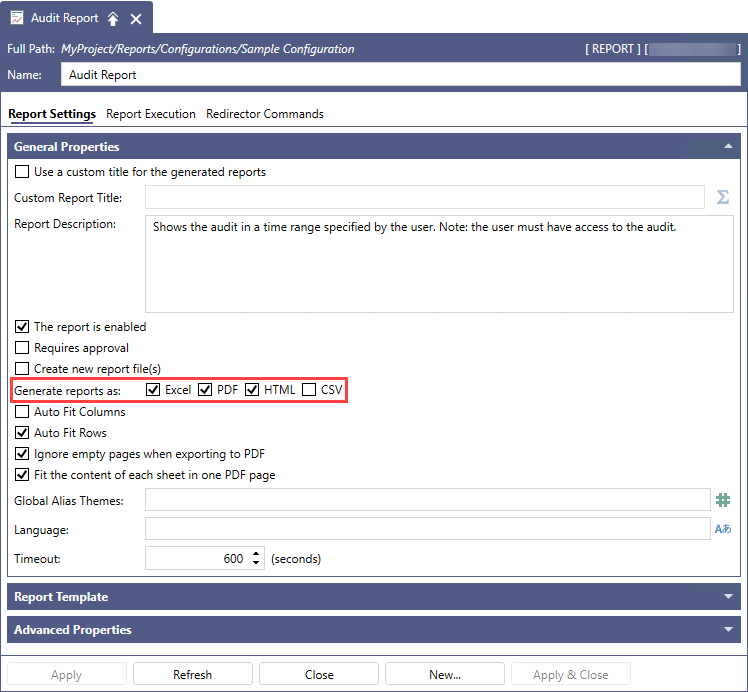
-
Complete the remaining General Properties settings as desired, and then click Apply.