Setting Up Recipe Command Security
In the Security component in Workbench, you can allow or deny users or user groups access to performing various actions (commands) for recipes. For example, you can allow or deny to delete, copy, download, upload, or create a recipe.
To set up recipe command security for a user or a group:
-
Open Workbench and in Project Explorer, expand your project > Security, and then expand either Groups or Users.
-
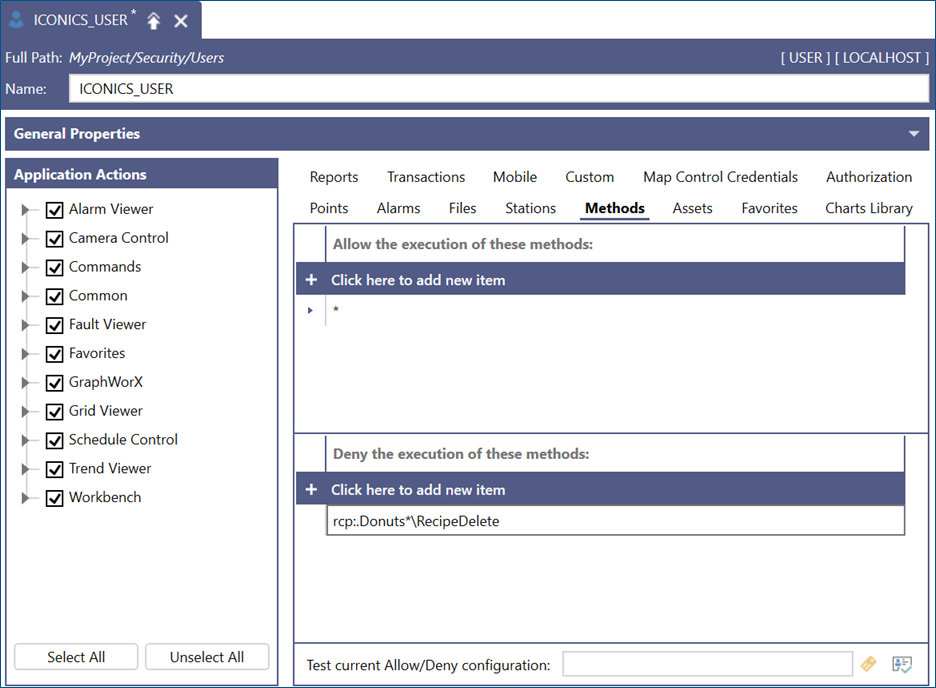
Double-click the desired group or user and select the Method tab.
- In the Allow the executing of these methods section, select Click here to add new item and click
 to open Data Browser.
 -
In Data Browser, navigate to Platform Services >Recipes, select the recipe data points (tags) to which you want to allow access, and click OK.
Use the asterisk (*) as a wild card character, which means that any subsequent set of characters will match this entry. - In the Deny the executing of these methods section, select Click here to add new item, and then click .Data Browser path to recipes is Platform Services > Recipes.
-
Select a recipe command that you want to secure and click OK.
Example: The following setting prevents the user from deleting all donut recipe items using the rcp:.Donuts:*\RecipeDelete command.
- To deny access to an action for all recipe items, do the following:
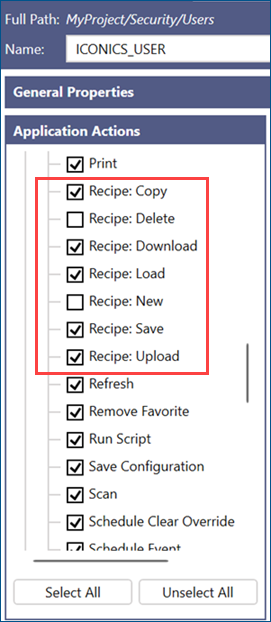
- In the Application Actions section, scroll to Commands and expand the list.
- Scroll to the recipe commands and clear the desired checkboxes to deny these methods for an individual user or group of users. When finished, click Apply.