Introduction to Kubernetes
Kubernetes is an open-source system for automating the deployment, scaling, recovery, and management of containerized applications. It allows applications to run across multiple machines—physical and virtual—or in the cloud, spreading the load and providing a consistent way to deploy and manage applications anywhere.
Using Kubernetes with GENESIS
In GENESIS, you can use Kubernetes to deploy and run WebHMI. All other GENESIS components — including FrameWorX and all point managers — must run outside of Kubernetes. In the setup described here, WebHMI runs within Kubernetes and connects to FrameWorX, which runs on a virtual or physical machine outside the Kubernetes cluster.
How Kubernetes Works
Kubernetes is built around the concept of containers, which package an application together with everything that it needs to run—its dependencies, libraries, and configuration files. These containers are grouped into pods and distributed across a cluster of physical or virtual machines called nodes. The control plane manages the cluster—deciding where containers should run, restarting them if they fail, and scaling them as the demand changes.
Each pod has its own IP address and behaves like an individual computer within the overlay network. Kubernetes networking automatically routes requests between pods, so users and developers don’t need to worry about where each pod is running. When one application in the cluster communicates with another, it sends requests to a service that handles load balancing and directs traffic to the appropriate pods. When an external application or website needs to access an application running in Kubernetes, the connection is typically routed through a load balancer and then through the ingress controller.
For more details, refer to Kubernetes Terminology and Kubernetes Resources.
Cluster Visualization
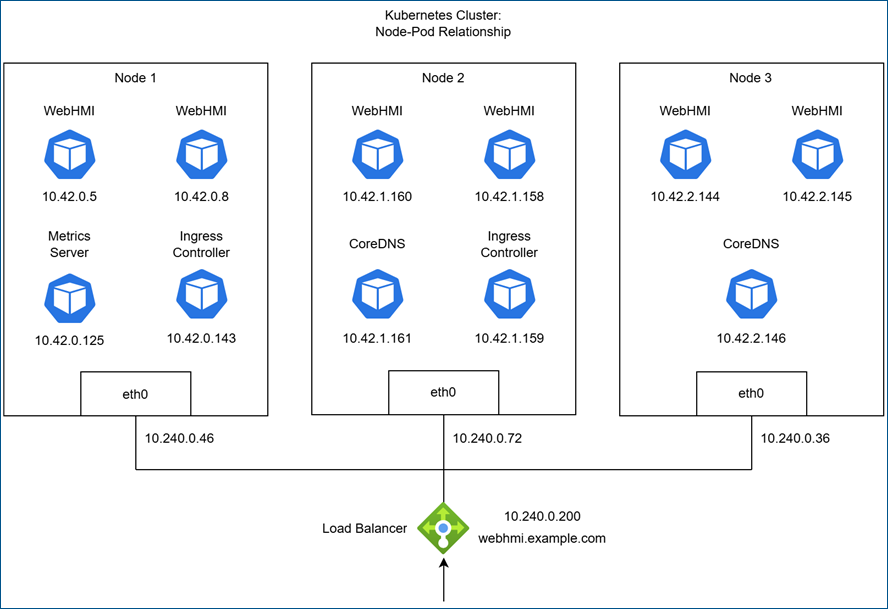
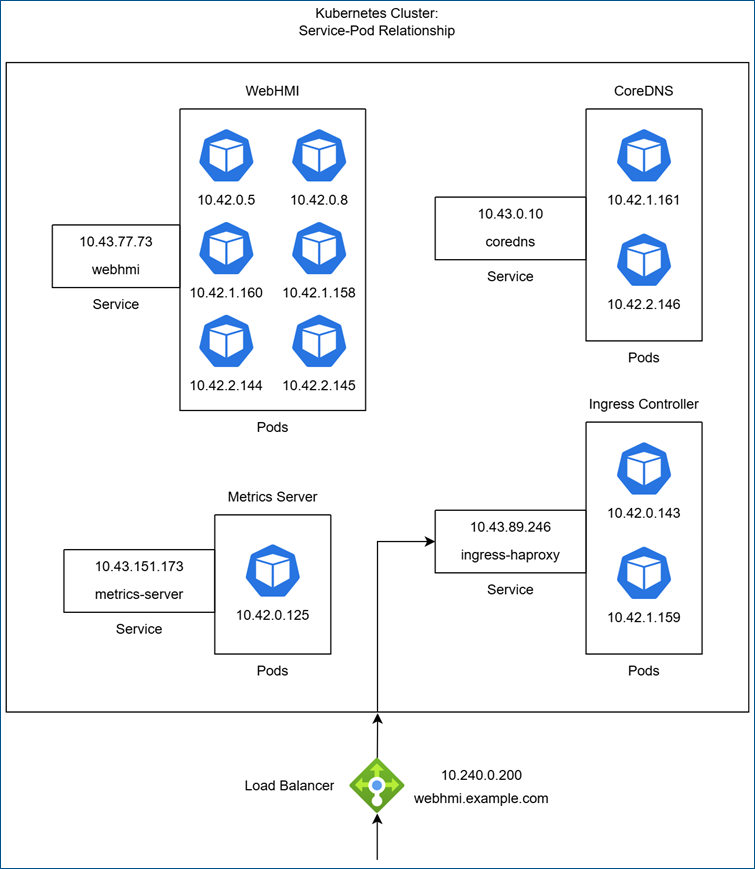
The following two images visualize a small three-node Kubernetes cluster running four applications: a WebHMI web server with six pods, an ingress controller with two pods, a DNS server (CoreDNS) with two pods, and the metrics server with one pod. Each image shows the same cluster from a different perspective.
The first image illustrates the three nodes and the pods running on each node. Services are not displayed here because they do not exist on any specific node; instead, they are part of the cluster’s networking layer, embedded in the routing across all nodes.
The second image focuses on how services distribute traffic to individual pods. You can identify the node a pod belongs to by the second-to-last number in its IP address. This view shows what Kubernetes looks like from a user’s perspective, with the underlying nodes abstracted away. In this view, the key components are the services that provide stable IP addresses and DNS names for accessing applications.
Kubernetes Tools
There are several ways to interact with the Kubernetes API server to view or manage cluster resources. The standard approach is to use command-line tools such as kubectl and Helm, but you can also use graphical interfaces, such as the Kubernetes Dashboard or Rancher.
-
kubectl—The Kubernetes command-line tool used to interact with your cluster. It allows you to deploy applications, inspect and manage cluster resources, and view logs. Learn more
-
Helm—The package manager for Kubernetes, used to install, configure, and manage applications through Helm charts. Learn more
View basic Helm commands.
-
Kubernetes Dashboard —A web-based user interface (UI) for monitoring and inspecting cluster resources. Learn more
-
Rancher —A complete container management platform for Kubernetes, to deploy and manage Kubernetes clusters. It provides a powerful web UI, centralized management, and multi-cluster support. Learn more
What's Next?