Installing the K3s Cluster on Premises Using Rancher
As outlined in Installing a Kubernetes Cluster Overview, you can use several Kubernetes distributions available for an on-premises cluster installation. We recommend K3s, a lightweight Kubernetes distribution that is easy to install and requires significantly fewer resources than a standard Kubernetes setup.
Prerequisites:
-
Before setting up an on-premises Kubernetes cluster, you need a remote access to the host machines to run the commands that install Kubernetes on each node. We recommend using SSH (Secure Shell) . Learn more
-
To use the Rancher application for cluster installation and management, you first need to install Rancher inside a Docker container on a machine with a Debian-based Linux distribution. Learn more
To install the K3s Kubernetes cluster on premises using Rancher:
-
(Optional but recommended) Add the Rancher certificate to the trusted store on each node.
-
Log in to each Kubernetes host (node), for example via SSH.
-
Download the Rancher CA certificate and save it in the system’s CA store:
echo | openssl s_client -connect "<rancher_server_address>":8443 -showcerts 2>/dev/null | openssl x509 -outform PEM | sudo tee /usr/local/share/ca-certificates/rancher.crt -
Update the CA store:
sudo update-ca-certificates -
Repeat these steps on each Kubernetes node.
-
-
Create a cluster in Rancher.
-
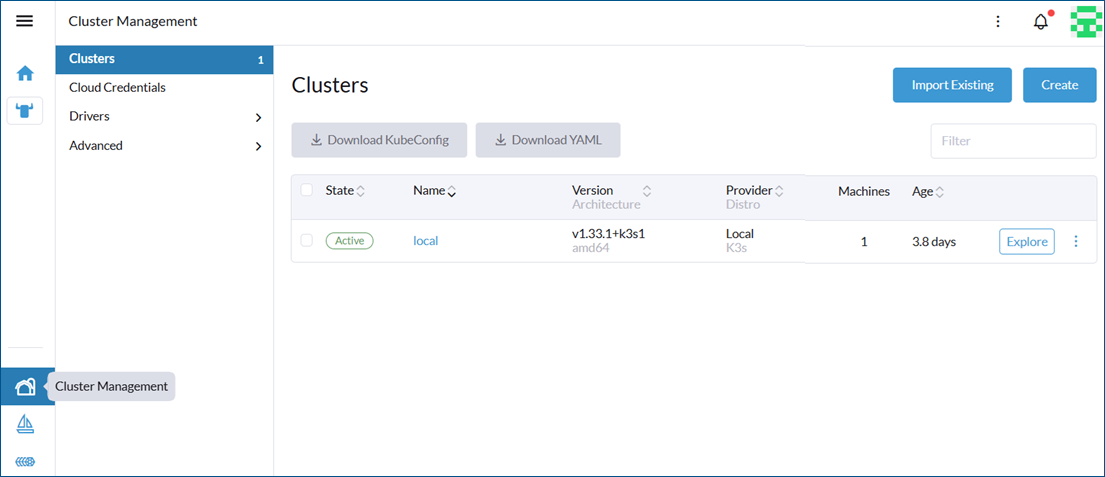
In the navigation menu on the left, select
 (Cluster Management).
To expand the menu labels, click
 at the top right.
This opens a dialog with the list of clusters. By default, it contains only one cluster named local, which runs and manages Rancher itself.
-
Click Create to start creating a new cluster.
-
Select Custom to create an on-premises cluster.
-
In the configuration form, set the following parameters, and then click Create.
-
At the top of the dialog, enter a Cluster Name . Click Customize in Cluster Appearance to edit the abbreviation that appears in the menu.
-
In Kubernetes Version , select the latest stable version of K3s.
-
In System Services, leave CoreDNS, Local Storage, and Metrics Server selected, and clear the other checkboxes.
-
-
-
Register each Kubernetes node with Rancher.
-
If the registration page does not open automatically, open your cluster under Cluster Management and go to the Registration tab. Use the instructions and automatically generated commands for registering each node.
-
Select the node's role—either a server (master) or an agent (worker)—and then select the appropriate option.
-
For server (master) nodes: select etcd , Control Plane , and Worker .
-
For agent (worker) nodes: select only Worker .
-
-
Log in to each node and run the custom registration command that Rancher generates based on the selected role. The node will automatically download and install the required K3s components, connect to Rancher, and join the cluster. This process may take a few minutes.
-
-
On the Machines tab, verify that the nodes appear with the status Running. You can also view detailed progress in the Provisioning Log and Conditions tabs.
-
If the nodes are not showing as Running or not showing at all, you can troubleshoot by checking the status of the K3s service on each node.
-
On a server node, run:
systemctl status k3s -
On an agent node, run:
systemctl status k3s-agent
-
After at least one control-plane node joins successfully, your cluster appears in Rancher’s left-hand menu (abbreviated name by default). You can also find the newly created cluster in the cluster list on the Cluster Management home page.
The following is an image of a cluster view right after the cluster named webhmi has been created, with HMI as the abbreviated name.
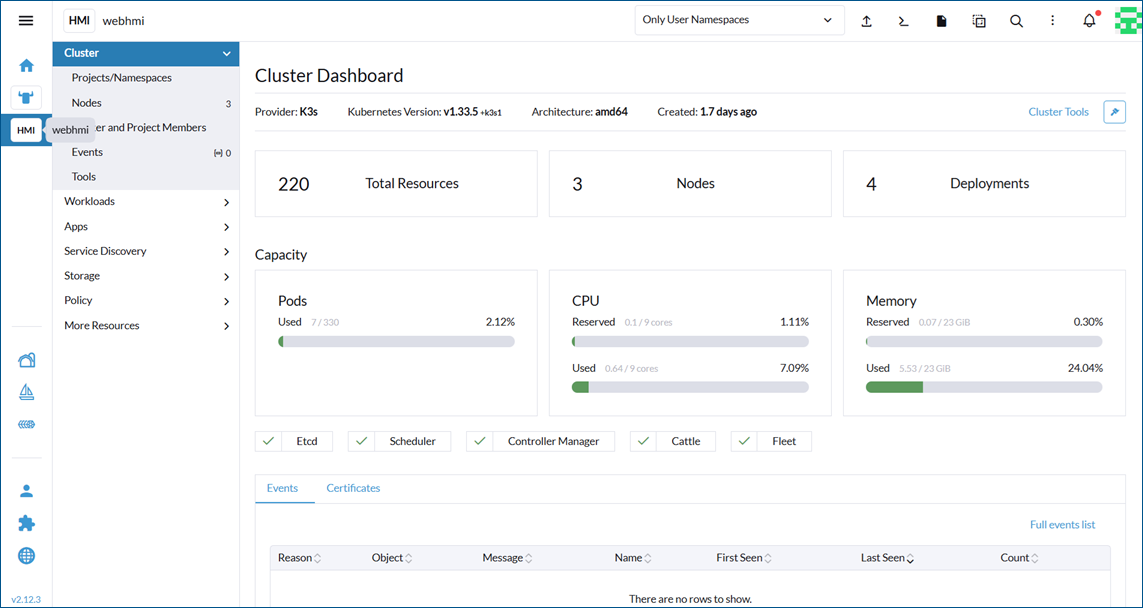
You can also connect to the cluster from your local machine using the kubectl CLI tool. To do this, use the Download KubeConfig button on the top ribbon of your cluster view to download the cluster’s Kubeconfig file from Rancher and save it as $HOME/.kube/config on your local machine. Kubectl automatically detects and uses the file, provided that its exact name is config. Once set up, verify the access with:
What's Next?