Redundancy Hot Switching
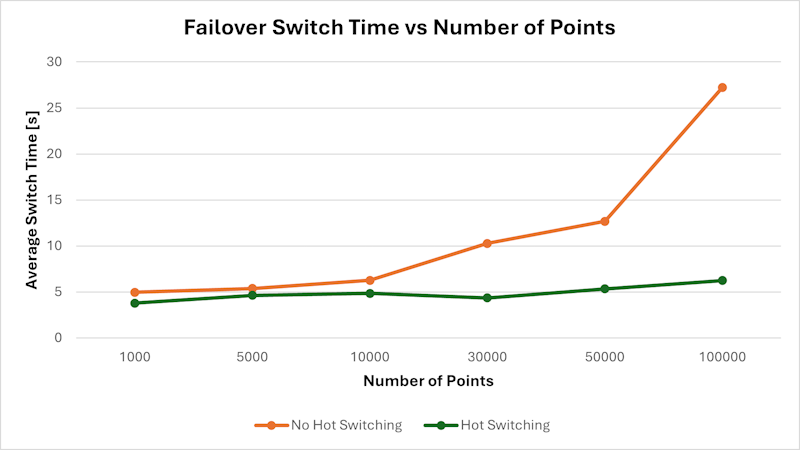
The purpose of this test is to measure the failover switching time for 1,000 to 100,000 points in a redundant setup and to compare system behavior with and without Hot Switching enabled. The primary metric is the time required until the first update of all points is received after a failover event.
Scenario
-
Product / Version
-
GENESIS 11.04 (11.4.625)
-
-
Environment
-
Redundant configuration running on two virtual machines (VMs) with a common SQL server on one of them.
-
Operating System: Windows 11
-
VM Configuration (each node):
-
CPU: 6 cores – Intel Xeon Silver 4314 @ 2.4 GHz
-
Memory: 20 GB RAM
-
-
Default cluster configuration - Cluster timeout: 5 seconds
-
-
Failover Trigger
-
Failover was initiated by manual disconnection of the network adapter on the active node.
-
Methodology
-
A custom test utility was developed specifically for this test.
-
The utility connects to a defined number of points coming from the internal simulator located at:
\cluster\.. -
Each point represents a random integer value Example:
\clusterA\svrsim:random int 10 999999 -
Test procedure:
-
Manual disconnection of the network adapter on the active node
-
Manual start of the time measurement
-
Measurement of the time until the first update of all points is received
-
-
In addition to the utility, two points were also observed in TrendWorX Viewer (GraphWorX) to verify data updates.
-
For each configuration:
-
Two measurements were performed
-
Average switching time was calculated
-
-
CPU and RAM usage were monitored during the tests.
Results
|
# points |
Hot Switching |
time 1 (s) |
time 2 (s) |
avg time (s) |
CPU avg % |
CPU max % |
RAM avg (MB) |
RAM max (MB) |
|---|---|---|---|---|---|---|---|---|
|
1000 |
✖ |
4.31 |
5.6 |
4.96 |
2.95 |
11.35 |
916 |
1248 |
|
1000 |
✔ |
4.05 |
3.5 |
3.78 |
2.62 |
66.17 |
1122 |
6599 |
|
5000 |
✖ |
5.43 |
5.32 |
5.38 |
2.95 |
11.35 |
916 |
1248 |
|
5000 |
✔ |
4.49 |
4.75 |
4.62 |
2.62 |
66.17 |
1122 |
6599 |
|
10000 |
✖ |
6.33 |
6.16 |
6.25 |
2.95 |
11.35 |
916 |
1248 |
|
10000 |
✔ |
5.07 |
4.61 |
4.84 |
2.62 |
66.17 |
1122 |
6599 |
|
30000 |
✖ |
10.17 |
10.38 |
10.28 |
27.60 |
63.15 |
3224 |
5752 |
|
30000 |
✔ |
4.36 |
4.33 |
4.35 |
2.62 |
66.17 |
1122 |
6599 |
|
50000 |
✖ |
13.75 |
11.6 |
12.68 |
27.60 |
63.15 |
3224 |
5752 |
|
50000 |
✔ |
4.5 |
6.17 |
5.34 |
2.62 |
66.17 |
1122 |
6599 |
|
100000 |
✖ |
26.62 |
27.81 |
27.22 |
27.60 |
63.15 |
3224 |
5752 |
|
100000 |
✔ |
6.21 |
6.25 |
6.23 |
2.62 |
66.17 |
1122 |
6599 |
Summary
-
Enabling Hot Switching results in stable and fast failover timing (close to failover timeout) across all tested point counts.
-
Failover switching time without Hot Switching increases noticeably with the number of points.
-
The largest difference is observed at higher loads (30k–100k points), where Hot Switching significantly reduces recovery time.
-
-
CPU and memory values are included for reference only; average values in some test cases are influenced by the fact that all measurements with Hot Switching were captured in a single performance log file, while measurements without Hot Switching used 2 separate log files. Peak loads were very similar.
Conclusion
Hot Switching significantly improves failover switching time, especially for higher point counts.
Without Hot Switching, the switching time grows proportionally with the number of points. With Hot Switching enabled, the recovery time within a narrow range (close to failover timeout) even at 100,000 points.