Language Localization in GENESIS
GENESIS supports displaying Workbench and GraphWorX configuration environments in the following languages:
-
English (default)
-
Chinese (simplified)
-
French
-
German
-
Japanese
The GENESIS installer detects the language version of Windows installed on the machine and automatically installs the corresponding language pack if available. On systems with unsupported language versions of Windows, GENESIS is installed in the default English version. When you switch the display language of the operating system, the GENESIS environment switches to the corresponding language after you restart the machine.
However, some parts of Workbench might be still displayed in the previous language. This happens when the Windows service that handles the culture switch starts more slowly than the GENESIS Workbench Point Manager service. The Workbench point manager reads the old culture because it has not been updated yet.
You can resolve this issue in several ways.
-
If you only expect to change your operating system display language once:
-
Before using Workbench or creating a new configuration database, restart the machine again or open the Services application using the Windows search box and restart the GENESIS Workbench Point Manager service.
-
Open the Configure System utility and create a new project database. Learn more
If prompted, you can overwrite the existing project database. You do not need to change the configuration database or any other settings.
-
-
If you expect to change your operating system display language repeatedly:
In addition to the previous steps, set the startup type of the GENESIS Workbench Point Manager service to Automatic (Delayed) to ensure that the operating system correctly updates the culture before the Workbench configuration service reads it. You can do this in the Windows Services application or in Workbench using Configure Services. Learn more
-
If you are changing your language frequently for testing or other purposes:
Instead of changing the language in the operating system, override the culture that GENESIS thinks you are using in the FrameWorX Server configuration file.
-
Navigate to C:\ProgramData\ICONICS\11\Servers and open FwxServer.config.json in Notepad or another text editor.
-
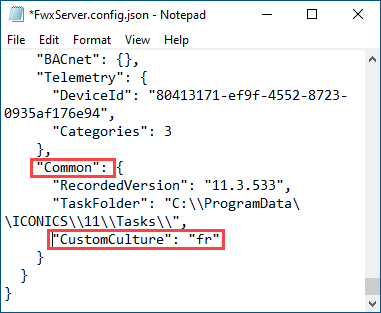
Scroll down to the [Common] section, add a comma to the end of the previous line, and insert the following line: "CustomCulture":, followed by a space and the code of the desired language, enclosed in quotation marks. Use the codes in the following table.
Language
Code
English
en
Chinese (simplified)
zh-hans
French
fr
German
de
Japanese
ja
Example:
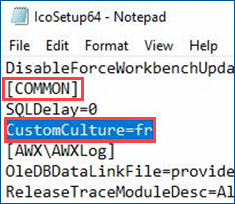
In GENESIS version 11.2 and earlier, open IcoSetup64.ini instead, and add the line to the [COMMON] section in the following format: CustomCulture=, followed by the code of the desired language (no space).
Example:
-
Save the file and restart the machine.
-