Adding a Camera Control
GENESIS allows you to integrate streaming IP camera feeds into your application. This is accomplished with a specialized control in GraphWorX, as well as with corresponding services in GENESIS to support the data connection to the camera.
Related GENESIS Services
-
Camera Point Manager—Integrates GENESIS with ONVIF (Open Network Video Interface Forum) cameras. This protocol allows you to discover and control a camera. ONVIF cameras use a UDP broadcast for discovery and allow subscriptions to motion and noise detection alerts. Certain camera models also support PTZ (Pan-Tilt-Zoom) control functionality.
-
Camera Streaming Proxy—Manages MJPEG (Motion JPEG) and/or RTSP (Real-Time Streaming Protocol) streams from both standard cameras and ONVIF cameras.
The appropriate service must be running for the corresponding camera streaming protocol to work within a GraphWorX display.
In case of GraphWorX display with HTML5 clients, RTSP streams are converted to MJPEG streams. These MJPEG streams can be padded to allow Apple devices to play it.
Specific Protocols Supported for ONVIF Cameras
-
RTP: Real-time Transport Protocol, an audio/video streaming protocol.
-
MJPEG: Motion JPEG, a video compression format.
-
H.264: Also known as Advanced Video Coding (AVC), a video compression format.
-
H.265: Also known as High Efficiency Video Coding (HEVC), a video compression format.
ONVIF cameras currently support only a part of the profile S, which includes audio/video streaming, PTZ control, and video settings. Only the H.265 final specification is supported.
Suggested Camera Models
-
Axis M5014
-
Bosch Autodome IP 4000
While GENESIS has a broad compatibility with other camera types from other camera manufacturers who implement the standards, we cannot guarantee that all models are supported.
To add a camera control to a GraphWorX display:
-
Open GraphWorX in the configuration mode (default). On the Controls ribbon, select Camera Control, and then drag the mouse across the canvas to make a rectangle for inserting the control.
-
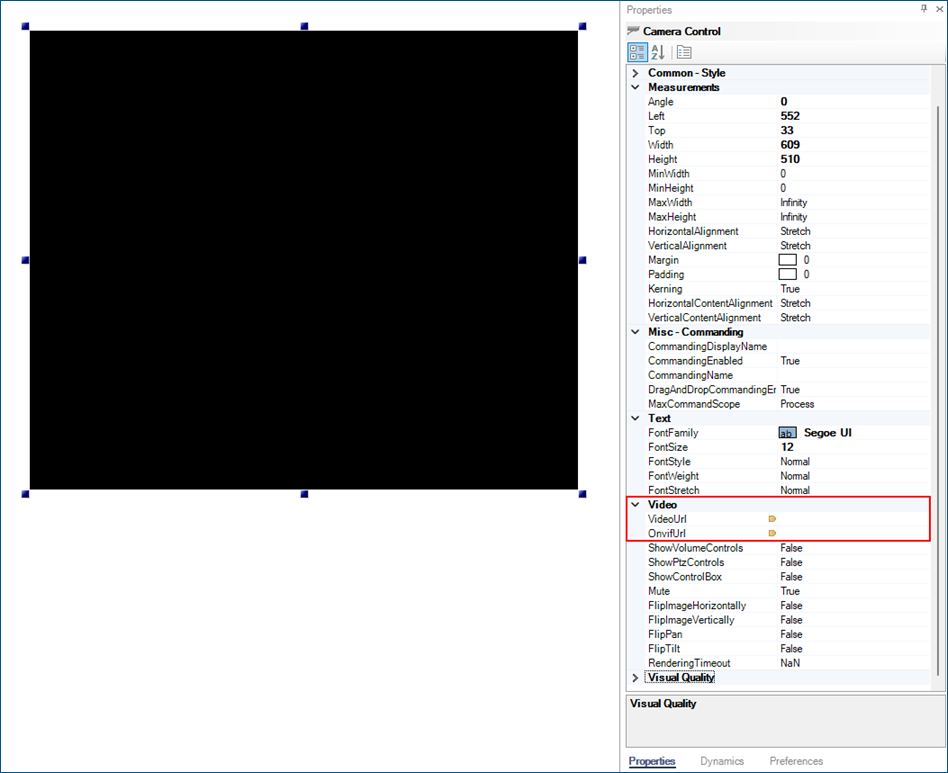
Select the control and in the Properties grid in the right GraphWorX panel, set up the Video section.
-
Enter the VideoUrl if your camera does not follow the ONVIF standard.
-
Enter the OnvifUrl if your camera follows the ONVIF standard.
-
-
Start the appropriate GENESIS service(s), GENESIS Camera Point Manager (FwxCameraService) and GENESIS Camera Streaming Proxy Service (IcoStreamingService), if they are not already running.
-
Verify the Camera Control settings in runtime. Use the options on the upper right of the GraphWorX screen to switch to the runtime mode
 or to open the display in a web browser
  .
.