IoT Point Manager Custom Decoder Plug-in
This section explains how and why you may want to create a custom decoder for IoT Point Manager.
IoT Point Manager is a plugin module for FrameWorX Server, which makes available data coming from IoT devices via a hub or broker (such as Azure IoT Hub, Azure Event Hub, or an MQTT broker, e.g. RabbitMQ). The messages from the hub are decoded by a message decoder. The decoder is supposed to extract the point names, their properties, values, etc., and provide them to the IoT Point Manager.
You may want to create a custom decoder when you already have IoT devices, which send messages to a hub or broker and you want to make the data from those devices available in GENESIS. The following text describes this use case.
Before writing code, check whether the format is already covered. GENESIS ships decoders for several common formats, and a JSON message layout can usually be described in Workbench with the CustomJson plug-in instead of a plug-in assembly. Learn more
Plugging in the IoT Custom Decoder
To plug in a custom decoder into GENESIS, add an entry into the file FwxIotSubscriber.Plugins.config.xml. The entry should look like this:
The individual tags have the following meaning:
-
Name - name of the decoder. This is how it will appear in the list of decoders in Workbench.
-
Assembly - name of the assembly that contains implementation of the decoder
-
ClassName - fully qualified name of the class that implements the decoder
-
Disabled - flag whether the decoder is (temporarily) disabled
-
SupportsCustomFormat - for internal use; should be false for custom decoders
-
HasParameters - for internal use; should be false for custom decoders
Once you have created this configuration entry, restart Workbench. Your decoder should appear in the drop-down list 'Default Decoder' when you try to create a new subscriber connection:
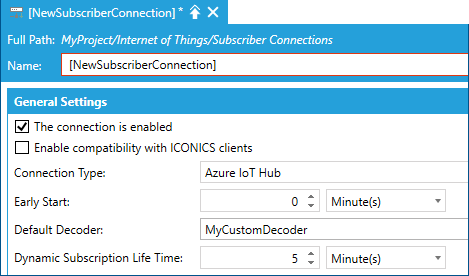
Note that the checkbox 'Enable compatibility with GENESIS clients' should be unchecked. This configuration tells the IoT Point Manager to use your custom decoder for the configured subscriber connection.
Message Types in GENESIS
IoT in GENESIS sends various types of messages. In this use case you want to plug in a custom decoder in order to translate your proprietary messages to GENESIS messages. There are the following types of messages (see enumerated type IotMessageType):
-
Refresh - contains data update for all variables published by an IoT device.
-
Delta - contains data updates for variables published by an IoT device, which changed since the last Delta or Refresh message.
-
BufferedData - contains buffered data updates for all variables published by an IoT device.
-
HistoryData - contains history data updates for all variables published by an IoT device.
-
EventsEvent - contains states of alarm conditions published by an IoT device. In previous versions we used RefreshEvents and DeltaEvents types that are now deprecated.
When a custom decoder receives a custom message, it should create one of the messages listed above. Besides of them, there are defined the following message types (for completeness):
-
ResponseHeader, ResponseBody, ResponseFooter - contain a response to a request, which has been sent to a device. This assumes two-way communication with the IoT devices.
-
EventsProcedure - reserved for internal GENESIS usage.
-
ConnectionState - reserved for internal GENESIS usage. In previous versions we used also PublishList type that is now deprecated.
IoT Custom Decoder Implementation
Technically, a custom decoder is a class implementing interface IMessageDecoder, which is defined in namespace Ico.Fwx.Iot.Common.Messages in assembly FwxIotCommon.dll.
The assembly containing the decoder class should be for .NET Standard 2.0. Create a new class derived from IMessageDecoder, for example:
Implement the methods and properties defined by IMessageDecoder interface.
Class and Name Getters
Getters for properties Class and Name should both return the same string, which represents the name of the decoder. Typically, this would be the same name as the name defined in FwxIotSubscriber.Plugins.config.xml.
Method TryDecodeMessage
Method TryDecodeMessage is called when the Subscriber receives a message and determines that the message should be decoded by the custom decoder. It has the following signature:
The method returns true if the message was decoded successfully, otherwise returns false.
The parameters are:
-
messageType - the type of the message (see above) as detected by the subscriber. IotWorX Gateways send the message type in the message header. In the described use case, when receiving custom proprietary messages, this parameter would be most likely set to 'Unknown'.
-
data - the actual message body as received from a hub or message broker.
-
userMetadata - additional information about the message source, if it comes from an MQTT broker. For internal usage.
-
decodedMessages - output list of decoded messages to be passed to IoT Point Manager and then to GENESIS.
-
decodedMessageMetadata - additional information about the decoded message.
DecodedMessageMetadata
Class DecodedMessageMetadata has many properties used internally. In the considered use case you need to set only two of its properties:
-
MessageType - defines the type of message (see above).
-
DeviceId - identification of the IoT device that sent the message.
IMessage
The decoded messages are derived from interface IMessage. The actual class depends on the message type. Use one of those classes:
-
DataUpdateMessage - contains real-time data updates (telemetry). For use with Refresh or Delta message types. May contain values of multiple properties of one item.
-
BufferedDataMessage - contains buffered data updates. For use with BufferedData message type.
-
HistoryDataMessage - contains history data updates. For use with HistoryData message type.
-
EventUpdateMessage - contains an event notification, e.g. a simple event or notification about condition state changes (alarms and events).
Sample Implementation
The following sample indicates what a decoder method could look like. It assumes there are custom devices that send proprietary messages in JSON (for the sake of the example we ignore that custom JSON messages could be decoded by already existing CustomJson decoder without the need of coding).
Method TryDecodeResponseMessage
Method TryDecodeResponseMessage is called when the subscriber receives a response message. Because the response messages are not supported for custom decoders, just set the output parameters to null and return false.
Method Decompress
Override the Decompress method when the messages published by the custom devices are compressed, e.g. with GZip.
The input parameter represents the buffer with compressed message. The method should return decompressed message. When no compression is used, the implementation should just return the input parameter as is: