Creating a Web Method
This topic describes creating a web method to connect to a REST API's endpoint from GENESIS.
The following procedure uses the Placeholder REST API, which is a fake and reliable API for testing and prototyping. Alternatively, you can use the default JsonPlaceholder sample that is installed with GENESIS.
To create a web method:
- Open Workbench and in Project Explorer, expand your project > Data Connectivity > Web Services, and then expand the folder with the desired REST service.
- Right-click the desired REST service and select Add Web Method. The Web Method Configuration dialog is displayed.
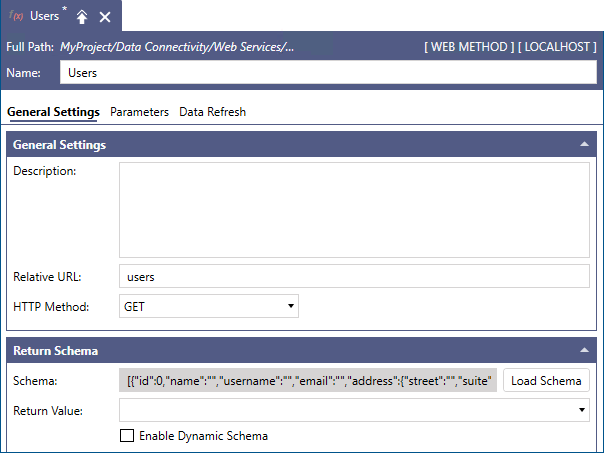
- Enter a name of the web method. To follow the example, name it Users.
- In Relative URL, enter users to follow the example.
- In HTTP Method, select the desired method to use for the call.
- (Optional) On the Parameters tab, configure any parameters required by the REST API endpoint.
-
Go back to the General Settings tab and in the Return Schema section, click Load Schema. GENESIS makes a call to the REST API, collects the result, and displays it in the Schema field. This field is read-only.
-
Configure the remaining Return Schema settings as desired, and then click Apply. See the table for more information.
Return Schema Setting
Description
Schema
Displays the anonymized result retrieved by calling the REST API endpoint. This field is read-only.
Load Schema
Calls the REST API endpoint, retrieves and anonymizes the result, and displays it in the Schema field.
Return Value
Allows the web method to only expose a subset of the result returned by the REST API endpoint.
Enable Dynamic Schema
Supports dynamic schemas if the REST API endpoint result has a schema that is not fixed.
What's Next?