Adding Web Services to Your Project
To add Web Services connectivity to your project:
-
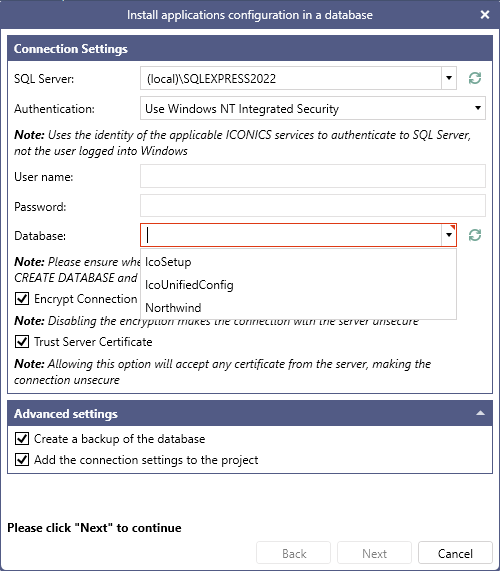
Open Workbench and on the Project ribbon, click Configure. This opens the Install components configuration in a database dialog.
-
In SQL Server, select the SQL Server containing the Workbench configuration database. The SQL Server currently used by Workbench should be pre-selected.
-
In Database, select the desired database for adding the web services connectivity tables, and then click Next. If possible, select the configuration database that is currently used by Workbench.
To create a new database for the web services connectivity tables, enter a new database name in the box.
-
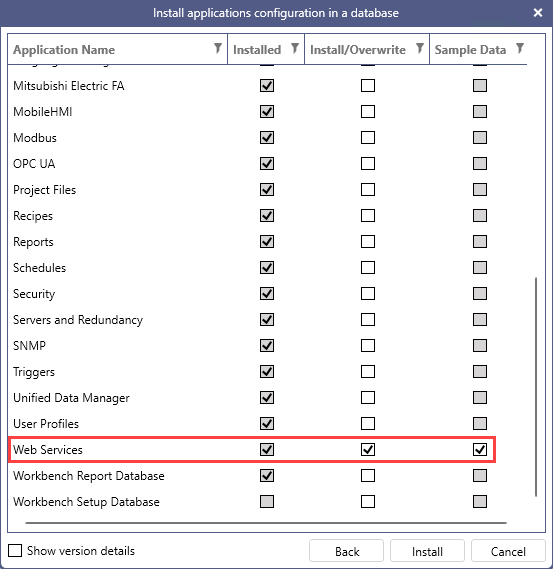
Scroll down the application list and in the Web Services row, select the checkbox in the Install/Overwrite column. Optionally, select Sample Data to include the sample configuration.
-
Click Install to create the objects required to enable web services connectivity. When a success message is displayed, click OK.