Creating a BACnet Process Point
You can visualize any real-time data provided by BACnet devices by adding a process point to a GraphWorX display and connecting the point to the desired data source.
To create a BACnet process point in a GraphWorX display:
-
Open GraphWorX in the configuration mode (default).
-
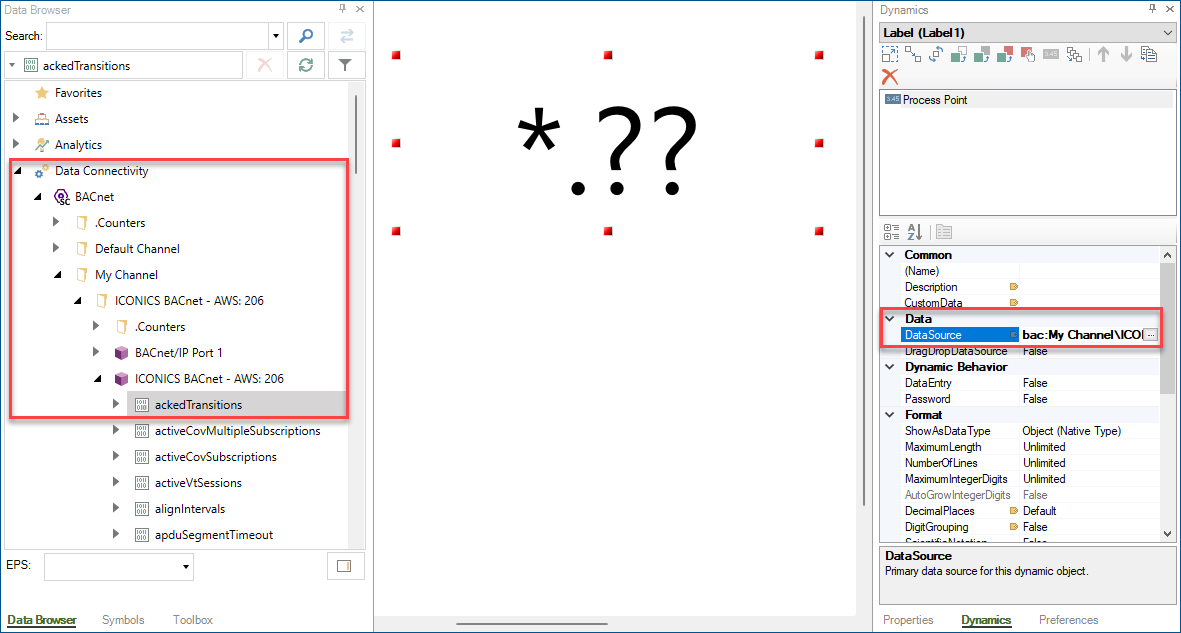
In Data Browser in the left panel of the GraphWorX screen, go to Data Connectivity > BACnet, expand the desired channel, device, and object, and then click the desired property and drag and drop it in the process point area in the main pane.
A process point is added to the canvas, and the selected data source is displayed in the Data section in the right panel.
-
Click
 on the quick access toolbar or in the File menu to save the display.
 -
Use the options on the upper right of the GraphWorX screen to switch to the runtime mode
 or to open the display in a web browser
  . The real-time data is displayed.