Using the WHERE and HAVING Keywords
Using the WHERE Keyword
It is possible to restrict the results of a BI Server query by adding a WHERE clause. The condition of a WHERE clause is a Boolean predicate made from one or more logical comparisons. Comparisons are allowed generically between columns and/or expressions.
The following query retrieves all products that are discontinued by comparing a column to a constant.
Example:
SELECT * FROM Products WHERE Discontinued = true
The following query retrieves all products that have to be reordered and are not discontinued, performing a comparison between two columns.
Example:
SELECT * FROM Products WHERE UnitsInStock <= ReorderLevel AND Discontinued = false
Predicates can also use generic expressions. The following query retrieves all orders that have been placed in August 1997 by using the year and month functions.
Example:
SELECT * FROM Orders WHERE year(OrderDate) = 1997 AND month(OrderDate) = 8
Below is the list of the supported comparison operators for search predicates.
- = (Equals): Tests equality between two expressions. The following query retrieves all the products that have their CategoryID equal to 8.
Example:
SELECT * FROM Categories WHERE CategoryID = 8
- <> (Not Equals): Tests inequality between two expressions. The following query retrieves all the products that have their CategoryID not equal to 3.
Example:
SELECT * FROM Categories WHERE CategoryID <> 3
- != (Not Equals): Tests inequality between two expressions. The following query retrieves all the products that have their CategoryID not equal to 5.
Example:
SELECT * FROM Categories WHERE CategoryID != 5
- > (Greater Than): Tests whether the left expression is greater than the right expression. The following query retrieves all products that have a UnitPrice greater than 40.
Example:
SELECT * FROM Products WHERE UnitPrice > 40
- >= (Greater Than or Equal): Tests whether the left expression is greater than or equal to the right expression. The following query retrieves all products that have a UnitPrice greater than or equal to 40.
Example:
SELECT * FROM Products WHERE UnitPrice >= 40
-
< (Less Than): Tests whether the left expression is less than the right expression. The following query retrieves all products that have a UnitPrice less than 40.
-
Example:
SELECT * FROM Products WHERE UnitPrice < 40 -
<= (Less Than or Equal): Tests whether the left expression is less than or equal to the right expression. The following query retrieves all products that have a UnitPrice less than or equal to 40.
-
Example:
SELECT * FROM Products WHERE UnitPrice <= 40 -
[NOT] LIKE: Indicates that the character string on the right is to be used with pattern matching against the left expression.
-
% (percent): The % character can be used as a wildcard to match any string of zero or more characters. The following query retrieves all customers whose ContactName starts with a and ends with o.
Example:
SELECT ContactName FROM Customers WHERE ContactName LIKE 'a%o'
- _ (underscore): The _ character can be used as a wildcard to match any single character. The following query retrieves all customers whose CustomerID starts with TRA and ends with H.
Example:
SELECT * FROM Customers WHERE CustomerID LIKE 'TRA_H'
- [] (brackets): Square brackets can be used to match any single character enclosed in the brackets. The following query retrieves all customers whose CustomerID starts with B and where the second letter is either a L or an O.
Example:
SELECT * FROM Customers WHERE CustomerID LIKE 'B[LO]%'
-
^ (caret): The caret character can be used with square brackets in order to match any characters not enclosed in the brackets. The following query retrieves all customers whose CustomerID starts with B and has a second letter that is not L or S.
Example:
SELECT * FROM Customers WHERE CustomerID LIKE 'B[^LS]%'
Prefixing the LIKE keyword with NOT produces the negation of the result. The following query retrieves all customers whose CustomerID does not start with A.
Example:
SELECT * FROM Customers WHERE CustomerID NOT LIKE 'A%'
To match a literal % (percent) or _ (underscore) characters they must be enclosed in square brackets. The following query retrieves all bikes from a hypothetical Bikes table that have their discount set to 30%.
Example:
SELECT * FROM Bikes WHERE Discount LIKE '30[%]'
- [NOT] BETWEEN: Tests whether the value of an expression is between two other expressions. The following query retrieves all orders places between two specific dates.
Example:
SELECT * FROM Orders WHERE OrderDate BETWEEN '1997-09-03' AND '1997-09-05'
Bounds are included in the result. Prefixing the BETWEEN keyword with NOT returns all rows not in the specified interval, not including the bounds. The following query retrieves all orders not placed between two specific dates and made in September 1997.
Example:
SELECT * FROM Orders
WHERE OrderDate NOT BETWEEN '1997-09-10' AND '1997-09-20'
AND year(OrderDate) = 1997
AND month(OrderDate) = 9
- IS [NOT] NULL: Tests whether the left expression is NULL. The following query retrieves all customers whose fax number is NULL.
Example:
SELECT * FROM Customers WHERE Fax IS NULL
When prefixing with the NOT keyword, tests whether the left expression is not NULL.
- [NOT] IN: Tests whether the left expression is included or excluded from a list; the list can be a set of constants, column references, expressions or a subquery. The following query retrieves all products that have a CategoryID of either 1 or 2.
Example:
SELECT * FROM Products WHERE CategoryID IN (1, 2)
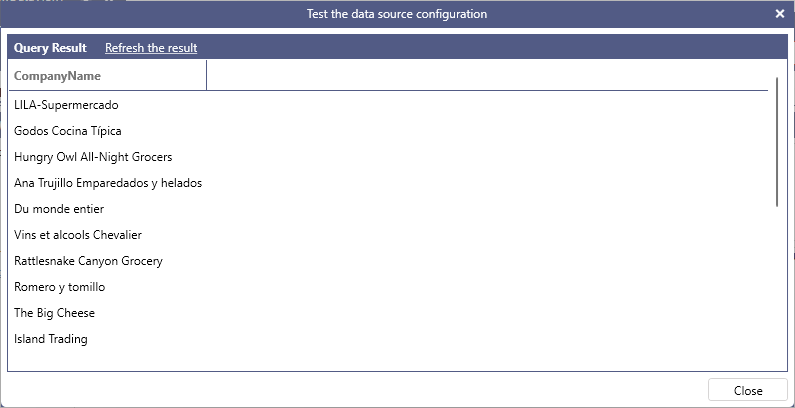
When using a subquery, the subquery must return a single column of a type that is compatible with the type on the column on the left of the IN. The following query retrieves the company name for all customers who have placed an order in September 1996.
Example:
SELECT CompanyName FROM Customers WHERE CustomerID IN (SELECT CustomerID FROM Orders WHERE OrderDate BETWEEN '9/1/96' AND '9/30/96')
- [NOT] EXISTS: Used with a subquery to test for existence (or non-existence) of rows returned by the subquery. When testing for existence, the values in the rows returned from the subquery are irrelevant, as EXISTS only needs to check for the existence of returned rows. For this reason, the subqueries written with EXISTS are typically in the form of SELECT or SELECT 1.
The following query produces the same output as the query in the previous section, using EXISTS instead of IN
Example:
SELECT CompanyName FROM Customers AS c WHERE EXISTS (SELECT 1 FROM Orders WHERE c.CustomerID = CustomerID AND OrderDate BETWEEN '9/1/96' AND '9/30/96')
NOT EXISTS can be used to test for absence of rows returned from the subquery, and is generally preferable to NOT IN. The following query retrieves all customers that have not placed an order.
Example:
SELECT CustomerID FROM Customers AS c WHERE NOT EXISTS (SELECT 1 FROM Orders WHERE c.CustomerID = Orders.CustomerID)
Using the HAVING Keyword
The HAVING keyword works conceptually the same way as WHERE, but HAVING specifies a search condition for a group or an aggregate.
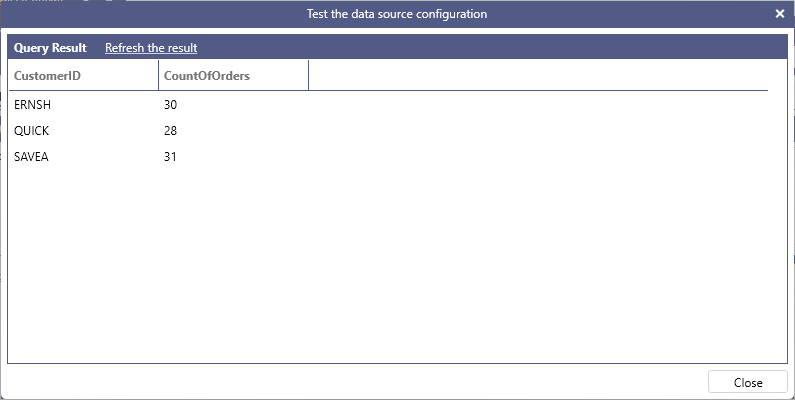
The following query returns only customers that have placed more than twenty orders.
Example:
SELECT CustomerID, COUNT(OrderID) AS CountOfOrders FROM Orders GROUP BY CustomerID HAVING COUNT(OrderID) > 20