Using the UNION, COLLATE, and CASE Keywords
Using the UNION [ALL] Keyword
The UNION keyword concatenates the result sets of two queries into a single result set. To union the result sets, the two queries must:
- Return the same number of columns, in the same order
- have the same data types of the columns at the same position in the two results sets.
When using UNION ALL, the result set is allowed to contain duplicate rows, so it will contain all rows from both sets. When using UNION, duplicate rows will be removed. The following query returns the union of customers and employees.
Example:
SELECT ContactName, CompanyName FROM Customers
UNION ALL
SELECT FirstName + ' ' + LastName, 'Northwind' FROM Employees
The order of the rows in the output is generally unspecified. To apply a specific order, the ORDER BY keyword can be used outside the union. The following query returns the union of customers and employees ordered by ContactName.
Example:
SELECT * FROM
(SELECT ContactName, CompanyName FROM Customers
UNION ALL
SELECT FirstName + ' ' + LastName, 'Northwind' FROM Employees) AS t
ORDER BY ContactName
Using the COLLATE Keyword
The COLLATE keyword represents a collation cast operation when applied to a character string expression. As mentioned in the Culture and Collation section, BI Server collations are composed of two parts, separated by underscore:
-
A culture identifier, which follows the .NET rules for culture identifiers. The name is a combination of an ISO 693 two-letter culture code associated with a language and an ISO 3166 two-letter subculture code associated with a country or region. Examples include jp-JP for Japanese (Japan) and en-US for English (United States). For more information, refer to Culture names and Identifiers for .NET.
-
A case identifier, which can be one of the two possibilities:
- ci – which stands for case-insensitive
- cs – which stands for case-sensitive
Collation identifiers are case-insensitive so, for example, all the following identifiers are equivalent in BI Server:
- COLLATE en-US_ci
- COLLATE EN-US_CI
- COLLATE en-us_ci
The following query will return the row associated with the Beverages categories because the default collation is case-insensitive.
Example:
SELECT * FROM Categories WHERE CategoryName = 'beverages'
The following query will not return any row because it is forcing a case-sensitive comparison using the COLLATE keyword.
Example:
SELECT * FROM Categories WHERE CategoryName COLLATE en-us_cs = 'beverages'
The COLLATE keyword can be used after column references of type string or after string literals.
Using the CASE Keyword
The CASE keyword evaluates a list of conditions and returns one of multiple possible result expressions. The CASE expression has two formats:
-
Simple CASE, which compares an expression to a set of simple expressions to determine the result
-
Searched CASE, in which a set of Boolean expressions are evaluated to determine the result
CASE can be used anywhere in an expression, like in a SELECT list, in a WHERE statement, ORDER BY, etc.
Simple CASE
The simple CASE expression operates by sequentially comparing the first expression to the expression in each WHEN clause for equivalency. If the expressions are equivalent, the expression in the THEN clause will be returned.
Simple CASE supports an optional ELSE clause, which allows to specify a default value to return if none of the expressions in the WHEN clauses is equivalent to the first expression. When the ELSE clause is not provided, NULL is returned when none of the expressions in the WHEN clauses is equivalent to the first expression.
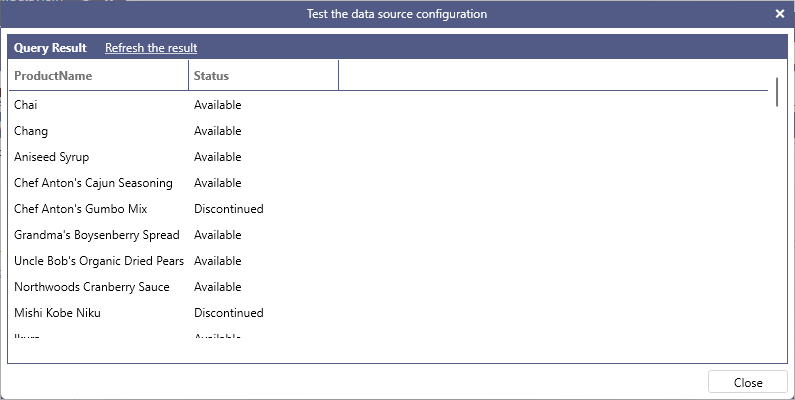
The following query returns all products with a string description on whether the product has been discontinued or not. In this example, the first expression (the column Discontinued) gets compared with the Boolean values false and then true to produce the result in the THEN clause.
Example:
SELECT ProductName,
CASE Discontinued
  WHEN false THEN 'Available'
  WHEN true THEN 'Discontinued'
END AS Status
FROM Products
The following query uses the ELSE clause to return a UnitPrice discounted by 10% for all beverages, a UnitPrice increased by 5% for all seafood, and an unmodified UnitPrice for any other product type.
Example:
SELECT ProductName, UnitPrice,
CASE CategoryID
  WHEN 1 THEN UnitPrice * 0.90
  WHEN 8 THEN UnitPrice * 1.05
  ELSE UnitPrice
END AS ModifiedUnitPrice
FROM Products
Searched CASE
The searched CASE expression operates by sequentially evaluating the Boolean expressions in each WHEN clause. If an expression evaluates to true, the expression in the THEN clause is returned.
Searched CASE supports an optional ELSE clause, which allows to specify a default value to return if none of the expressions in the WHEN clauses evaluate to true. When the ELSE clause is not provided, NULL is returned when none of the expressions in the WHEN clauses evaluate to true.
The following query returns the fax number for all customers and defaults to the string “No Fax” for customers that do not have a fax number.
Example:
SELECT ContactName,
CASE
  WHEN Fax IS NULL THEN 'No Fax'
  ELSE Fax
END
FROM Customers