Using the ORDER BY, OFFSET and FETCH Keywords
Using the ORDER BY Keyword
Orders the result set of a query by the specified column list and, optionally, limits the rows returned to a specified range. It is possible to ORDER BY columns that are not in the SELECT clause, except when using aggregates. When using aggregates, the ORDER BY clause can only contain the attributes that are being aggregated or used as group by attributes.
The following query retrieves the list of products ordered from the most expensive to the least expensive.
Example:
SELECT ProductName, UnitPrice FROM Products ORDER BY UnitPrice DESC
The ORDER BY clause supports the ASC and DESC modifiers to specify the order of the sorting: if no modifier is specified, ASC is used. Multiple columns can be used for sorting, and their sequence in the ORDER BY clause determines the organization of the sorted result set. The following query orders products by category name first and then by product name.
Example:
SELECT CategoryName, ProductName
FROM Categories AS c INNER JOIN Products AS p ON c.CategoryID = p.CategoryID
ORDER BY CategoryName, ProductName
The columns in the ORDER BY can be column references or expressions. The following query retrieves the month total for all orders placed in 1997, ordered by month.
Example:
SELECT SUM(Quantity * UnitPrice * (1 - Discount)) AS Total, month(OrderDate) AS Month
FROM OrderDetails AS od INNER JOIN Orders AS o ON od.OrderID = o.OrderID
WHERE year(OrderDate) = 1997
GROUP BY month(OrderDate)
ORDER BY month(OrderDate)
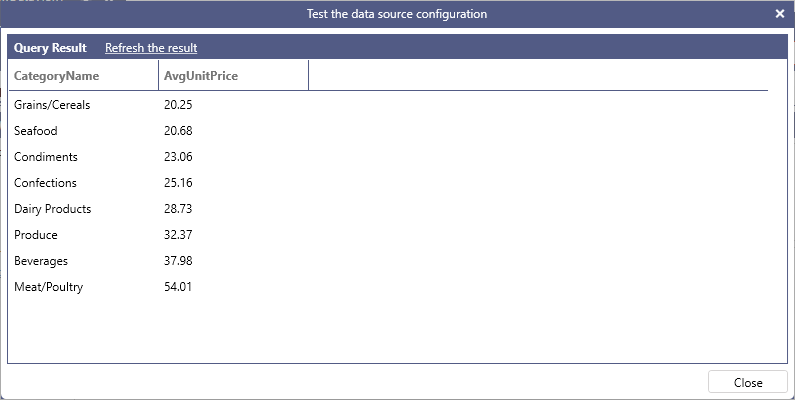
ORDER BY can also reference columns appearing in the SELECT list by their alias. The following query orders categories by their average product unit price.
Example:
SELECT CategoryName, toformat(AVG(UnitPrice), 'n')  AS AvgUnitPrice
FROM Categories AS c INNER JOIN Products AS p ON c.CategoryID = p.CategoryID
GROUP BY CategoryName
ORDER BY AvgUnitPrice
Using the OFFSET Keyword
Specifies the number of rows to skip before starting to return rows from the query. This value must be an integer constant greater or equal to zero. The following query returns rows from the Products table, skipping the first 30 rows.
Example:
SELECT * FROM Products ORDER BY ProductID OFFSET 30
Using the FETCH Keyword
Specifies the number of rows to return after the OFFSET clause has been processed. The value must be an integer constant greater or equal to zero. The following query skips the first ten rows from the Products table and returns the next fifteen rows.
Example:
SELECT * FROM Products ORDER BY ProductID OFFSET 10 FETCH 15