Using Date and Time Functions
Date and Time functions operate on DateTime values and provide related functionality.
ADDDAYS
Adds the specified number of days to a DateTime expression. Negative values subtract days from the DateTime expression.
Example:
SELECT adddays(cast('2021-09-29 18:32:45.123' AS DateTime), 1) --returns September 30, 2021 6:32:45.123 PM
ADDMONTHS
Adds the specified number of months to a DateTime expression. Negative values subtract days from the DateTime expression.
Example:
SELECT addmonths(cast('2021-09-29 18:32:45.123' AS DateTime), 1) --returns October 29, 2021 6:32:45.123 PM
ADDYEARS
Adds the specified number of years to a DateTime expression. Negative values subtract days from the DateTime expression.
Example:
SELECT addyears(cast('2021-09-29 18:32:45.123' AS DateTime), 1) --returns September 30, 2022 6:32:45.123 PM
BDAY
Returns a DateTime value where the time part of the specified DateTime expression is set to 12:00:00 AM. The returned DateTime value has its Kind property set to Unspecified.
Example:
SELECT bday(cast('2021-09-29 18:32:45.123' AS DateTime)) --returns September 29, 2021 12:00:00.000 AM
BHOUR
Returns a DateTime value where the time part of the specified DateTime expression is set to the beginning of the hour. The returned DateTime value has its Kind property set to Unspecified.
Example:
SELECT bhour(cast('2021-09-29 18:32:45.123' AS DateTime)) --returns September 29, 2021 6:00:00.000 PM
BMINUTE
Returns a DateTime value where the time part of the specified DateTime expression is set to the beginning of the minute. The returned DateTime value has its Kind property set to Unspecified.
Example:
SELECT bminute(cast('2021-09-29 18:32:45.123' AS DateTime)) --returns September 29, 2021 6:32:00.000 PM
BMONTH
Returns a DateTime value where the day is set to the first day of the month relative to the specified DateTime expression, and the time part is set to 12:00:00 AM. The returned DateTime value has its Kind property set to Unspecified.
Example:
SELECT bmonth(cast('2021-09-29 18:32:45.123' AS DateTime)) --returns September 1, 2021 12:00:00.000 AM
BSECOND
Returns a DateTime value where the time part of the specified DateTime expression is set to the beginning of the second. The returned DateTime value has its Kind property set to Unspecified.
Example:
SELECT bsecond(cast('2021-09-29 18:32:45.123' AS DateTime)) --returns September 29, 2021 6:32:45.000 PM
BWEEK
Returns a DateTime value where the day is set to the first day of the week relative to the specified DateTime expression, and the time part is set to 12:00:00 AM. The returned DateTime value has its Kind property set to Unspecified. The first day of the week is determined by the culture associated with the data model's collation.
Examples:
SELECT bweek(cast('2021-09-29 18:32:45.123' AS DateTime)) --returns September 26, 2021 12:00:00.000 AM (Sunday) for the en-us culture
				SELECT bweek(cast('2021-09-29 18:32:45.123' AS DateTime)) --returns September 27, 2021 12:00:00.000 AM (Monday) for the it-it culture
BYEAR
Returns a DateTime value where the day is set to the first day of the year relative to the specified DateTime expression, and the time part is set to 12:00:00 AM. The returned DateTime value has its Kind property set to Unspecified.
Example:
SELECT byear(cast('2021-09-29 18:32:45.123' AS DateTime)) --returns January 1, 2021 12:00:00.000 AM
DATEPART
Returns the specified part from the specified DateTime expression. The syntax is:
datepart(datetime_expression, 'date_part')
The date_part parameter can be one of the following values (case-insensitive):
- year
- month
- day
- dayofweek
- dayofweekoffset
- hour
- minute
- second
- millisecond
The following queries show examples with the DATEPART function.
Examples:
SELECT datepart(cast('2021-09-29 18:32:45.123' AS DateTime), 'year') --returns 2021
				SELECT datepart(cast('2021-09-29 18:32:45.123' AS DateTime), 'month') --returns 9
				SELECT datepart(cast('2021-09-29 18:32:45.123' AS DateTime), 'day') --returns 29
				SELECT datepart(cast('2021-09-29 18:32:45.123' AS DateTime), 'dayofweek') --returns 3 (Wednesday); dayofweek is culture-invariant and returns a value between 0 (Sunday) to 6 (Saturday)
				SELECT datepart(cast('2021-09-29 18:32:45.123' AS DateTime), 'dayofweekoffset') --returns a value relative to the first day of the week in the culture of the data model's collation
				SELECT datepart(cast('2021-09-29 18:32:45.123' AS DateTime), 'hour') --returns 18
				SELECT datepart(cast('2021-09-29 18:32:45.123' AS DateTime), 'minute') --returns 32
				SELECT datepart(cast('2021-09-29 18:32:45.123' AS DateTime), 'second') --returns 45
				SELECT datepart(cast('2021-09-29 18:32:45.123' AS DateTime), 'millisecond') --returns 123
TIP: See the DAYOFWEEKOFFSET function for more details
DATETIMEFROMPARTS
Builds a DateTime value from individual parts; the returned DateTime value has its Kind property set to Unspecified. The function has three different overloads:
datetimefromparts(year_expression, month_expression, day_expression, hour_expression, minute_expression, second_expression, millisecond_expression)
				datetimefromparts(year_expression, month_expression, day_expression, hour_expression, minute_expression, second_expression)
				datetimefromparts(year_expression, month_expression, day_expression)
The following query shows how to use the DATETIMEFROMPARTS function to build a DateTime value.
Example:
SELECT datetimefromparts(2021, 09, 29, 18, 32, 45, 123) --returns September 29, 2021 6:32:45.123 PM
DAY
Returns the day part of a DateTime expression. This function is a shortcut for DATEPART when the date_part parameter is day.
Example:
SELECT day(cast('2021-09-29 18:32:45.123' AS DateTime)) --returns 29
DAYNAME
Returns the name of the day of a DateTime expression in the invariant culture. The invariable culture day names are the English Sunday, Monday, Tuesday, Wednesday, Thursday, Friday, and Saturday.
Example:
SELECT dayname(cast('2021-09-29 18:32:45.123' AS DateTime)) --returns 'Wednesday'
DAYNAMECULTURE
Returns the name of the day of a DateTime expression in the culture of the data model's collation.
Examples:
SELECT daynameculture(cast('2021-09-29 18:32:45.123' AS DateTime)) --returns 'Wednesday' in en-us culture
				SELECT daynameculture(cast('2021-09-29 18:32:45.123' AS DateTime)) --returns 'mercoledì' in it-it culture
DAYOFWEEK
Returns the numeric index of the day of a DateTime expression in the invariant culture. This function is a shortcut for DATEPART when the date_part parameter is dayofweek. In the invariant culture, the first day of the week is always Sunday, with index 0, and the last day of the week is Saturday with index 6.
Example:
SELECT dayofweek(cast('2021-09-29 18:32:45.123' AS DateTime)) --returns 3 (Wednesday)
DAYOFWEEKOFFSET
Returns the numeric index of the day of a DateTime expression in the culture of the data model's collation. This function is a shortcut for DATEPART when the date_part parameter is dayofweekoffset.
The following query returns 3 as a day of the week when it runs in the en-US culture, where the first day of the week is Sunday.
Example:
SELECT dayofweekoffset(cast('2021-09-29 18:32:45.123' AS DateTime)) --returns 3 (Wednesday)
The same query returns 2 as a day of the week when it runs in the it-it culture, where the first day of the week is Monday.
Example:
SELECT dayofweekoffset(cast('2021-09-29 18:32:45.123' AS DateTime)) --returns 2 (Wednesday)
DAYSECONDS
Returns the number of seconds elapsed since the beginning of the day of a DateTime expression.
Example:
SELECT dayseconds(cast('2021-09-29 18:32:45.123' AS DateTime)) --returns 66765
EMONTH
Returns a DateTime value where the day is set to the last day of the month relative to the specified DateTime expression, and the time part is set to 12:00:00 AM. The returned DateTime value has its Kind property set to Unspecified.
Example:
SELECT emonth(cast('2021-09-29 18:32:45.123' AS DateTime)) --returns September 30, 2021 12:00:00.000 AM
EWEEK
Returns a DateTime value where the day is set to the last day of the week relative to the specified DateTime expression, and the time part is set to 12:00:00 AM. The returned DateTime value has its Kind property set to Unspecified. The last day of the week is determined by the culture associated with the data model's collation.
Examples:
SELECT eweek(cast('2021-09-29 18:32:45.123' AS DateTime)) --returns October 2, 2021 12:00:00.000 AM (Saturday) for the en-us culture
				SELECT eweek(cast('2021-09-29 18:32:45.123' AS DateTime)) --returns October 3, 2021 12:00:00.000 AM (Sunday) for the it-it culture
EYEAR
Returns a DateTime value where the day is set to the last day of the year relative to the specified DateTime expression, and the time part is set to 12:00:00 AM.
Example:
SELECT eyear(cast('2021-09-29 18:32:45.123' AS DateTime)) --returns December 31, 2021 12:00:00.000 AM
FROMEPOCH
Converts a Unix seconds epoch to a DateTime value. The returned DateTime value is in UTC time and has its Kind property set to UTC.
Example:
SELECT fromepoch(1632940365) --returns September 29, 2021 6:32:45 PM
FROMEPOCHOFFSET
Converts a Unix seconds epoch to a DateTimeOffset value.
Example:
SELECT fromepochoffset(1632940365) --returns September 29, 2021 6:32:45 PM GMT
GETDATE
This function has two overloads:
-
getdate(): Returns a DateTime value representing the current date and time. The result of this function is the same as the NOW function. The returned DateTime value has its Kind property set to Unspecified.
Example:
SELECT getdate() --returns the current date and time -
The second overload accepts a DateTime expression as a parameter and returns the date portion with the time set to 12:00:00 AM. The returned DateTime value has its Kind property set to Unspecified.
Example:
SELECT getdate(cast('2021-09-29 18:32:45.123' AS DateTime)) --returns September 29, 2021 12:00:00.000 AM
GETTIMEOFDAY
Returns the time portion of a DateTime expression as a TimeSpan.
Example:
SELECT gettimeofday(cast('2021-09-29 18:32:45.123' AS DateTime)) --returns 0.18:32:45.123
GETUTCDATE
Returns a DateTime value representing the current date and time. The result of this function is the same as the UTCNOW function. The returned DateTime value has its Kind property set to UTC.
Example:
SELECT getutcdate() --returns the current date and time in UTC
HOUR
Returns the hour part of a DateTime expression. This function is a shortcut for DATEPART when the date_part parameter is an hour.
Example:
SELECT hour(cast('2021-09-29 18:32:45.123' AS DateTime)) --returns 18
ISDST
Returns whether a DateTime expression represents a point in time within a DaylightSavings Time period or not. If the Kind property of the DateTime expression is Unspecified or Local, the value will be considered a local time – where "local" is the time zone configured for the machine. If the Kind property is UTC, the ISDST function will return false.
Examples:
SELECT isdst(cast('2021-09-29 18:32:45.123' AS DateTime)) --returns true for Eastern Time (US & Canada)
				SELECT isdst(cast('2021-02-20 18:32:45.123' AS DateTime)) --returns false for Eastern Time (US & Canada)
				SELECT isdst(utcnow()) --always returns false
MAXTIME
Returns the maximum value for DateTime expressions.
Example:
SELECT maxtime() -- returns 12/31/9999 11:59:59 PM
MILLISECOND
Returns the millisecond part of a DateTime expression. This function is a shortcut for DATEPART when the date_part parameter is a millisecond.
Example:
SELECT millisecond(cast('2021-09-29 18:32:45.123' AS DateTime)) --returns 123
MINTIME
Returns the minimum value for DateTime expressions. Note that DateTime expressions are allowed to assume a value lesser than MINTIME, however MINTIME produces the exact DateTime value that, when converted to a numeric type, returns zero.
Example:
SELECT cast(mintime() AS Int32) --returns 0
MINUTE
Returns the minute part of a DateTime expression. This function is a shortcut for DATEPART when the date_part parameter is a minute.
Example:
SELECT minute(cast('2021-09-29 18:32:45.123' AS DateTime)) --returns 32
MONTH
Returns the month part of a DateTime expression. This function is a shortcut for DATEPART when the date_part parameter is month.
Example:
SELECT month(cast('2021-09-29 18:32:45.123' AS DateTime)) --returns 9
MONTHNAME
Returns the name of the month of a DateTime expression in the invariant culture. The invariable culture day names are English January, February, March, April, May, June, July, August, September, October, November, and December.
Example:
SELECT monthname(cast('2021-09-29 18:32:45.123' AS DateTime)) --returns 'September'
MONTHNAMECULTURE
Returns the name of the month of a DateTime expression in the culture of the data model's collation.
Examples:
SELECT monthnameculture(cast('2021-09-29 18:32:45.123' AS DateTime)) --returns 'September' in en-us culture
				SELECT monthnameculture(cast('2021-09-29 18:32:45.123' AS DateTime)) --returns 'settembre' in it-it culture
NOON
Returns the date portion with the time set to 12:00:00 PM. The returned DateTime value has its Kind property set to Unspecified.
Example:
SELECT noon(cast('2021-09-29 18:32:45.123' AS DateTime)) --returns September 29, 2021 12:00:00.000 PM
NOW
Returns the current date and time. The returned DateTime value has its Kind property set to Unspecified.
Example:
SELECT now() --returns the current date and time
SECOND
Returns the second part of a DateTime expression. This function is a shortcut for DATEPART when the date_part parameter is second.
Example:
SELECT second(cast('2021-09-29 18:32:45.123' AS DateTime)) --returns 45
TODAY
Returns the current date with the time set to 12:00:00 AM. The returned DateTime value has its Kind property set to Unspecified.
Example:
SELECT today() --returns the current date with the time portion set to 12:00:00 AM
TOEPOCH
Converts a DateTime expression into a Unix epoch in seconds. If the DateTime expression has its Kind property set to Unspecified, it will be considered as local time, and converted to UTC before getting converted to epoch.
Examples:
SELECT toepoch(cast('2021-09-29T18:32:45Z' AS DateTime)) --CAST returns a DateTime with Kind set to Utc, so returns 1632940365
				SELECT toepoch(cast('2021-09-29T18:32:45' AS DateTime)) --CAST returns a DateTime with Kind set to Unspecified, which is interpreted as local time, so returns 1632954765 (representing September 29, 2021 14:32:45 UTC)
TOLOCAL
Converts a DateTime expression to local time and returns a DateTime value with its Kind property set to Local.
The result of the conversion is dependent on the Kind property of the expression.
- UTC: The expression is converted to local time.
- Local: No conversion is performed.
- Unspecified: The expression is assumed to be UTC and the conversion is performed as if Kind were UTC.
Example:
SELECT tolocal(cast('2021-09-29T18:32:45Z' AS DateTime)) --returns September 29, 2021 18:32:45 UTC in local time
TOTIMEZONETIME
Converts a DateTime expression from one time zone to another. The function has two overloads:
totimezonetime(datetime_expression, destination_time_zone)
				totimezonetime(datetime_expression, destination_time_zone, source_time_zone)
When used without the source_time_zone parameter, the datetime_expression's Kind property determines the source time zone. Both source_time_zone and destination_time_zone are case-insensitive strings and can be either a time zone identifier or a fixed time offset.
To retrieve the identifier for a specific time zone, it is possible to use the Time Zone picker for Equipment in the Assets provider in Workbench.
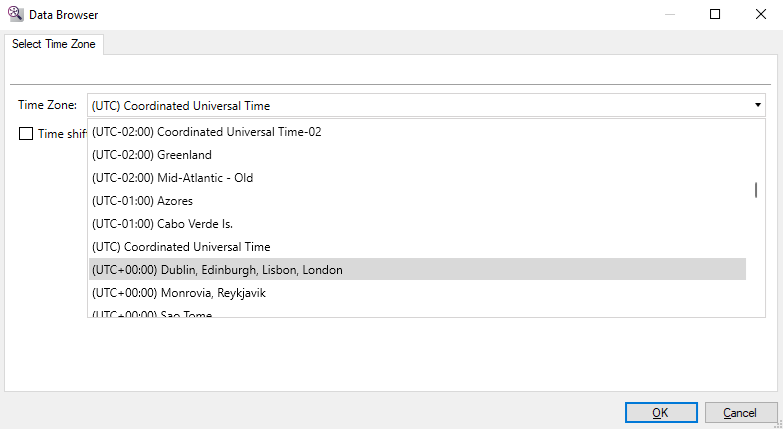
When the input DateTime expression's Kind property is set to Local or Unspecified, it will be considered Local time.
Examples:
SELECT totimezonetime('2021-09-29T12:00:00', 'Eastern Standard Time') --returns September 29, 2021 12:00:00 PM when run in Eastern Time (US & Canada)
				SELECT totimezonetime('2021-09-29T12:00:00', 'Pacific Standard Time') --returns September 29, 2021 9:00:00 AM when run in Eastern Time (US & Canada)
When the input DateTime expression's Kind property is set to UTC, it will be considered UTC time.
Example:
SELECT totimezonetime('2021-09-29T12:00:00Z', 'Eastern Standard Time') --returns September 29, 2021 8:00:00 AM in any time zone
When the input DateTime expression's Kind property is set to UTC, the source_time_zone parameter will be ignored even if specified. The following query returns September 29, 2021 8:00:00 AM even if the source time zone is set to Eastern Standard Time because the input is a UTC DateTime.
Example:
SELECT totimezonetime('2021-09-29T12:00:00Z', 'Eastern Standard Time', 'Eastern Standard Time') --returns September 29, 2021 8:00:00 AM in any time zone
When the input DateTime expression's Kind property is set to Local or Unspecified, it will be interpreted as a Local time in the source time zone. The following query translates a DateTime value from Pacific Standard Time to Eastern Standard Time.
Example:
SELECT totimezonetime('2021-09-29T12:00:00', 'Eastern Standard Time', 'Pacific Standard Time') --returns September 29, 2021 3:00:00 PM
Conversions take into account daylight savings status. The following query shows a 6-hour difference between Eastern Time and Central European Time when daylight savings was still in effect in both time zones.
Example:
SELECT totimezonetime('2020-10-24T12:00:00', 'Central Europe Standard Time', 'Eastern Standard Time') --returns October 24, 2020 6:00:00 PM (6 hours difference)
The following query shows a 5-hour difference because daylight savings ended in Central European Time but not in Eastern Time.
Example:
SELECT totimezonetime('2020-10-25T12:00:00', 'Central Europe Standard Time', 'Eastern Standard Time') --returns October 25, 2020 5:00:00 PM (5 hours difference)
TOUTC
Converts a DateTime expression to Universal Coordinated Time and returns a DateTime value with its Kind property set to UTC. The result of the conversion is dependent on the Kind property of the expression.
- UTC: No conversion is performed.
- Local: The expression is converted to UTC.
- Unspecified: The expression is assumed to be local time, and the conversion is performed as if Kind were Local.
Example:
SELECT toutc(cast('2021-09-29T18:32:45' AS DateTime)) --returns September 29, 2021 18:32:45 local time in UTC
UTCNOW
Returns the current UTC date and time. The returned DateTime value has its Kind property set to UTC.
Example:
SELECT utcnow() --returns the current UTC date and time
WEEKDAY
Returns the numeric index of the day of a DateTime expression in the invariant culture. In the invariant culture, the first day of the week is always Sunday with index 0, and the last day of the week is Saturday with index 6. This function returns the same result as DAYOFWEEK.
Example:
SELECT weekday(cast('2021-09-29 18:32:45.123' AS DateTime)) --returns 3 (Wednesday)
WEEKNUMBER
Returns a number between 1 and 53 representing the week in the year of the given date in the Gregorian calendar. The function has three overloads:
weeknumber(datetime_expression)
				weeknumber(datetime_expression, week_rule)
				weeknumber(datetime_expression, week_rule, firstDayOfWeek)
The week_rule parameter is an enumerated integer that can assume the values described in the following list. The default value is 0 (FirstDay).
-
0 (FirstDay): Indicates that the first week of the year starts on the first day of the year and ends before the following designated first day of the week.
-
1 (FirstFullWeek): Indicates that the first week of the year begins on the first occurrence of the designated first day of the week.
-
2 (FirstFourDayWeek): Indicates that the first week of the year is the first week with four or more days before the designated first day of the week.
-
3 (ISO 8601 Week Date Standard): Indicates that the first week of the year is a week with a Thursday in it. When using this option, the
firstDayOfWeekparameter is ignored if supplied, and the week starts on Monday.
The firstDayofWeek parameter indicates what the first day in the week is. The default value is 0 (Sunday).
Examples:
SELECT weeknumber(cast('2021-09-29 18:32:45.123' AS DateTime)) --returns 40
				SELECT weeknumber(cast('2021-09-29 18:32:45.123' AS DateTime), 1) --returns 39
				SELECT weeknumber(cast('2021-09-29 18:32:45.123' AS DateTime), 1, 4) --returns 38
				SELECT weeknumber(cast('2021-09-29 18:32:45.123' AS DateTime), 2) --returns 39
WEEKNUMBERCULTURE
Returns a number between 1 and 53 representing the week in the year of the given date in the default calendar in the culture of the data model's collation. The function has three overloads:
weeknumberculture(datetime_expression)
				weeknumberculture(datetime_expression, week_rule)
				weeknumberculture(datetime_expression, week_rule, firstDayofWeek)
The week rule parameter is an enumerated integer that can assume the values described in the following list. The default value is 0 (FirstDay).
-
0 (FirstDay). Indicates that the first week of the year starts on the first day of the year and ends before the following designated first day of the week.
-
1 (FirstFullWeek). Indicates that the first week of the year begins on the first occurrence of the designated first day of the week.
-
2 (FirstFourDayWeek). Indicates that the first week of the year is the first week with four or more days before the designated first day of the week.
The firstDayofWeek parameter indicates what the first day in the week is. The default value is 0 (Sunday).
Examples:
SELECT weeknumberculture(cast('2021-09-29 18:32:45.123' AS DateTime)) --returns 40
				SELECT weeknumberculture(cast('2021-09-29 18:32:45.123' AS DateTime), 1) --returns 39
				SELECT weeknumberculture(cast('2021-09-29 18:32:45.123' AS DateTime), 1, 4) --returns 38
				SELECT weeknumberculture(cast('2021-09-29 18:32:45.123' AS DateTime), 2) --returns 39
YDAY
Returns the date of the day before the current date, with its time part set to 12:00:00 AM. The returned value has its Kind property set to Unspecified.
Example:
SELECT yday() --returns yesterday's date at 12:00:00 AM
YEAR
Returns the year part of a DateTime expression. This function is a shortcut for DATEPART when the date_part parameter is year.
Example:
SELECT year(cast('2021-09-29 18:32:45.123' AS DateTime)) --returns 2021
YEARDAY
Returns the day of the year of a DateTime expression. The result is a number between 1 and 366.
Example:
SELECT yearday(cast('2021-09-29 18:32:45.123' AS DateTime)) --returns 272