Using Aggregate Functions
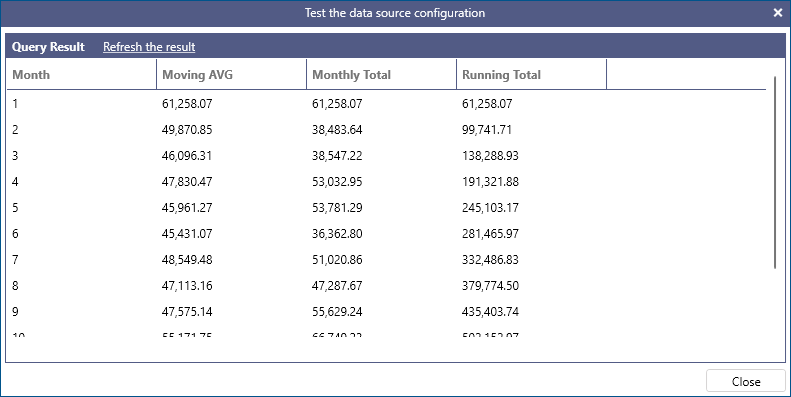
Aggregates can be used to easily calculate running totals, moving averages, etc. The following query calculates the monthly order total for the year 1997 by using a subquery, and then using window functions over this result to compute a moving average for the previous 3 months and a running total. The results are formatted with thousand separators and decimals using the toformat function.
Example:
SELECT
  Month,
  toformat(AVG(Total) OVER (ORDER BY [Month] ROWS BETWEEN 3 PRECEDING AND CURRENT ROW), 'n') AS [Moving AVG],
  toformat(Total,'n')  AS [Monthly Total],
  toformat(SUM(Total) OVER (ORDER BY [Month]), 'n') AS [Running Total]
FROM
(
  SELECT
    month(OrderDate) AS [Month],
    SUM(Quantity * UnitPrice * (1 - Discount)) AS [Total]
  FROM
    Orders AS o INNER JOIN OrderDetails AS od ON od.OrderID = o.OrderID
  INNER JOIN
    Customers AS c ON c.CustomerID = o.CustomerID
  WHERE
    year(OrderDate) = 1997
  GROUP BY
    month(OrderDate)
) AS t
ORDER BY Month
An aggregate function performs a calculation on a set of values and returns a single value. Values can be divided into groups using the GROUP BY keyword, and aggregate functions will be calculated individually per group; when no GROUP BY expressions are specified, the whole input is treated as a single group. The argument to an aggregate function can be a column reference or an expression.
With the exception of COUNT(*), all aggregate functions ignore NULL values. If an aggregate function is applied to all NULL values, its result will be NULL with the exception of COUNT – where the result will be 0 – and COUNT(*), where the result will be the number of rows.
Aggregate functions also support the DISTINCT keyword: when used, the aggregate function will be applied only to distinct values.
AVG
Returns the arithmetic mean of all the values, or only the DISTINCT values, in the expression. AVG can only be used with numeric columns. NULL values are ignored. The following query returns the average unit price of all products by category.
Example:
SELECT AVG(UnitPrice) AS [Average Price], CategoryName
FROM Products AS p INNER JOIN Categories AS c ON p.CategoryID = c.CategoryID
GROUP BY CategoryName
COUNT
Returns the count of all the values, or only the DISTINCT values, in the expression. COUNT can be used with columns of any type and the return type is always integer. NULL values are ignored. The following query returns the number of orders placed by individual customers in 1997.
Example:
SELECT COUNT(OrderID) AS OrdersCount, CustomerID FROM Orders
WHERE year(OrderDate) = 1997
GROUP BY CustomerID
The following query returns the count of all distinct customer titles.
Example:
SELECT COUNT(DISTINCT ContactTitle) AS Title FROM Customers
When COUNT(*) is used, it specifies that COUNT should count all rows, including duplicate rows or rows that contain NULL values. COUNT(*) does not take an input expression to indicate that it does not use information about any particular column during the calculation. DISTINCT cannot be used with COUNT(*). The following query returns the total number of items in the Products table.
Example:
SELECT COUNT(*) FROM Products
MAX
Returns the maximum of all the values in the expression. MAX can be used with numeric, date time and string columns. NULL values are ignored. The following query returns the highest unit price for all products.
Example:
SELECT MAX(UnitPrice) FROM Products
MIN
Returns the minimum of all the values in the expression. MIN can be used with numeric, date time and string columns. NULL values are ignored. The following query returns the lowest unit price for all products.
Example:
SELECT MIN(UnitPrice) FROM Products
MEDIAN
Returns the median of all the values, or only the DISTINCT values in the expression. MEDIAN can be used with numeric columns only. NULL values are ignored. The following query returns the median unit price for all products by category.
Example:
SELECT MEDIAN(UnitPrice) AS [Median Price], CategoryName
FROM Products AS p INNER JOIN Categories AS c ON p.CategoryID = c.CategoryID
GROUP BY CategoryName
STDEV
Returns the statistical standard deviation of all the values, or only the DISTINCT values, in the expression. STDEV can only be used with numeric columns. NULL values are ignored. The following query returns the statistical standard deviation for product unit prices by category.
Example:
SELECT STDEV(UnitPrice) AS [Price Standard Deviation], CategoryName
FROM Products AS p INNER JOIN Categories AS c ON p.CategoryID = c.CategoryID
GROUP BY CategoryName
SUM
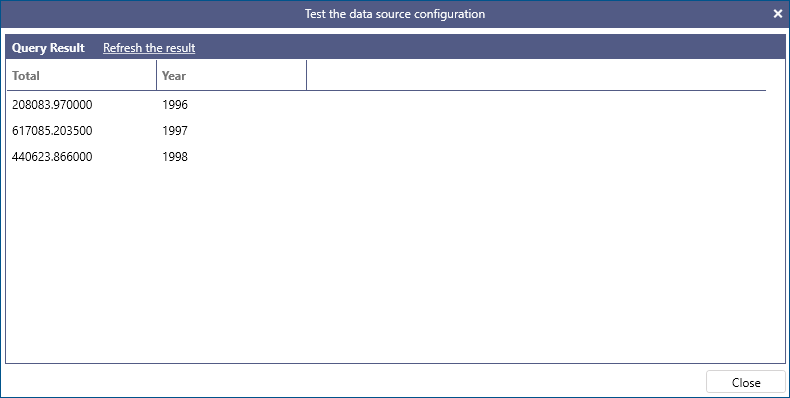
Returns the sum of all the values, or only the DISTINCT values, in the expression. SUM can only be used with numeric columns. NULL values are ignored. The following query returns the total of all orders grouped by calendar year.
Example:
SELECT SUM(Quantity * UnitPrice * (1 - Discount)) AS Total, year(OrderDate) AS Year
FROM OrderDetails AS od INNER JOIN Orders AS o
ON od.OrderID = o.OrderID
GROUP BY year(OrderDate)
VAR
Returns the statistical variance of all the values, or only the DISTINCT values, in the expression. VAR can only be used with numeric columns. NULL values are ignored. The following query returns the statistical variance for product unit prices by category.
Example:
SELECT VAR(UnitPrice) AS [Price Variance], CategoryName
FROM Products AS p INNER JOIN Categories AS c ON p.CategoryID = c.CategoryID
GROUP BY CategoryName