Composition of Template Projects
The following table lists the components of FREQROL Template Version 1 and MELFA Template Version 1.
Overall
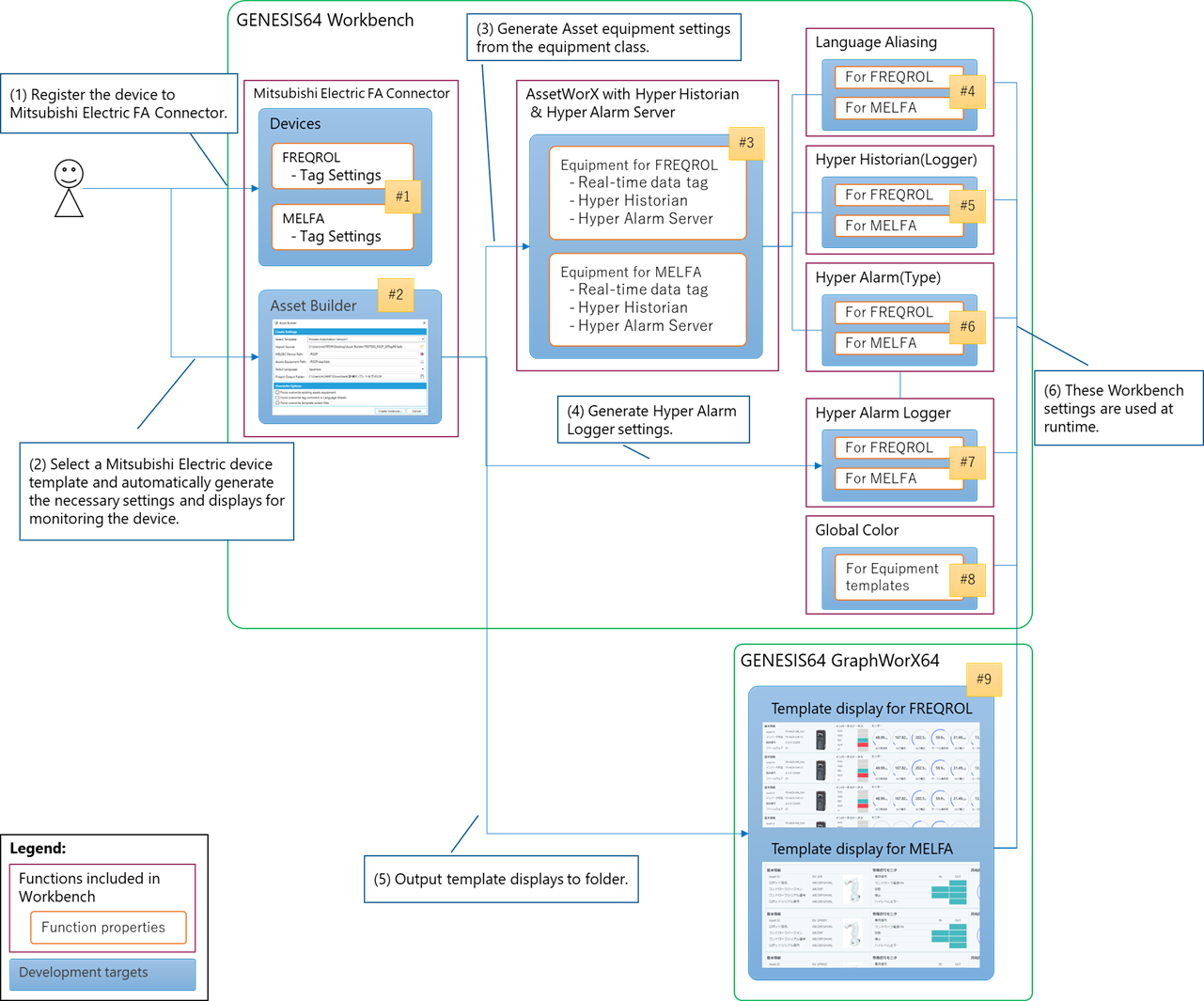
|
No. |
Component |
Role |
|
|---|---|---|---|
|
1. |
GENESIS |
Asset Builder |
Asset equipment instance generation—Asset Builder can generate equipment in Workbench that corresponds to equipment already created in Mitsubishi Electric FA Connector. |
|
2. |
Mitsubishi Electric FA |
Mitsubishi Electric FA configuration—You can create equipment on the Mitsubishi Electric FA Connector settings screen. |
|
|
3. |
Assets |
Asset equipment settings—On the equipment or equipment class settings screen, you can edit the thresholds of the graphs that are displayed on the equipment template screen, and so forth. |
|
|
4. |
Language Aliasing |
Multilingual display settings—You can change the display language of templates (GraphWorX). |
|
|
5. |
Data Historian |
Logging Settings—Historical data can be logged. You can enable or disable logging, change the logging cycle, and change the way log files are managed. |
|
|
6. |
Alarm Server |
Alarm definition settings—Generates alarms that occur on devices. You can enable or disable alarm generation. |
|
|
7. |
Alarm Historian |
Alarm logging settings Alarms from the Alarm Server can be logged. You can enable or disable alarm logging and change how log files are managed. |
|
|
8. |
Global Color |
Color theme settings—You can select and edit the color theme that is displayed on the screen. |
|
|
9. |
Device Templates Screen |
Inverter or robot template—This is a group of GraphWorX display files for Mitsubishi Electric inverters or robots. They can display the device’s faceplate screen, monitor screen, and so forth. |
|
Workbench Configuration
The following table describes the various Asset Builder components, how they're created, and their contents.
|
No. |
Component |
Creation |
Contents |
|
|---|---|---|---|---|
|
1. |
Assets |
Equipment classes |
Import by equipment classes |
Equipment classes that are compatible with Mitsubishi Electric inverters or robots. |
|
2. |
Equipment |
Generated by Asset Builder |
Equipment that is generated based on the equipment class. |
|
|
3. |
Language Aliasing |
Display item |
Import by equipment classes |
Translation information for displaying screen files in multiple languages. Includes characters to be displayed on various display items and buttons. |
|
4. |
Data Historian |
Logging Settings |
Import by equipment classes |
Logging cycle for monitor items and log file management settings. |
|
5. |
Alarm Server |
Alarm definition settings |
Import by equipment classes |
Alarm definitions that correspond to error codes of Mitsubishi Electric inverters or robots. |
|
6. |
Alarm Historian |
Alarm logging settings |
Import by equipment classes |
Settings for enabling or disabling alarm logging and managing log files. |
|
7. |
Global Color |
Color Theme Settings |
Import by equipment classes |
Displays colors such as accent color, base color, and background color. |
|
8. |
Mitsubishi Electric FA |
FREQROL or MELFA Tag Settings |
Automatically generated when Mitsubishi Electric FA FREQROL or MELFA equipment is added |
When you add Mitsubishi Electric FA’s FREQROL or MELFA equipment, the necessary communication tags are automatically generated in FREQROL template version 1. |