Customizing Vonage Voice and Style
Vonage supports multiple voice and style options. You can set up the desired option in your Vonage configuration in Workbench on the General Settings tab in the Additional settings for text to talk section.
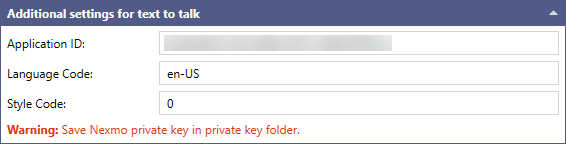
To select Vonage language and style:
- Go to the voice and style options on the Vonage website, select the desired language and style, and copy their codes.
- Open Workbench and in Project Explorer, expand your project > Alarms and Notifications > Alert Notifications > Vonage Configurations, expand the desired folder and open the desired configuration.
-
In the Additional settings for text to talk section in Language Code, enter the selected language code copied from the Vonage website.
If a you set a different language than English, the message text should be in that language for the voice customization to work. - In Style Code, enter the selected language code copied from the Vonage website, and then click Apply.