Priorities
Scheduled events are prioritized using a strict order of precedence that first evaluates the event type and then evaluates the event priority. This order determines which event runs whenever there is a conflict between two or more events.
The order in which event types are processed is as follows:
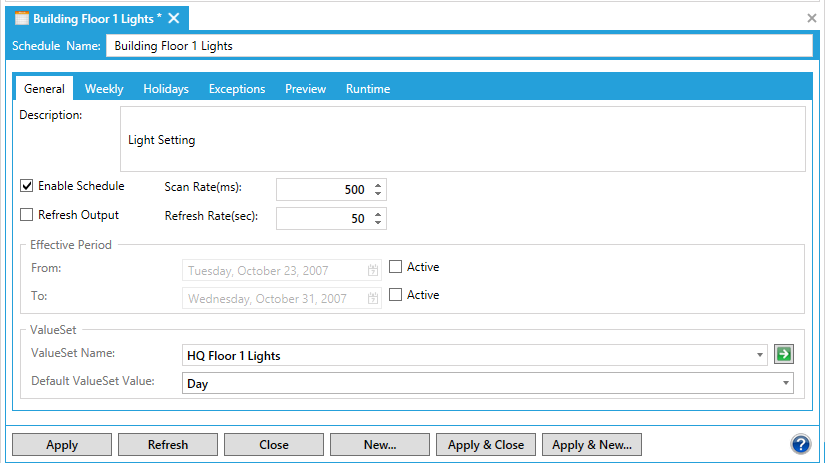
If there are no scheduled events, Schedules in the Workbench runs the default value defined on the General tab shown below.
A default value runs whenever no other event is scheduled.
- A weekly event run takes precedence over a regularly scheduled event. A weekly scheduled event with a higher priority will run before a weekly scheduled event with a lower priority. Priorities can be set at a number from 1 (lowest) to 1000 (highest).
|
|
Note: One way to remember the order of precedence for event types is to think of the Event Properties multi-tabbed pane as a wizard. The lowest precedent event you define is on the General tab. Moving from left to right, weekly is higher, and holidays higher still and exceptions run in precedence to all of these other events. You can also set an override to any event and that override value will be applied for the duration of the override you specified. |

- A holiday event takes precedence over either a weekly or regularly scheduled event. A holiday event with a higher priority will run before a holiday event with a lower priority. Priorities can be set at a number from 1 (lowest) to 1000 (highest).
- An exception event takes precedence over a holiday, weekly, or regularly scheduled event. An exception event with a higher priority will run before an exception event with a lower priority. Priorities can be set at a number from 1 (lowest) to 1000 (highest).
- Overrides take precedence over all other events. You apply an override directly to your schedule during runtime, specifying the override condition as well as its starting and stopping time. An override is similar to taking control over your schedule manually and takes precedence over all other events.
|
|
Note: If you want to schedule an event with only one instance, then you need to schedule it as an exception event. |
See also: