Setting Up the Logger System in BACnet
You can configure the History Logger system settings in Workbench to modify the behavior of Data Historian in BACnet. The default settings are useful for most common use cases, but you can customize them according to the needs and requirements of your project.
To configure the logger system settings:
-
Open Workbench and in Project Explorer, expand your project > Data Connectivity > BACnet > Logger Settings.
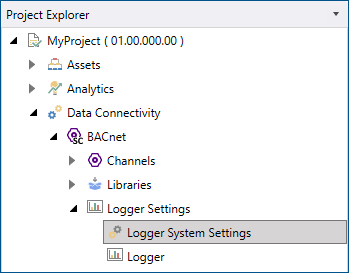
- Double-click Logger System Settings to open the configuration dialog.
- (Optional) In Logger Directory, enter a custom location of the log file or click
 to browse for the desired folder. When left empty, the log is saved in the default location in C:\ProgramData\ICONICS\11\BACnet.
 - Edit the default values of the settings in the following sections as needed. When finished, click Apply & Close.
Cache
Setting
Description
Flush Time
Specifies the time interval (in seconds) after which the cache is cleared.
Maximum Unused Data Blocks LifeTime
Specifies the maximum lifetime (in seconds) of unused data blocks.
Maximum Unused Index Blocks LifeTime
Specifies the maximum lifetime (in seconds) of unused index blocks.
Logger
Setting
Description
Operation Retry Interval
Specifies the time interval (in seconds) after which the logger attempts to re-execute a failed operation.
Master Logger
Setting
Description
Data File Extension
Specifies the extension for data log files.
Index File Extension
Specifies the extension for index files.
Maximum Inactivity Period
Specifies the maximum inactivity period (in minutes) allowed for the logger.
Operation Retry Interval
Specifies the time interval (in seconds) after which the logger attempts to re-execute a failed operation.
Enable Auto Attach Archives
Turns on the automatic attach/detach feature.
Logger Data Store and Master Logger Data Store
Setting
Description
Data File Buffer Size
Specifies the size of the data file buffer (in kilobytes).
Data Slot Size
Specifies the size of the data slot (in kilobytes).
Index File Buffer Size
Specifies the size of the index file buffer (in kilobytes).
Index Slot Size
Specifies the size of the index slot (in kilobytes).
Value Reservation
Specifies the values reservation as a percentage.
Value Split Size
Specifies values split size as a percentage.
What's Next?