SAML 2.0 Configuration Settings
SAML 2.0 is an XML-based protocol that relies on security tokens containing assertions to exchange encoded messages from identity providers (IdPs) that convey user ID and other credentials to ICONICS security. These assertions allow ICONICS security to control access rights to GENESIS64™ applications. Additionally, ICONICS security supports both an SP-initiated and external IdP-initiated single log out (SLO).
Before configuring SAML 2.0 IdPs, you need to:
-
Verify web server endpoints.
-
Define the security settings on the Global Settings General tab.
-
Have a basic understanding of SAML 2.0.
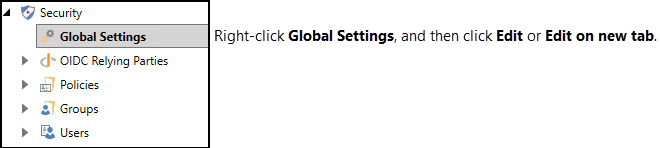
Access the SAML 2.0 configuration settings for security authorization in the Global Settings Web Login tab (accessed through the Security node in Workbench).
SAML Authentication and User Mapping
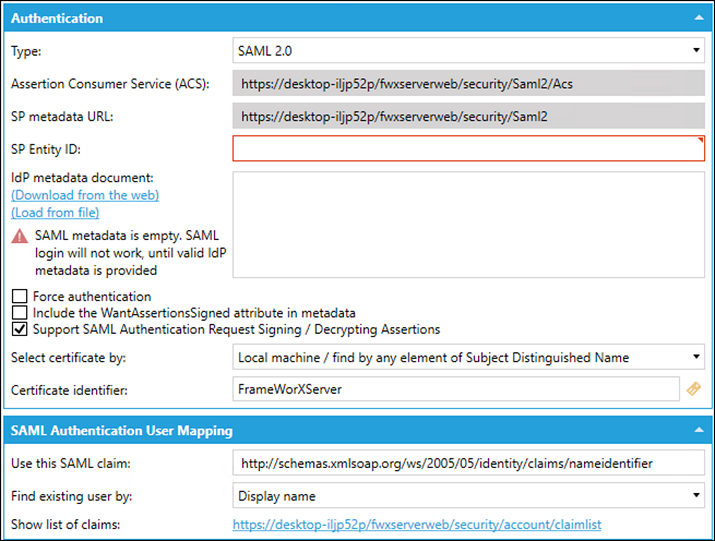
The Authentication and User Mapping sections are required for configuring the access gateway between ICONICS security and the external IdP.
Authentication
|
Authentication Property |
Description |
|---|---|
|
Type |
Select SAML 2.0 to show all required SAML authentication information. |
|
Assertion Consumer Service (ACS) |
If required, the ACS is used for setting up the external SAML IdP. |
|
SP metadata URL |
The SP metadata URL is used when setting up the external SAML IdP. |
|
SP Entity ID |
This is similar to the OIDC Client Identifier. Enter the ID (any value will work). Recommend using a globally unique value in the form of a URL. The value entered may be required when setting up the external SAML IdP. |
|
IdP metadata document |
Add the external IdP's metadata XML file to the text box. If the text box is left empty, the SAML login will not work. However, the SAML 2.0 protocol is partially set up on the server to at least produce the SP metadata document. Download the document from the URL shown in SP metadata URL. It's necessary to cut and paste the URL into the web browser. |
|
Force Authentication |
Select this checkbox to set a flag (ForceAuthn = "true"), indicating that the IdP performs a new authentication instead of reusing an existing session. Different IdPs may react differently to this setting. |
|
Include the WantAssertionsSigned attribute in metadata |
Select this checkbox to make the metadata generated by GENESIS64 security for SAML integration include a WantAssertionsSigned="true" attribute in the SPSSODescriptor element. |
|
Support SAML Authentication Request Signing /Decrypting Assertions |
Select the checkbox when the IdP requires signed authorization requests (the IdP's metadata contains WantAuthnRequestsSigned="true"). |
|
Select certificate by / Certificate identifier |
Specifies how to find the signing / decryption certificate in the Windows Certificate Store. Multiple certificates can match these criteria. |
SAML Authentication User Mapping
|
User Mapping Property |
Description |
|---|---|
|
Use this SAML claim |
Information about the user (claim) that gets extracted from the SAML XML tokens when mapping users from the external IdP.
|
|
Find existing user by |
The selected claim can be mapped to one of a fixed list of user attributes:
|
|
Show list of claims |
The Show list of claims hyperlink opens a web page that redirects to the external IdP and then lists all the claims that it extracted from the token. To use this link, you need to click Apply and wait a second for the server to notice the changes and reconfigure. |