Adding a Pick Action to a 3D Object
To add a Pick Actiondynamic to a 3D object:
-
Click a 3D object to select it.
-
Click the Pick Action button
 on the Dynamics ribbon.
-
Click the Command property and set the command type you desire.
-
Click the CommandParameter properties and set the parameters associated with the action you wish to define.
-
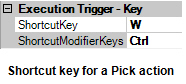
For the ShortcutKey property, select the key that will be part of your keystroke.
-
Click the ShortcutModifierKeys and select the modifiers you want to be part of your keystroke.
-
Save your assignments. Then go into runtime and test that your keystroke works correctly.